
VGA Out to HDMI Adapters: 3 Models Compared

For VGA out to HDMI, BENFEI VGA-to-HDMI Adapter suits most buyers who want a compact converter with USB audio support; choose VENTION VGA-to-HDMI 0.5-ft Adapter or MT-VIKI VGA-to-HDMI Adapter if you need a clearly specified USB power connection and 1080p at 60 Hz.
These active adapters convert analog VGA video into digital HDMI, so they work from a VGA source to an HDMI display, not the reverse. Choose a different cable or converter if your source has HDMI and your display has VGA.
We earn a commission if you buy through links on this page. As an Amazon Associate I earn from qualifying purchases. Products are compared on manufacturer specifications, not hands-on testing.
- Best overall: BENFEI VGA-to-HDMI Adapter – Compact converter with USB audio support and an HDMI cable required for the display connection.
- Best for cable reach: VENTION VGA-to-HDMI 0.5-ft Adapter – Includes a 0.5-foot adapter cable and a 0.6-meter Micro USB power cable.
- Best for USB-powered setup: MT-VIKI VGA-to-HDMI Adapter – Requires USB power and supports 1080p at 60 Hz with a 3.5 mm audio jack.
| Product | Best for | Audio | Power | Shop |
|---|---|---|---|---|
| BENFEI VGA-to-HDMI Adapter | Compact audio setup | USB audio support | — | Check Price on Amazon |
| VENTION VGA-to-HDMI 0.5-ft Adapter | Cable reach | 3.5 mm audio output | Micro USB power | Check Price on Amazon |
| MT-VIKI VGA-to-HDMI Adapter | USB-powered audio | 3.5 mm audio | USB power required | Check Price on Amazon |
VGA Out to HDMI Adapters
Compare the direction, audio connection, and power needs before matching a converter to your source and display.
BENFEI VGA-to-HDMI Adapter

BENFEI VGA-to-HDMI Adapter is the compact option for a VGA computer or laptop feeding an HDMI TV, monitor, or projector. Its built-in chip converts VGA’s analog signal to HDMI, and its integrated USB cable supports carrying audio along with video. An HDMI cable is required to connect the adapter to the display. The maker identifies the converter as unidirectional, so it cannot take HDMI from a source and output VGA to a screen. Choose it when compactness and USB audio support matter; check that your setup has the separate HDMI cable and the audio connection you need.
Bottom line: Pick this if you want a compact VGA-to-HDMI adapter with USB audio support.
VENTION VGA-to-HDMI 0.5-ft Adapter
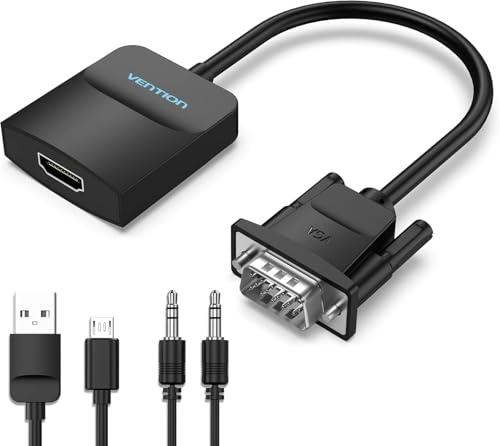
VENTION VGA-to-HDMI 0.5-ft Adapter stands out for its 0.5-foot adapter lead and a 0.6-meter Micro USB cable for power. The VGA input goes to a computer, laptop, or other source, while the HDMI output connects to a TV, monitor, or projector. Its 3.5 mm audio output is a separate audio connection, and the maker specifies 1080p at 60 Hz. Like other active VGA-to-HDMI converters, it will not reverse direction. Choose it when the short lead and included power cable suit your setup; confirm the source has VGA and the display has HDMI.
Bottom line: Choose this when a short adapter lead and Micro USB power cable fit your setup.
MT-VIKI VGA-to-HDMI Adapter

MT-VIKI VGA-to-HDMI Adapter clearly pairs a 3.5 mm audio jack with a USB-powered converter, making it a fit when the source’s USB port or a USB power adapter can supply power. The adapter converts VGA from a computer or laptop to HDMI for a TV, monitor, or projector; the maker specifies 1080p at 60 Hz. It is unidirectional, so it cannot convert HDMI output into VGA. Unlike a setup relying only on an integrated audio cable, this model calls out a mini jack for audio. Choose it when you can provide USB power and want a distinct 3.5 mm audio connection.
Bottom line: Pick this when USB power and a 3.5 mm audio jack match your setup.
How to Choose a VGA-to-HDMI Converter
Choose an active VGA-to-HDMI converter when the source has VGA output and the display accepts HDMI input. VGA carries analog video, while HDMI carries digital video and can carry audio, so a converter chip is needed to translate the signal. Check direction first: VGA source to HDMI display is different from HDMI source to VGA display, and a one-way adapter cannot do both. Then decide how audio will connect, because VGA itself carries video only; adapters may use a 3.5 mm audio input or an integrated USB audio cable. If you need audio, choose a model with an audio path and match its connector to the source.
VGA and HDMI Connection Fit
Match the adapter’s VGA end to the source and its HDMI end to the display; reversing those connections does not work for a unidirectional converter. VGA connectors are typically 15-pin, while HDMI connectors use a compact, flat-ended plug, so confirm the ports rather than relying on device age or name. For a desktop setup, check whether the display cable must be supplied separately; for example, BENFEI VGA-to-HDMI Adapter requires an HDMI cable. A practical rule: if the source has only HDMI out, none of these VGA-to-HDMI adapters is the right direction. Choose an HDMI-to-VGA converter instead, and use the right adapter for the signal path.
Audio and USB Power for VGA-to-HDMI
VGA does not carry audio, so a VGA-to-HDMI setup needs a separate audio route if sound is required. A 3.5 mm audio connection is common for analog audio, while a converter may also carry audio over USB; verify which connector your source provides. Active converters also need power to run the conversion chip: USB power is a common arrangement, and some models require a USB cable to be plugged in during use. A useful decision rule is to choose a model with an explicit USB power connection if you can provide an available USB port or USB power adapter. Do not assume a video connection alone powers an active adapter.
Resolution and Setup Checks
Set the source and display to a resolution both can accept; the makers of VENTION VGA-to-HDMI 0.5-ft Adapter and MT-VIKI VGA-to-HDMI Adapter specify support up to 1080p at 60 Hz. That maximum is not a guarantee that every computer, display, or cable combination will negotiate the same mode. If the display remains blank, check that the source is outputting VGA, the display is on the correct HDMI input, the adapter is powered when required, and the HDMI cable is seated. For audio problems, verify the separate audio connection or USB audio route and select the appropriate output on the source. Avoid buying a VGA-to-HDMI adapter for an HDMI-to-VGA connection; direction is the most common compatibility mistake.
Frequently Asked Questions
Can VGA output connect directly to an HDMI TV?
A VGA source needs an active converter to connect to an HDMI display because VGA is analog and HDMI is digital. Choose a VGA-to-HDMI model and connect any needed audio separately.
Does VGA carry sound along with video?
No, VGA carries video but not audio. Use a converter with an audio connection if sound must reach the display or speakers.
Will a VGA-to-HDMI adapter work in reverse?
No, a unidirectional VGA-to-HDMI adapter converts only from VGA source to HDMI display. For an HDMI source and VGA display, use an HDMI-to-VGA converter.
Why does a VGA-to-HDMI converter need USB power?
An active converter uses a chip to change analog VGA into digital HDMI, and USB power runs that circuitry. If the model requires USB power, connect its USB cable to a powered USB port or adapter.
What resolution should I set for VGA to HDMI?
Use a resolution supported by both the source and display; two converters here specify up to 1080p at 60 Hz. If the screen does not sync at that setting, try a lower resolution supported by both devices.