
Virtual Reality Glasses VR Shinecon: 5 Models Compared

For virtual reality glasses from VR Shinecon, VR SHINECON Smartphone VR Glasses is the clearest match for smartphone viewing with 360° video and head-rotation support; choose VR SHINECON 3D Glasses with Remote instead if you need a phone-size range or remote control. These smartphone viewers rely on a compatible phone and VR content, so buyers who want a self-contained headset should choose a different type.
We earn a commission if you buy through links on this page. As an Amazon Associate I earn from qualifying purchases. Products are compared on manufacturer specifications, not hands-on testing.
- Best overall: VR SHINECON Smartphone VR Glasses – Supports 360° video and head rotation, and is explicitly branded VR SHINECON.
- Best for phone-fit range: VR SHINECON 3D Glasses with Remote – Its maker gives a supported smartphone screen range of 4.7 to 6.8 inches.
- Best for larger phones: 3D VR Glasses for 4.5–7-Inch Phones – Its name specifies compatibility with phones from 4.5 to 7 inches.
| Product | Best for | Phone screen fit | Remote | Weight | Shop |
|---|---|---|---|---|---|
| VR SHINECON Smartphone VR Glasses | 360° video | — | — | 0.75 lb | Check Price on Amazon |
| VR SHINECON 3D Glasses with Remote | Remote control | 4.7–6.8 in | Yes | 0.99 lb | Check Price on Amazon |
| Smartphone VR Headset with Remote | Compact phones | 4.7–6 in | Yes | 1.25 lb | Check Price on Amazon |
| 3D VR Glasses for 4.5–7-Inch Phones | Wide phone range | 4.5–7 in | — | 0.40 lb | Check Price on Amazon |
| HD Smartphone VR Headset with Gamepad | Gamepad control | — | Bluetooth remote/gamepad | — | Check Price on Amazon |
VR Shinecon virtual reality glasses and alternatives
Compare the smartphone fit and controls first, then choose the viewer that matches your phone and VR content.
VR SHINECON Smartphone VR Glasses

For smartphone viewing with 360° content, this VR SHINECON headset specifically supports 360° video and head rotation. It also supports VR-compatible games, and its adjustable head strap accommodates a range of head sizes. The maker says the headset provides an immersive 3D viewing experience; the practical result depends on using a phone and compatible content. Choose it if those viewing features matter more than a defined phone-size range or included remote. Buyers should verify their phone fits before choosing this model.
Bottom line: Pick this for 360° video and head-rotation support.
VR SHINECON 3D Glasses with Remote
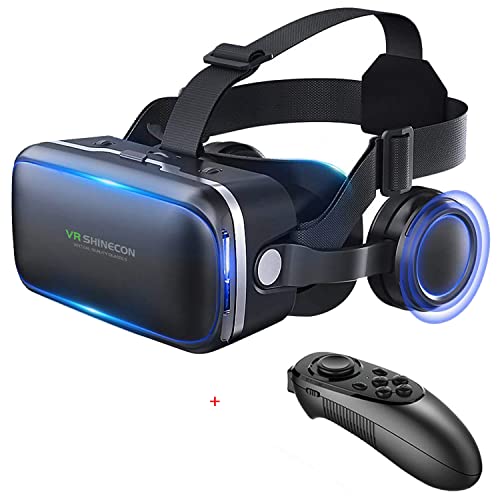
Unlike VR SHINECON Smartphone VR Glasses, this VR SHINECON model includes a remote control and gives a phone screen range: 4.7 to 6.8 inches. It is intended for movies, videos, and games, and the maker claims its lenses block 72% of harmful blue light. That lens claim should not be treated as a health benefit. The fit range is useful when checking a phone, but screen diagonal alone does not establish that every phone fits the headset opening. Choose it when the remote and a screen range are priorities.
Bottom line: Choose this when a remote and stated phone range matter.
Smartphone VR Headset with Remote

For smaller phones, this alternative specifies a 4.7-to-6-inch screen range and includes a Bluetooth remote controller. The maker describes it as a phone-dependent viewer rather than a standalone headset: VR apps and content come from the user’s smartphone, and some third-party apps may not be compatible. That dependence is a meaningful limitation for anyone expecting built-in software or movies. Its narrower stated range makes it a candidate for compact phones, but check the phone’s physical dimensions as well as its diagonal measurement.
Bottom line: Pick this for a phone within the 4.7–6-inch range.
3D VR Glasses for 4.5–7-Inch Phones

This alternative covers the broadest explicitly named phone range here, from 4.5 to 7 inches, and advertises 360° panoramic viewing with adjustable pupil distance. The adjustable lens spacing can help align the two views with a viewer’s eyes, an important part of comfortable stereoscopic viewing. The maker also describes myopia support, but fit and vision correction should not be assumed from that claim. No remote is identified in its name or features, so choose it for its phone range and lens adjustment rather than remote operation.
Bottom line: Choose this for its 4.5–7-inch phone range and pupil adjustment.
HD Smartphone VR Headset with Gamepad

This phone-based alternative emphasizes a Bluetooth controller/gamepad, unlike the other models whose features do not specify gamepad support. The maker says some software and games do not support the handle function, and says the remote works only with iOS 11.2.5 or lower because of iOS system restrictions. The headset also mentions aspherical lenses and a lightweight design without providing a weight. Choose it only if controller use suits your phone and apps; buyers who need a clearly stated phone-size range should favor a model that provides one.
Bottom line: Pick this when gamepad control is the deciding feature.
How smartphone VR glasses work
Smartphone VR glasses use the phone as the screen and split its display into two views, one for each eye. The headset’s lenses focus those views, while compatible VR apps supply the 3D or panoramic content. These phone viewers generally provide rotational head tracking through the phone’s sensors, not the room-scale positional tracking of dedicated systems; leaning forward does not add a tracked viewpoint. A phone viewer also needs content formatted for a side-by-side VR view, so ordinary video apps may not fill both lenses correctly. Check that the phone can run the intended VR app and that the headset leaves its sensors unobstructed. Treat a phone viewer as an accessory, not a standalone console.
How to choose a phone fit
Choose by the phone’s screen diagonal and its physical width and height, not by diagonal alone. The phone ranges differ across these models, from 4.5–7 inches to 4.7–6 inches; cases add bulk and can prevent a phone from seating in the tray. Measure the phone with its case if you plan to leave the case on, and confirm the headset’s fit range before ordering. A secure fit also places the screen center behind the lens divider; misalignment can make the two images harder to fuse. Adjust each lens or phone position until the center lines up, then stop if the image remains uncomfortable.
Phone VR versus standalone headsets
A phone viewer uses a smartphone for the display and processing, while a standalone headset has its own screen and onboard computing. Phone models are a fit for buyers who already have a compatible smartphone and plan to use phone VR apps; controller support depends on the headset, phone operating system, and the app. Standalone devices are the more appropriate category when a buyer needs built-in VR software or positional tracking. This choice table separates the two by what supplies the experience.
| Need | Choose | Trade-off |
|---|---|---|
| Use a compatible phone and phone VR apps | Smartphone viewer | Phone fit and app compatibility matter |
| Built-in display and computing | Standalone headset | Not a phone-only viewer |
Do not assume that the word “VR” means the headset includes software, movies, or tracking beyond head rotation; verify the capabilities needed for the intended app.
Lens alignment and comfortable viewing
Lens alignment matters because each eye must see its intended half of the image. Adjust interpupillary spacing where available, then position the phone so the center split lines up with the headset’s divider. Start with a short viewing session and take a break if eyestrain, headache, dizziness, or nausea occurs; stop immediately if symptoms persist. Children should use VR only with adult supervision and age-appropriate content. Smartphone viewers do not correct vision simply because a product claims support for users with myopia, so use prescribed corrective lenses if needed and confirm they fit safely. A loose phone can also shift the image, so secure it before wearing the headset.
Frequently Asked Questions
Does a VR Shinecon headset work without a phone?
No, these smartphone viewers use a phone to display VR content. The phone must fit the headset and run a compatible VR app; a phone viewer is not a standalone headset.
What phone screen size fits VR glasses?
The ranges vary by model: examples here run from 4.5–7 inches and 4.7–6 inches. Check both screen diagonal and the phone’s physical width, especially if it will be used with a case.
Can smartphone VR glasses track walking around?
Phone viewers typically track head rotation through the phone’s sensors, not movement through a room. For positional tracking, choose a headset designed for room-scale tracking rather than a phone viewer.
Why does the VR image look blurry or doubled?
Misaligned phone placement or lens spacing can make the two views difficult to fuse. Center the phone behind the lens divider and adjust pupil spacing; stop using the headset if discomfort continues.
Will every VR app work with a Bluetooth remote?
No, controller support depends on the app and phone software. One supplied product specification specifically cautions that some games do not support its handle and limits its remote to iOS 11.2.5 or lower.