
Vizio TV Stand Replacement: Model Fit and VESA Guide

For a Vizio TV stand replacement, start with Vizio Replacement Legs for V505-H9 Series if your TV is one of its named models; matching the model and bottom-port measurements decides whether these feet fit. Choose Vizio V505-J09 TV Legs for the V505-J09, or consider a universal stand only after checking your TV’s VESA pattern and weight.
We earn a commission if you buy through links on this page. As an Amazon Associate I earn from qualifying purchases. Products are compared on manufacturer specifications, not hands-on testing.
- Best overall: Vizio Replacement Legs for V505-H9 Series – Model-specific legs for V505-H9, V505-H19, D50X-G9 and M506X-H9, with fit dependent on matching the pictured measurements.
- Best for V505-J09: Vizio V505-J09 TV Legs – Designed for that exact Vizio model rather than a range of TV sizes.
- Best for wide VESA range: ML1760 Universal TV Stand – Supports VESA patterns from 75 × 75 mm to 800 × 500 mm and TVs up to 65 inches.
| Product | Best for | TV fit | VESA range | Weight limit | Shop |
|---|---|---|---|---|---|
| Vizio Replacement Legs for V505-H9 Series | Named Vizio models | V505-H9, V505-H19, D50X-G9, M506X-H9 | — | — | Check Price on Amazon |
| Vizio V505-J09 TV Legs | V505-J09 owners | Vizio V505-J09 only | — | — | Check Price on Amazon |
| ML1760 Universal TV Stand | Wide VESA coverage | 20–65 in. | 75 × 75 to 800 × 500 mm | 110 lb | Check Price on Amazon |
| ELIVED Universal Tabletop TV Stand | Smaller VESA TVs | 27–55 in. | 200 × 100 to 800 × 400 mm | 88 lb | Check Price on Amazon |
Vizio TV stand replacement options
Match model-specific feet by the full TV model number, or compare universal stands by VESA pattern, screen size and weight limit.
Vizio Replacement Legs for V505-H9 Series

These are model-specific Vizio replacement feet, unlike the universal stands in this group. The manufacturer names V505-H19, V505-H9 and M506X-H9 as compatible models; the product name also includes D50X-G9. It calls for checking the pictured measurements against the TV before buying, so compare those dimensions as well as the model number. The ABS plastic base is intended for a table or cabinet setup. The fit is limited to the models, making these the wrong choice for another Vizio model even if the screen size looks similar.
Bottom line: Pick these only when your model number and the pictured measurements match.
Vizio V505-J09 TV Legs

These replacement legs target one specific set, the Vizio V505-J09, while Vizio Replacement Legs for V505-H9 Series names several models. The manufacturer specifies ABS plastic construction and includes screws and instructions. Check the model label on the rear of the TV before choosing these feet; the maker explicitly says they are not universal and do not fit other models. That narrow compatibility is useful when the label matches, but it rules them out for other Vizio televisions, including models that share a similar screen size.
Bottom line: Choose these when the rear label reads V505-J09.
ML1760 Universal TV Stand

The ML1760 covers a broader VESA range than the other universal stand here, from 75 × 75 mm through 800 × 500 mm. It is designed for 20- to 65-inch screens and supports up to 110 pounds (50 kg). Two mounting-hole height settings offer some adjustment, and soft pads help protect the supporting surface. The maker says installation takes about 20 minutes. This is a universal alternative, not a Vizio-specific fit: verify the TV’s VESA pattern and weight before relying on it.
Bottom line: Pick this for a compatible Vizio with a larger VESA pattern or screen.
ELIVED Universal Tabletop TV Stand
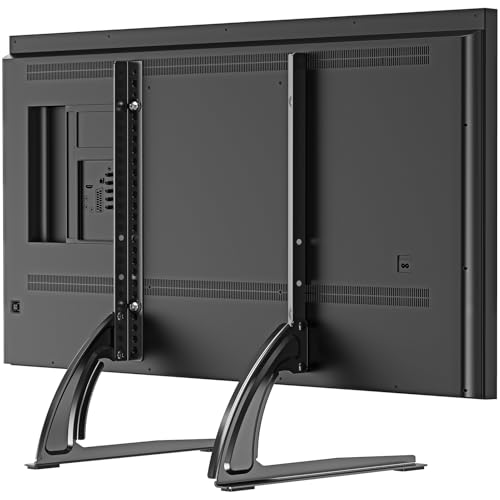
The ELIVED stand starts at a 200 × 100 mm VESA pattern, whereas ML1760 Universal TV Stand supports smaller patterns down to 75 × 75 mm. It fits 27- to 55-inch flat or curved screens and supports up to 88 pounds. Height adjustment lets the installer choose a position, and the maker says an adapter plate is needed when the TV’s VESA pattern is smaller than 200 × 100 mm; that plate is not included. As with any universal option, confirm the TV’s mounting pattern and weight first.
Bottom line: Choose this when your Vizio falls within its size, VESA and weight limits.
How to choose Vizio TV stand replacement legs
Match the TV’s full model number before comparing universal stands. Vizio feet can be model-specific, while a universal tabletop stand attaches through the VESA mounting holes on the back of the set. Measure the horizontal and vertical distance between the centers of those holes in millimeters; a pattern written as 200 × 100 mm means 200 mm across and 100 mm vertically. Then check the stand’s supported screen-size range and weight capacity. A size match alone is not enough: two TVs with the same diagonal can use different mounting patterns or original foot placements. If the model-specific stand calls for a dimension check, compare the actual measurements rather than relying on a similar-looking model name.
VESA fit and screen measurements
VESA measurements are center-to-center distances between threaded mounting holes, not the outside dimensions of the TV. A tape measure across the hole centers gives the pattern in millimeters, which you can compare directly with a stand’s range. Check both dimensions: a mount that accepts a 200 mm horizontal span may still not accept the TV’s vertical spacing. Screen size is measured diagonally, but it does not tell you the stand’s hole pattern or weight. For a universal stand, verify all three before assembly. If the TV pattern is below 200 × 100 mm, the ELIVED option requires an extra adapter plate that is not included.
A simple choice table separates the main fit paths.
| What you know | Best fit path | Next check |
|---|---|---|
| Exact Vizio model match | Model-specific feet | Confirm any required measurements |
| Model not named | Universal tabletop stand | VESA pattern, screen size and weight |
| VESA pattern under 200 × 100 mm | Stand supporting that pattern | Whether an adapter is needed |
Safe setup for tabletop TV stands
Place a tabletop TV stand on a level, stable surface and keep the TV’s full base footprint supported. A stand’s weight limit is a hard ceiling, not a target: choose one rated for at least the TV’s weight, and confirm the maximum screen size as a separate requirement. Follow the assembly sequence and use the correct screws for the TV’s mounting holes; a screw that is too long can damage the set, while one that is too short may not hold securely. Keep cables from pulling the TV toward an edge, and avoid placing a stand where children can climb or tug on it. Recheck fasteners after moving the TV.
Common replacement-leg fit mistakes
The most common mismatch is buying by screen diagonal alone. A 50-inch TV can have a different VESA pattern, bottom-port layout or leg attachment points from another 50-inch model. Read the complete model number from the rear label, then measure the mounting-hole centers where required. For universal mounts, compare the VESA dimensions and TV weight with the stand limits; for model-specific feet, do not assume that a nearby model number is interchangeable. Also check that the feet point in the correct direction and sit flat before setting the TV upright. Stop if a screw resists or the stand rocks, since forcing hardware or using an uneven surface can compromise stability.
Frequently Asked Questions
How do I find my Vizio TV model number?
The model number is printed on a label on the back of the TV, often near the ports. Use the full model string when checking model-specific feet; a similar series name is not enough to establish compatibility.
How do I measure a TV’s VESA pattern?
Measure horizontally and vertically from the center of one mounting hole to the center of the next, in millimeters. A 200 × 100 mm pattern means 200 mm across and 100 mm between rows.
Can universal TV feet fit any Vizio TV?
No; universal feet fit only when the VESA pattern, screen-size range and weight all fall within the stand’s limits. A model-specific attachment or an unsupported hole pattern can still prevent a fit.
What if my TV weighs more than the stand limit?
Do not install the TV on that stand if its weight exceeds the capacity. Select a stand rated for the TV’s weight and confirm that the TV size and mounting pattern also fit.
Do replacement TV legs need an adapter plate?
An adapter is needed only when the stand’s mounting range does not directly match the TV’s VESA pattern. The ELIVED stand requires a separate adapter plate for patterns smaller than 200 × 100 mm.