
Vortex T10M Pro Tablet Screen Parts Compared

For a Vortex Tab T10M Pro with cracked outer glass but a working display, Vortex T10M Pro Front Glass Digitizer is the closest match because it is made for that model and replaces the touch glass, not the LCD.
We earn a commission if you buy through links on this page. As an Amazon Associate I earn from qualifying purchases. Products are compared on manufacturer specifications, not hands-on testing.
- Best overall: Vortex T10M Pro Front Glass Digitizer – A front-glass digitizer made specifically for the Vortex Tab T10M Pro.
- Best for model-specific repair: Duotipa T10M Pro Touch Digitizer – A T10M Pro-only touch digitizer that includes repair tools.
- Best for screen protection: Doemoil T10M Pro Tempered Glass Protector – A 0.33 mm tempered glass protector with 9H hardness.
| Product | Best for | Type | Model fit | Includes | Shop |
|---|---|---|---|---|---|
| Vortex T10M Pro Front Glass Digitizer | T10M Pro glass repair | Touch digitizer | T10M Pro only | Repair tools | Check Price on Amazon |
| Duotipa T10M Pro Touch Digitizer | T10M Pro tool kit | Touch digitizer | T10M Pro only | Repair tools | Check Price on Amazon |
| MJK-GG101-2329-V1 Digitizer | Multiple model fit | Touch digitizer | T10/T10M/T10M Pro | Tools, adhesive | Check Price on Amazon |
| Doemoil T10M Pro Tempered Glass Protector | Preventive screen cover | Tempered glass protector | T10M Pro only | 1 protector | Check Price on Amazon |
Vortex T10M Pro tablet screen parts
Match the part to the fault: digitizers replace touch glass, while a protector covers a screen that still works.
Vortex T10M Pro Front Glass Digitizer
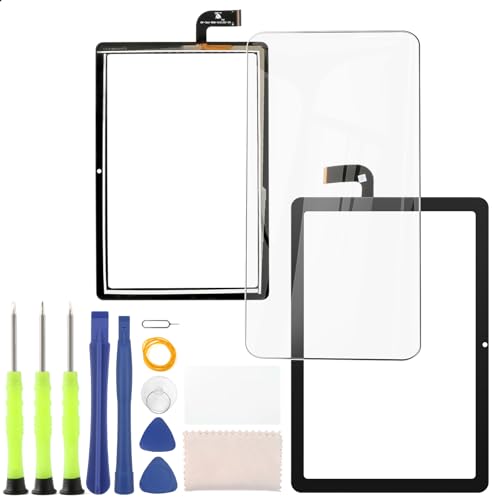
For a T10M Pro whose outer glass is damaged while the display still shows an image, this replacement is a front-glass touch digitizer rather than a complete screen. The maker says its materials are selected for durability and scratch and crack resistance. Model fit is narrower than the T10M/T10M Pro-compatible part, which may help avoid a cross-model mismatch. The main limitation is important: because no LCD is included, this part will not replace a broken or blank display panel.
Bottom line: Choose this when the T10M Pro touch glass is damaged and its LCD still works.
Duotipa T10M Pro Touch Digitizer

This T10M Pro-only digitizer is another outer-glass repair part, and its maker says the package includes a repair tools kit. It is intended for a damaged outer glass when the underlying display remains visible; it does not include an LCD. The maker advises testing before installation and notes that no instructions come with the part. That makes it less suitable for a first-time repairer who needs written guidance, and screen disassembly can damage replacement glass.
Bottom line: Pick this if the display works and you are prepared to source installation guidance.
MJK-GG101-2329-V1 Digitizer

Unlike the two T10M Pro-only parts, this 10.1-inch digitizer is sold for the Vortex Tab 10, T10M, and T10M Pro. Its package includes a tools kit and pre-shaped adhesive, and the maker recommends testing the touch screen before installation. The broader compatibility claim is useful when the tablet label or settings identify a supported sibling model, but it raises the need to verify the exact model and part designation before opening the device. It does not include an LCD.
Bottom line: Choose this only after confirming the tablet is one of its supported models.
Doemoil T10M Pro Tempered Glass Protector

For an intact T10M Pro screen, this is a protective cover rather than a repair part. It is 0.33 mm thick, with a 9H hardness rating, rounded 2.5D edges, and a hydrophobic coating. The maker gives a 98.86% light-transmittance figure and says the protector is designed for responsive touch. It cannot restore cracked glass or replace a failed display, so choose a digitizer instead if the screen itself is already damaged. Confirm the exact tablet model before application.
Bottom line: Choose this to cover a working T10M Pro screen, not to fix broken glass.
How to choose a T10M Pro screen part
Start with the symptom: a digitizer handles touch and outer glass, while an LCD produces the image. If the image is clear and touch or glass is the problem, a digitizer may fit; a black, blank, or visibly damaged display calls for an LCD-inclusive assembly instead. The digitizers here do not include an LCD. A screen protector is for a working screen and cannot repair a crack.
Before ordering, compare the model number in the tablet settings or on its label with the part’s compatibility. The T10M Pro-only parts are narrower matches than a digitizer claiming compatibility with T10, T10M, and T10M Pro. Use the narrower model match when the model is confirmed, and verify the exact part designation when considering a multi-model replacement.
Digitizer versus protector for a tablet
A digitizer is a repair component; a tempered glass protector is a sacrificial cover applied over a functioning screen. Digitizer replacement generally requires opening the tablet and separating bonded layers, so it is a delicate repair rather than a peel-and-stick fix. A protector is thinner and simpler to apply, but does not bring broken touch glass back into working order.
Use this need-to-choice guide to avoid buying a cover when a repair part is needed.
| Screen condition | Part type | What it can do |
|---|---|---|
| Outer glass or touch issue, image remains | Digitizer | Replaces touch-glass layer |
| Display panel fails or image is damaged | LCD-inclusive assembly | Replaces the display panel too |
| Screen intact | Protector | Covers the existing screen |
Tablet digitizer installation risks
Test a replacement digitizer before final installation, as the maker of one multi-model part advises; adhesive and sealing can make a later swap harder. Tablet glass is commonly bonded with adhesive, and separating it can crack the panel or damage cables, so a repair tool kit alone does not remove the skill requirement. Work slowly and keep track of flex cables and screws during disassembly.
Do not proceed with a glass-only replacement if the LCD is also damaged. For a tablet without documented repair steps, a novice should weigh the risk of damaging the display during separation rather than assuming included tools make installation straightforward.
Confirming Vortex tablet model compatibility
Model names that differ by a suffix can point to different parts, even when screens share a 10.1-inch diagonal. Compare the exact model identifier, not just the brand or screen size, against the compatible-model wording. One replacement here distinguishes the T10M Pro from the T10M, while another claims support for the Tab 10, T10M, and T10M Pro.
A 10.1-inch measurement alone is not enough to confirm cutouts, connector position, or cable compatibility. If the tablet settings and product model wording do not agree, confirm the precise part fit before ordering rather than relying on similar names.
Frequently Asked Questions
Can a digitizer replace a tablet LCD?
No, a digitizer replaces the touch-glass layer and does not provide the LCD. If the image is missing or damaged, choose an LCD-inclusive assembly instead.
When should I use a screen protector?
Use a protector on an intact screen to add a sacrificial surface. A 0.33 mm glass protector cannot repair existing cracks or restore touch function.
How do I confirm my Vortex tablet model?
Check the model identifier in the tablet settings or on its label, then match it exactly to the part’s compatibility. A 10.1-inch screen size by itself does not confirm fit.
Should I test a replacement digitizer first?
Yes, testing before final installation can reveal a problem before adhesive or reassembly makes access harder. The maker of one multi-model digitizer specifically recommends a pre-install test.
Is replacing tablet glass a simple repair?
No, separating bonded glass can crack the display or damage flex cables. A tool kit does not remove that risk, so inexperienced repairers should consider whether they can safely disassemble the tablet.