
WiFi Bluetooth PCI Cards: 5 Options Compared

For a dual-band Wi-Fi 6 card, TP-Link Archer AX3000 stands out with its 2.4 Gbps combined maximum and Bluetooth 5.2; choose a Wi-Fi 6E model instead if your router and PC can use 6 GHz.
These PCIe adapters add wireless networking and Bluetooth to compatible desktop PCs. Choose BZIZU Intel AX210 Wi-Fi 6E or OKN Intel AX210 Wi-Fi 6E AX5400 for tri-band Wi-Fi 6E, or TP-Link Archer AX1800 if a lower stated Wi-Fi 6 speed is sufficient.
We earn a commission if you buy through links on this page. As an Amazon Associate I earn from qualifying purchases. Products are compared on manufacturer specifications, not hands-on testing.
- Best overall: TP-Link Archer AX3000 – Offers dual-band Wi-Fi 6 with a 2.4 Gbps maximum and Bluetooth 5.2.
- Best for Wi-Fi 6E: BZIZU Intel AX210 Wi-Fi 6E – Supports 2.4, 5 and 6 GHz bands and Bluetooth 5.3.
- Best for low-profile builds: BZIZU Intel AX200 Wi-Fi 6 – Includes a low-profile bracket and supports PCIe x1, x4, x8 or x16 slots.
| Product | Best for | Wi-Fi bands | Maximum stated speed | Bluetooth | Shop |
|---|---|---|---|---|---|
| TP-Link Archer AX3000 | Dual-band Wi-Fi 6 | 2.4, 5 GHz | 2.4 Gbps | 5.2 | Check Price on Amazon |
| BZIZU Intel AX200 Wi-Fi 6 | Low-profile desktops | 2.4, 5 GHz | 3,000 Mbps | 5.2 | Check Price on Amazon |
| BZIZU Intel AX210 Wi-Fi 6E | Tri-band Wi-Fi 6E | 2.4, 5, 6 GHz | 5,400 Mbps | 5.3 | Check Price on Amazon |
| TP-Link Archer AX1800 | Lower Wi-Fi 6 speed | 2.4, 5 GHz | 1.8 Gbps | 5.2 | Check Price on Amazon |
| OKN Intel AX210 Wi-Fi 6E AX5400 | Wi-Fi 6E bandwidth | 2.4, 5, 6 GHz | 5,400 Mbps | 5.3 | Check Price on Amazon |
WiFi Bluetooth PCI Cards Compared
Compare band support, stated maximum speed and Bluetooth version to find a card that matches your desktop and wireless network.
TP-Link Archer AX3000

For a TP-Link option with a higher stated Wi-Fi 6 speed than the AX1800 model, TP-Link Archer AX3000 pairs dual-band networking with Bluetooth 5.2. The maker gives a maximum of 2,402 Mbps on 5 GHz and 574 Mbps on 2.4 GHz, and cites OFDMA and MU-MIMO for busy networks. Two high-gain antennas are included. This suits a desktop using a 2.4 or 5 GHz router that also needs Bluetooth. Its Windows support is limited to Windows 10 and 11 64-bit, so other operating systems are a poor fit.
Bottom line: Choose this for dual-band Wi-Fi 6 and Bluetooth 5.2 on Windows 10 or 11 64-bit.
BZIZU Intel AX200 Wi-Fi 6

For a build where bracket height matters, BZIZU Intel AX200 Wi-Fi 6 is the only option here that explicitly includes a low-profile bracket. It uses an Intel AX200 chipset, supports PCIe x1, x4, x8 and x16 slots, and pairs Wi-Fi 6 with Bluetooth 5.2. The maker cites 2,400 Mbps on 5 GHz and 574 Mbps on 2.4 GHz. It suits a desktop with a compatible PCIe slot and Windows 10 or 11. Its dual-band radio does not add 6 GHz, so it is not the choice for Wi-Fi 6E networks.
Bottom line: Pick this when a low-profile bracket or broad PCIe slot compatibility is important.
BZIZU Intel AX210 Wi-Fi 6E

For Bluetooth 5.3 with tri-band support, BZIZU Intel AX210 Wi-Fi 6E pairs an Intel AX210 chipset with Wi-Fi 6E across 2.4, 5 and 6 GHz. The maker gives a combined maximum of 5,400 Mbps and positions the card for gaming, streaming and file transfers. This suits a desktop whose router supports Wi-Fi 6E and whose setup can use the 6 GHz band. A 6 GHz-capable card cannot make a 2.4/5 GHz-only router provide that band, so buyers without compatible network equipment will not use its main distinction.
Bottom line: Choose this for a Wi-Fi 6E setup that can use 6 GHz and Bluetooth 5.3.
TP-Link Archer AX1800

For a TP-Link Wi-Fi 6 card with a lower stated maximum than TP-Link Archer AX3000, TP-Link Archer AX1800 offers 1.8 Gbps combined and Bluetooth 5.2. The maker specifies 1,201 Mbps on 5 GHz and 574 Mbps on 2.4 GHz, plus OFDMA and MU-MIMO. It suits Windows 10 or 11 64-bit desktops on a dual-band network that do not need Wi-Fi 6E. Its 2.4/5 GHz support means it cannot connect over 6 GHz, so choose a tri-band option if that band is a requirement.
Bottom line: Pick this for dual-band Wi-Fi 6 and Bluetooth when 6 GHz is not needed.
OKN Intel AX210 Wi-Fi 6E AX5400
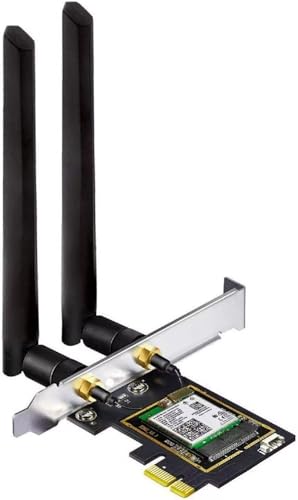
For a Wi-Fi 6E alternative to BZIZU Intel AX210 Wi-Fi 6E, OKN Intel AX210 Wi-Fi 6E AX5400 also uses an Intel AX210 chipset and supports 2.4, 5 and 6 GHz with Bluetooth 5.3. The maker gives a combined maximum of 5,400 Mbps and cites support for 80 MHz to 160 MHz channel widths. This suits a Windows 10 or 11 64-bit desktop with a 6 GHz-capable router. The 5,400 Mbps figure is a combined maximum across bands, not a single-band connection speed, so it should not be compared with one band’s rate alone.
Bottom line: Choose this for tri-band Wi-Fi 6E and Bluetooth 5.3 on supported Windows systems.
How to Choose a WiFi Bluetooth PCI Card
Start with the Wi-Fi bands your router supports, then compare Bluetooth version and operating-system compatibility. Dual-band cards use 2.4 and 5 GHz; tri-band Wi-Fi 6E adds 6 GHz, which is useful only when the router and client both support it. A card’s combined maximum speed adds rates across bands, so it is not the expected speed of one download. For example, the maker’s 2.4 Gbps figure for TP-Link Archer AX3000 combines 2,402 Mbps on 5 GHz and 574 Mbps on 2.4 GHz. If your network uses only 2.4 and 5 GHz, choose by those bands and the card’s other fit requirements rather than paying attention to a 6 GHz capability you cannot use.
Wi-Fi 6 and Wi-Fi 6E Bands Compared
Wi-Fi 6E’s defining difference is access to the 6 GHz band; Wi-Fi 6 cards in this set use 2.4 and 5 GHz. The added band can offer more spectrum where supported, but it does not extend coverage through walls as reliably as lower frequencies. Choose 6E only if your router broadcasts 6 GHz and the desktop sits within useful range. Use this table to match card type to network support.
| Card type | Band support | Choose when |
|---|---|---|
| Wi-Fi 6 dual-band | 2.4 and 5 GHz | Your router uses these bands |
| Wi-Fi 6E tri-band | 2.4, 5 and 6 GHz | Your router supports 6 GHz |
Both card types can connect to 2.4 and 5 GHz networks; only Wi-Fi 6E adds 6 GHz.
Check PCIe and Bluetooth Installation Fit
A desktop wireless card installs in a PCIe slot, but physical fit and operating-system support still matter. A PCIe x1 card can fit in longer x4, x8 or x16 slots when the motherboard slot is open-ended or otherwise compatible; BZIZU Intel AX200 Wi-Fi 6 explicitly supports those slot sizes. Small-form-factor cases may need a low-profile bracket, which BZIZU Intel AX200 Wi-Fi 6 includes. Combo cards often connect Bluetooth through an internal USB header cable, so confirm the Bluetooth connection requirement and available header before ordering. Also match the operating system: the two TP-Link cards specify Windows 10 and 11 64-bit support, while compatibility should be confirmed for any other system.
Frequently Asked Questions
Can a Wi-Fi 6E card use a Wi-Fi 5 router?
Yes, a Wi-Fi 6E card can use a router’s supported 2.4 or 5 GHz bands, but it cannot create a 6 GHz connection with a Wi-Fi 5 router. Both ends need 6 GHz support for that band.
Does a higher Mbps number guarantee faster internet?
No, the printed Mbps maximum is a theoretical wireless link rate, not a guaranteed internet speed. Router capability, signal strength, interference and your internet plan all affect real throughput.
What PCIe slot does a Wi-Fi card need?
Most PCIe wireless cards use a PCIe x1 interface, which can work in a longer compatible PCIe slot. Check that the motherboard has an available slot and that the card’s bracket fits the case.
Does Bluetooth on a PCIe Wi-Fi card need a USB header?
Many combo cards use an internal USB connection for Bluetooth in addition to the PCIe slot for Wi-Fi. Check the card’s installation requirements and confirm an available motherboard USB header before ordering.
Is 6 GHz better than 5 GHz for every desktop?
No, 6 GHz requires a compatible Wi-Fi 6E router and typically works best at shorter range with fewer obstacles. If the PC is separated from the router by several walls, 5 GHz or 2.4 GHz may be more practical.