
Wireless Otoscope Ear Camera: 5 Models Compared

For a compact viewing lens and two screen modes, WiFi Otoscope 3.9 mm is the strongest fit among these wireless otoscopes. Choose LEIPUT 1080P Ear Cleaner, BEBIRD R1, BEBIRD R1 Ultra or BEBIRD D39R instead if you want a named earwax-removal accessory or a flexible camera tube. An otoscope is a camera-equipped tool for viewing the ear canal, not a substitute for a clinician’s examination.
Ear canals are delicate, and the eardrum can be injured by inserted tools. Avoid pushing a camera or scoop into the canal; seek medical care for pain, drainage or sudden hearing changes.
We earn a commission if you buy through links on this page. As an Amazon Associate I earn from qualifying purchases. Products are compared on manufacturer specifications, not hands-on testing.
- Best overall: WiFi Otoscope 3.9 mm – Its 3.9 mm lens and full-screen and split-screen viewing modes make it the most adaptable viewing-focused pick.
- Best for silicone scoops: LEIPUT 1080P Ear Cleaner – It includes six soft silicone scoop covers and an IP67 waterproof lens.
- Best for curved canals: BEBIRD D39R – Its flexible silicone camera tube is designed to fit curved ear canals.
| Product | Best for | Camera detail | Lens or protection | Included accessories | Shop |
|---|---|---|---|---|---|
| WiFi Otoscope 3.9 mm | Compact viewing | HD; resolution unstated | 3.9 mm lens | Specula; details unstated | Check Price on Amazon |
| LEIPUT 1080P Ear Cleaner | Silicone scoop covers | 1080P HD | IP67 waterproof lens | Six silicone covers; seven-piece set | Check Price on Amazon |
| BEBIRD R1 | App video capture | 1080P; 3 MP lens | Wide-angle; six LED lights | Ten replacement tips | Check Price on Amazon |
| BEBIRD R1 Ultra | Tweezers and tools | 1296P; 10 MP lens | IP67; 3X magnification | 11 tips; tweezers and dropper | Check Price on Amazon |
| BEBIRD D39R | Flexible camera tube | HD; resolution unstated | Flexible silicone tube; IP67 | 12 tips; tweezers; case | Check Price on Amazon |
Wireless otoscope ear cameras
Compare the camera designs and included tools to decide whether you want a viewing-focused scope or a kit with removal accessories.
WiFi Otoscope 3.9 mm

The 3.9 mm lens and choice of full-screen or split-screen viewing distinguish this scope from the removal kits here. It connects wirelessly with iPhone and Android devices, and six LED lights illuminate the camera view. The maker also describes a 70-degree viewing angle. Those features suit someone who prioritizes a slim camera and live viewing over a large collection of scoops. The scope includes specula, but their count and materials are not given. A camera view is not a diagnosis, and the narrow lens does not make inserting it into the ear canal risk-free.
Bottom line: Choose this if a slim 3.9 mm lens and two viewing modes matter most.
LEIPUT 1080P Ear Cleaner

The six soft silicone scoop covers set this kit apart from the camera-first options. Its 1080P camera has six LED lights, and the lens is rated IP67 for water and dust resistance. The kit includes three scoop curvatures, so it suits a buyer specifically looking for a camera paired with several scoop shapes. The maker says the camera’s temperature is close to body temperature; that does not establish that inserting it is safe. The text also mentions a rechargeable 240 mAh battery. Even with a cover, avoid pushing any scoop into the ear canal.
Bottom line: Pick this if silicone-covered scoop accessories are your priority.
BEBIRD R1
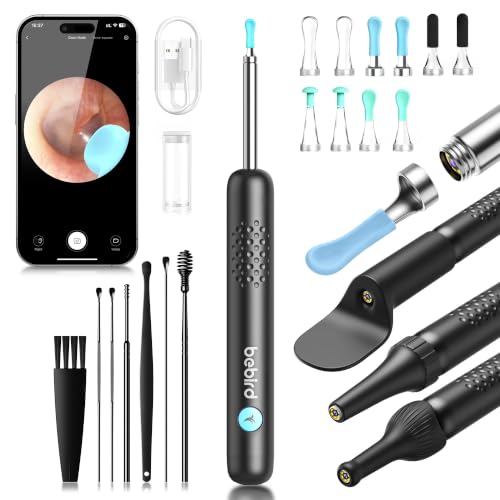
The R1 emphasizes app-based viewing and capture: its Wi-Fi connection works with the Bebird app, which supports pictures and video. The maker specifies a 3-megapixel lens, 1080P resolution and a 20-frame-per-second transfer rate. Six LED lights and ten replacement tips make it a fit for someone who wants both a live phone view and multiple replacement accessories. Do not use the camera or tips to probe for wax; a clinician can assess symptoms or blockage.
Bottom line: Choose this if app-based photo and video capture are the deciding features.
BEBIRD R1 Ultra

The R1 Ultra combines a 10-megapixel lens with tweezers and a visual dropper, unlike the scoop-centered kits. The maker specifies 1296P resolution and 3X magnification, plus an IP67 rating. Its 11 tips and safety stopper are aimed at buyers who want a broader assortment of ear-care tools in one kit. The included tools do not remove the risk of injury: magnification can make a close view clearer without making canal insertion safe. This is a poor choice for anyone who expects an otoscope kit to diagnose pain, infection or hearing changes.
Bottom line: Pick this if you want tweezers and a visual dropper alongside the camera.
BEBIRD D39R

The flexible silicone camera tube is the defining difference of the D39R, which the maker says fits curved ear canals. Its IP67 camera is paired with 12 removal tips, painless tweezers and a storage case. This combination suits someone who specifically wants a flexible camera rather than a rigid scope. The maker advises first-time users to get accustomed to the sensation and move gently and slowly, but that does not guarantee safe insertion. Stop if there is discomfort, and do not use the tool to investigate ear pain or sudden hearing changes.
Bottom line: Choose this if a flexible camera tube is more important than a rigid scope.
How to choose a wireless otoscope ear camera
Choose by camera design and intended task, not resolution alone. A scope is for viewing; a kit may also bundle scoops or tweezers, which introduce a separate risk because they enter the ear canal. Camera figures such as megapixels and video resolution describe image capture, not diagnostic accuracy. LED lights illuminate a close view, while an app connection allows a phone screen to display the camera feed. Decide first whether you only want to look at the outer ear canal or also expect included removal tools. If you have ear pain, drainage, sudden hearing change or a known eardrum problem, skip self-instrumentation and contact a clinician. Never insert an otoscope far enough to touch the eardrum.
This quick guide separates common features by what they offer; accessory count alone should not decide safe use.
| Need | Feature to prioritize | Limit |
|---|---|---|
| Phone viewing | Wireless app connection | Does not diagnose |
| Basic illumination | Built-in LED lights | Does not make insertion safe |
| Removal accessories | Named scoop or tweezer set | Can injure the canal |
Safe use and earwax removal
Do not put cotton swabs, camera tips or scoops into the ear canal; the ear canal’s skin is thin, and an inserted object can injure it or push wax deeper. Earwax normally moves outward on its own, so routine removal is unnecessary for many people. If wax causes a blocked feeling or hearing trouble, ask a health professional about suitable removal rather than trying to scoop blindly. Avoid home drops or irrigation if you have ear tubes, a perforated eardrum, prior ear surgery or active ear pain unless a clinician advises it. Stop immediately if a tool causes pain, bleeding, dizziness or sudden hearing change, and seek medical advice.
Camera resolution, lens size and fit
A smaller camera tip may fit into a narrower opening, but diameter alone does not establish safe reach or compatibility with an individual ear. The ear canal is curved, so a wide-angle lens or flexible tube may change the view without removing the need to keep tools shallow. Resolution labels such as 1080P and 1296P are not interchangeable with megapixel counts; they describe different image measures. Use the maker’s dimensions as a comparison point, not permission to insert farther. With a known narrow or curved canal, favor viewing from the entrance and ask a clinician to examine deeper areas. Never force a tip past resistance.
Cleaning and maintaining an otoscope
Clean camera tips and reusable accessories according to the manufacturer’s care instructions, and do not assume a waterproof rating means every part can be submerged. IP67 applies to the rated component under specified test conditions; it does not establish that a whole kit is washable or sterile. Keep scoop covers intact and firmly fitted when a tool is used, and do not share ear-contact accessories unless they can be properly cleaned. Store detachable tips dry and separated from dirty tools. Replace damaged, loose or cracked accessories rather than using them, since a cover that comes off in the canal can become difficult to retrieve.
Frequently Asked Questions
Can a wireless otoscope remove earwax safely?
A camera can show the canal, but an attached scoop or tweezer can injure the canal or eardrum. Earwax often moves outward naturally, so do not insert tools to remove it; ask a clinician about blockage or symptoms.
Does a 1080P otoscope diagnose an ear problem?
No; 1080P describes video resolution, not diagnostic accuracy. Ear pain, drainage or sudden hearing loss needs assessment by a health professional rather than a phone-camera view.
How often should an otoscope tip be cleaned?
Clean the tip after each use according to the maker’s care instructions, and do not assume an IP67 camera rating covers every accessory. Keep reusable tips dry and do not share ear-contact tools unless they can be properly cleaned.
Can I use ear drops before an otoscope?
Do not use drops if you have ear tubes, a perforated eardrum, prior ear surgery or active ear pain unless a clinician says they are appropriate. Those conditions can change which treatments are safe.
What should I do if the camera causes pain?
Stop immediately and remove the tool without pushing it farther. Pain, bleeding, dizziness or a sudden hearing change warrants medical advice rather than another attempt at inspection.