
Xvive In-Ear Monitor Systems and Headphones Compared

For a complete wireless stage-monitor setup, the Xvive U4 pairs one transmitter with one receiver and offers up to 5 hours of battery life. Choose the U4R4 for four receivers, the U45 for a 5.8 GHz system, or the T9 if you need earphones rather than a wireless transmitter-and-receiver kit.
Wireless in-ear monitor systems send a mix from a transmitter to bodypack receivers and earphones; the earphones themselves are a separate component.
We earn a commission if you buy through links on this page. As an Amazon Associate I earn from qualifying purchases. Products are compared on manufacturer specifications, not hands-on testing.
- Best overall: Xvive U4 Single-Receiver System – The single-receiver U4 combines a transmitter and receiver with 2.4 GHz operation and up to 5 hours of battery life.
- Best for four performers: Xvive U4R4 Four-Receiver System – The U4R4 includes one transmitter and four receivers for a group setup.
- Best for 5.8 GHz: Xvive U45 Wireless IEM System – The U45 uses 5.8 GHz, True Diversity reception and receiver channel scan.
- Best for wired listening: Xvive T9 In-Ear Headphones – The T9 is an in-ear headphone set with dual Knowles balanced-armature drivers, not a wireless system.
| Product | Best for | Wireless band / type | Included receivers | Latency | Shop |
|---|---|---|---|---|---|
| Xvive U4 Single-Receiver System | Solo monitoring | 2.4 GHz | 1 | Under 5 ms | Check Price on Amazon |
| Xvive U4R4 Four-Receiver System | Four performers | 2.4 GHz | 4 | Under 5 ms | Check Price on Amazon |
| Xvive U45 Wireless IEM System | 5.8 GHz setup | 5.8 GHz | 1 | Under 5 ms | Check Price on Amazon |
| Xvive U4R Receiver | Extra receiver | 2.4 GHz | 1 receiver only | Under 5 ms | Check Price on Amazon |
| Xvive T9 In-Ear Headphones | Wired listening | Wired headphones | — | — | Check Price on Amazon |
Xvive In-Ear Monitors Compared
Choose between complete wireless systems, a receiver add-on, and wired earphones by matching the kit contents to your monitoring setup.
Xvive U4 Single-Receiver System
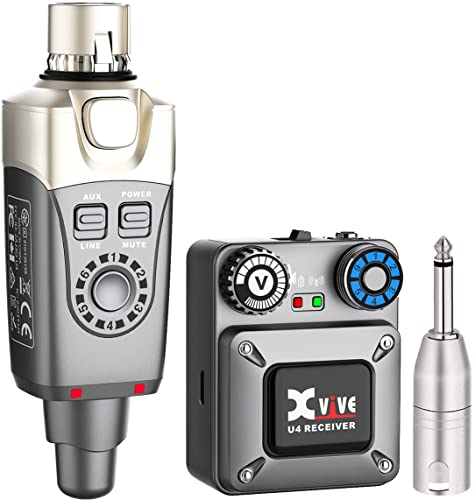
The U4 is the straightforward single-performer kit: it includes one transmitter, one receiver, a 1/4-inch-to-XLR adapter and a bag. Xvive says its 2.4 GHz system has a range over 90 feet, latency under 5 ms, six channels and up to 5 hours of battery life. That makes it a fit for a performer who needs one wireless monitor feed rather than a multi-receiver package.
The limitation is the single-receiver; a second performer needs another compatible receiver. The system sends audio wirelessly, but earphones are not among the included components.
Bottom line: Pick this for a one-performer wireless rig with the transmitter and receiver in one kit.
Xvive U4R4 Four-Receiver System

The U4R4 is the group-oriented choice, with four receivers paired to one transmitter instead of the single-receiver in the U4 kit. Xvive says it uses 2.4 GHz, supports six channels, has latency under 5 ms and runs up to 5 hours per charge; the claimed range is over 90 feet. The box contents also include a 1/4-inch-to-XLR adapter, bag and three charging cables.
Choose it when four performers need receivers for the same transmitter. It is not a four-transmitter system, so it does not provide a separate transmitter for each musician.
Bottom line: Pick this when four performers need receivers fed by one transmitter.
Xvive U45 Wireless IEM System

The U45 differs from the U4 family by operating at 5.8 GHz and using a True Diversity, dual-antenna receiver design. Xvive specifies 24-bit/48 kHz audio, a 20 Hz–20 kHz frequency response, 110 dB signal-to-noise ratio and latency under 5 ms. Its receiver can scan the local RF environment when you hold the channel button for three seconds, a useful setup option when choosing a channel.
Pick this for its band and scan feature, not for a multi-receiver bundle.
Bottom line: Pick this if you want the 5.8 GHz band and a receiver channel-scan feature.
Xvive U4R Receiver

The U4R is the receiver-only option, unlike the U4 kits that include a transmitter. It operates on 2.4 GHz; Xvive says the U4 system supports six channels, latency under 5 ms, range over 90 feet and up to 5 hours of battery life. The package contains one receiver and one charging cable.
This is for adding a receiver to a compatible U4 transmitter setup, not starting a wireless system from scratch.
Bottom line: Pick this only when you already have a compatible U4 transmitter.
Xvive T9 In-Ear Headphones

The T9 is the only wired earphone product here rather than a wireless transmitter-and-receiver system. Xvive describes dual Knowles balanced-armature drivers, a tuned mid-high driver, a custom crossover and small, medium and large ear tips. It is intended for studio, band rehearsal and live-performance listening, so it suits someone choosing the earphones rather than the wireless link that carries a monitor mix.
Unlike the U4 and U45, the T9 does not supply wireless transmission or a bodypack receiver.
Bottom line: Pick this if you need in-ear headphones, not a wireless monitor system.
How to Choose an Xvive In-Ear Monitor Setup
Start with whether you need the wireless link, the earphones, or both: a wireless IEM system uses a transmitter and bodypack receiver, while earphones reproduce the sound at the listener. The U4 kits in this comparison include transmitter hardware; the T9 is headphones. A transmitter can serve multiple receivers on a shared mix, but the U4R4 package has one transmitter and four receivers, not four independent mixes.
For one performer, the single-receiver U4 is the simplest complete kit here. For a group hearing one feed, match the receiver count to the number of listeners. Choose the U45 when its 5.8 GHz band and channel-scan feature matter; choose a receiver-only unit only when your existing transmitter is compatible. The earphones and transmitter system are separate purchase decisions, so check both against your setup.
2.4 GHz and 5.8 GHz Wireless Bands
The U4 family uses 2.4 GHz, while the U45 uses 5.8 GHz; both bands are used by consumer wireless devices and can encounter local radio traffic. The U45 feature set includes a receiver channel scan that checks the local RF environment, while the U4 feature set specifies six channels. Scanning can help identify a usable channel, but it does not guarantee an interference-free performance.
For a 2.4 GHz system, nearby Wi-Fi equipment and other devices can affect the RF environment; stage placement and distance from other transmitters matter. Keep wireless receivers and antennas positioned for a clear path where possible, and test the planned setup in the actual venue before performance. A range is not a guarantee through walls, crowds or other obstructions.
How Many Receivers Does Your Band Need
Count the performers who need a receiver, then compare that number with the kit contents: the U4 includes one, and the U4R4 includes four. A receiver-only U4R adds a receiver but does not include a transmitter. Receiver count should not be confused with the number of mixes; one transmitter feeding multiple receivers normally means those listeners receive the same transmitted feed.
Use this quick selection table to match the package to the basic need:
| Need | Package type |
|---|---|
| One performer and no existing transmitter | Transmitter plus one receiver |
| Four performers on a shared feed | One transmitter plus four receivers |
| Existing compatible transmitter | Receiver-only add-on |
| Earphones without a wireless system | In-ear headphones |
For separate mixes, confirm that the transmitter and receiver system supports the needed routing; the package receiver count alone does not establish independent mix capability.
Latency, Battery Runtime and Stage Safety
Wireless monitor latency is the delay between the source audio and what reaches the performer; all three wireless options here specify under 5 ms or less than 5 ms. Battery runtime matters just as much: the U4 products claim up to 5 hours, so plan charging around the full event rather than assuming the maximum runtime is guaranteed in every use. Bring charged equipment and a backup monitoring plan for a long set.
In-ear monitors can reduce the need to raise stage volume, but they also place sound close to the eardrum. Keep listening levels as low as practical, take breaks when possible and do not treat isolation as a substitute for hearing protection or situational awareness. A fit that seals well can make a mix sound fuller at a lower level.
Frequently Asked Questions
Do Xvive U4 receivers need a transmitter?
Yes, a U4 receiver needs a compatible transmitter to receive a wireless monitor feed. The U4R package includes a receiver only, while the U4 single kit includes one transmitter and one receiver.
Can four musicians use one Xvive U4 transmitter?
The U4R4 package is specified with one transmitter and four receivers, making it the matching kit for four listeners on a shared transmitted feed. Its receiver count does not establish that each musician gets a separate mix.
How long does the Xvive U4 battery last?
Xvive says the U4 transmitter and receiver have up to 5 hours of battery life. Treat that as a maximum claim rather than a guaranteed runtime, and charge the units before a performance.
What does under 5 ms latency mean for in-ear monitors?
Latency is the delay from the source audio to the sound arriving in the earphones; under 5 ms is the figure given for these wireless systems. A short delay helps the monitor feed feel more immediate, but the whole signal path also affects timing.
Are the Xvive T9 headphones wireless?
The T9 is described as in-ear headphones with dual Knowles balanced-armature drivers, not as a wireless transmitter-and-receiver system. Choose a separate compatible wireless system if you need to move freely on stage.
What is the difference between 2.4 GHz and 5.8 GHz IEM systems?
The U4 systems here use 2.4 GHz and the U45 uses 5.8 GHz. Both bands can encounter radio traffic in a venue; the U45 adds receiver channel scanning, while the U4 feature set specifies six channels.