
Zingyou BM 800 Microphones: BM-800 Options Compared

The Zingyou BM 800 itself is not among these options; for a single-microphone setup with an adjustable arm, pop filter and USB audio adapter, choose BM-800 Scissor Arm Bundle. Choose sktome Two-Mic V8s Bundle instead for a two-microphone podcast kit, or BM-800 Mic with Shock Mount if you already have compatible equipment and can supply 48V phantom power.
A BM-800 is a condenser microphone model commonly sold in recording bundles, so the included accessories and audio controls matter as much as the mic.
We earn a commission if you buy through links on this page. As an Amazon Associate I earn from qualifying purchases. Products are compared on manufacturer specifications, not hands-on testing.
- Best overall: BM-800 Scissor Arm Bundle – Includes one BM-800 microphone, an adjustable scissor arm, pop filter, shock mount and USB audio adapter.
- Best for two people: sktome Two-Mic V8s Bundle – Includes two microphones and a V8s sound card with multiple controls.
- Best for voice effects: ALSO GO BM-800 V8s Bundle – Pairs a BM-800 with a mixer offering 10 sound effects and four voice changes.
- Best for phantom power setups: BM-800 Mic with Shock Mount – The microphone requires a device that can provide 48V phantom power.
| Product | Best for | Microphones included | Audio controls | Shop |
|---|---|---|---|---|
| BM-800 Scissor Arm Bundle | Single-mic setup | 1 | USB audio adapter | Check Price on Amazon |
| sktome Two-Mic V8s Bundle | Two-person podcasts | 2 | V8s sound card | Check Price on Amazon |
| ALSO GO BM-800 V8s Bundle | Voice-effect streaming | 1 | 10 effects; 4 voice changes | Check Price on Amazon |
| BM-800 Mic with Shock Mount | Existing studio gear | 1 | — | Check Price on Amazon |
BM-800 Microphone Options
Compare the included microphones, controls and power needs before choosing a setup.
BM-800 Scissor Arm Bundle

For a one-microphone setup with a desk-mounted arm, this bundle includes a BM-800 condenser microphone, scissor arm, pop filter, shock mount, foam cap, audio cable and USB audio adapter. The maker says the dual-layer nylon mesh pop filter and foam cap help reduce wind noise, pops and handling interference; it also claims low self-noise and high sensitivity. The adjustable arm can suit a fixed recording desk where you want to reposition the mic. The bundle’s dimensions are 15.5 × 15 × 15 inches, so check the available desk and storage space before choosing it.
Bottom line: Pick this if you want one microphone with an adjustable arm and several recording accessories.
sktome Two-Mic V8s Bundle

Unlike the single-mic kits, this set is built for two speakers: it includes two BM-800 microphones, two hanging arm clippers and a V8s sound card. The maker says the sound card combines controls in one panel and supports plug-and-play operation; the microphone capsules are described as metal with cardioid pickup. That makes the set a match for a two-person podcast or recording arrangement where both speakers need a microphone. A two-mic setup takes more desk or mounting space and requires arranging two audio paths, so it may be more equipment than a solo streamer needs.
Bottom line: Choose this for a two-speaker setup that needs two microphones and an integrated control panel.
ALSO GO BM-800 V8s Bundle
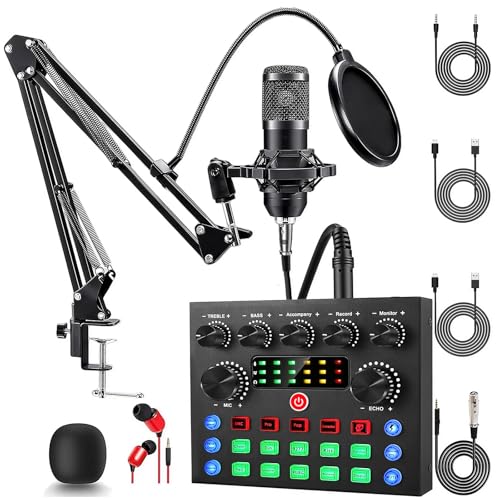
This bundle centers its difference on voice processing: it combines a BM-800 microphone with a DJ mixer, boom arms, shock holders, pop filters and foam covers. The maker says the mixer offers 10 sound effects, including reverb, treble, bass and noise reduction, plus four voice changes: female, male, child and monster. Those controls suit creators who want sound variations during streaming or gaming rather than a plain microphone-and-adapter package. The size is 5.12 × 4.17 × 1.02 inches, but the maker’s feature summary also mentions boom arms without clarifying their dimensions, so plan for the physical setup accordingly.
Bottom line: Pick this if sound effects and voice changes are central to your streams.
BM-800 Mic with Shock Mount

Unlike the larger accessory bundles, this option is a BM-800 microphone with a shock mount holder. The maker says the shock mount helps reduce handling noise and that the mic uses a cardioid pickup pattern; it also specifies that the microphone requires a device capable of supplying 48V phantom power. This makes it relevant when you already have a compatible stand and recording chain, but not a self-contained USB setup. Confirm that your audio interface or mixer supplies 48V phantom power before ordering, since the mic will not work as intended without it.
Bottom line: Choose this if you have a compatible stand and an audio device with 48V phantom power.
How to Choose a BM-800 Microphone Setup
Choose first by how many people need microphones, then by the controls your recording workflow requires. A solo setup usually needs one mic, while a two-person conversation needs a separate mic for each speaker to keep placement and levels manageable. A mixer or sound card can add monitoring and effects, but more controls also mean more setup decisions. Condenser microphones use an electrical signal to convert diaphragm movement into audio; studio condenser models often receive power through an audio interface or mixer, while USB models may handle conversion internally. The included adapter or sound card does not establish compatibility with every computer or phone. Verify the device’s input and connection requirements before assembling a complete recording chain.
BM-800 Power and Connection Fit
Some condenser microphones require 48V phantom power, and the standalone mic option here explicitly does. Phantom power is normally supplied by an audio interface or mixer, not by a passive microphone stand. If your recording device cannot provide 48V, choose a setup whose included USB adapter or sound card matches your intended device rather than assuming a bare microphone will connect directly. Turn phantom power off before connecting or disconnecting a microphone cable to reduce pops and protect connected equipment. Connection type matters too: check the ports on the microphone, adapter and computer together, since an included audio cable or USB adapter does not guarantee a match for every device.
Microphone Placement and Room Sound
Place a spoken-word microphone roughly 6 to 12 inches from the speaker as a practical starting range, then adjust for voice level and room noise. A pop filter can sit a few inches in front of the capsule to soften bursts of air from sounds such as “p” and “b”; it does not make a noisy room quiet. Cardioid microphones are most sensitive toward the front and reject more sound from the rear, but they still pick up reflections and background noise. Keep the back of a cardioid mic oriented toward the loudest unwanted source when possible. A shock mount can reduce some desk-borne vibration, but it cannot remove sound traveling through the air.
Common BM-800 Setup Mistakes
The most common setup mistake is choosing a microphone before checking power and input compatibility. A mic that requires 48V phantom power needs a compatible powered interface or mixer; a USB adapter is useful only if its ports and operating requirements match the recording device. Another mistake is treating a pop filter, foam cap and shock mount as interchangeable: a pop filter reduces plosive bursts, foam can soften some wind or breath noise, and a shock mount isolates vibration from the stand. None substitutes for sensible mic distance or a quieter recording space. For a two-speaker show, use separate microphone positions and avoid aiming each cardioid mic toward the other speaker’s voice.
Frequently Asked Questions
Does a BM-800 microphone need phantom power?
Some BM-800 setups require phantom power; the standalone microphone option here specifies 48V. Check that your interface or mixer supplies 48V before using that mic.
How far should a podcast microphone be from my mouth?
Start about 6 to 12 inches from your mouth for spoken-word recording, then adjust for voice level and room noise. A pop filter placed a few inches from the capsule can help soften plosive bursts.
What does a cardioid pickup pattern mean?
A cardioid mic is most sensitive to sound from the front and rejects more sound from the rear. Point its rear toward a loud unwanted source when practical, while remembering that side reflections can still enter the recording.
Can a pop filter remove background noise?
No; a pop filter is intended mainly to soften bursts of air from plosive sounds such as “p” and “b.” Background noise is better addressed by reducing noise at the source and choosing a quieter recording position.
Should phantom power be on when connecting a mic?
Turn phantom power off before connecting or disconnecting a microphone cable to reduce pops and protect connected equipment. Enable it only when the microphone and connected gear call for it.