
12VHPWR 90 Degree Adapter: 4 Options Compared

For most builds, 12VHPWR 90-Degree Adapter, Type B is the direct-fit choice when its Type B orientation matches the GPU, and its connector extends 11 mm from the card. Check orientation before choosing: the wrong angle can point the cable the wrong way, while a 180-degree adapter or a 2×8-pin extension suits a different setup.
These adapters redirect high-power GPU cabling to help manage tight case clearance. Confirm the connector type and GPU-facing direction, then leave enough room for the cable and side panel without forcing the plug.
We earn a commission if you buy through links on this page. As an Amazon Associate I earn from qualifying purchases. Products are compared on manufacturer specifications, not hands-on testing.
- Best overall: 12VHPWR 90-Degree Adapter, Type B – A direct Type B 90-degree adapter that extends 11 mm from the graphics card.
- Best for 12V-2×6: EZDIY-FAB 12V-2×6 90° Adapter – A 90-degree adapter designed for 12V-2×6 and compatible with 12VHPWR.
- Best for 180-degree routing: 12VHPWR 180-Degree Adapter, Type A – A Type A 180-degree adapter with a 7 mm profile.
- Best for 2×8-pin cables: JOYJOM 90-Degree 2×8-Pin Extension, Type B – A Type B right-angle cable that converts two 8-pin inputs to a 16-pin GPU connector.
| Product | Best for | Connector / angle | GPU-side clearance | Cable setup | Shop |
|---|---|---|---|---|---|
| 12VHPWR 90-Degree Adapter, Type B | Direct Type B fit | 12+4-pin, 90° Type B | 11 mm | Original power cable | Check Price on Amazon |
| EZDIY-FAB 12V-2×6 90° Adapter | 12V-2×6 systems | 12V-2×6, 90° | — | Original power cable | Check Price on Amazon |
| 12VHPWR 180-Degree Adapter, Type A | Type A routing | 12+4-pin, 180° Type A | 7 mm | Original power cable | Check Price on Amazon |
| JOYJOM 90-Degree 2×8-Pin Extension, Type B | Two 8-pin inputs | 16-pin, 90° Type B | — | Two 8-pin to 16-pin cable | Check Price on Amazon |
12VHPWR 90 Degree Adapters
Compare connector direction and cable arrangement before deciding which style fits your graphics card and case.
12VHPWR 90-Degree Adapter, Type B

For a direct Type B turn, this adapter is the clearest match among these options, with an 11 mm projection from the graphics card. It is intended for 12+4-pin GPU power connections and names RTX 3090 Ti, 4070 Ti, 4080, and 4090 compatibility. The adapter uses the original power cable rather than adding a two-plug cable assembly. Its key limitation is orientation: Type B must match the direction of the GPU socket, so compare the connector direction before buying.
Bottom line: Choose this when the GPU socket orientation is Type B and you want a compact right-angle turn.
EZDIY-FAB 12V-2×6 90° Adapter

For a newer 12V-2×6 connection, this adapter distinguishes itself with compatibility for 12VHPWR standards and a 600W power-support rating. Its 90-degree form redirects the cable at the card, and the aluminum casing has a mech-armor exterior with venting channels. It is aimed at RTX 40 and 50 series builds. The specifications do not give a connector-direction type or projection measurement, so buyers with very tight side-panel clearance should verify those dimensions and orientation before choosing it.
Bottom line: Choose this for a 12V-2×6 GPU connection when its physical orientation and clearance fit your case.
12VHPWR 180-Degree Adapter, Type A

Unlike the right-angle choices, this adapter turns the cable through 180 degrees, which can suit a build whose cable needs to exit in the opposite direction. It is a Type A adapter for a 12+4-pin connection and projects 7 mm from the graphics card. Its target GPUs include the RTX 3090 Ti, 4070 Ti, 4080, and 4090. The limitation is decisive: it is not a 90-degree adapter, and its Type A orientation must also match the GPU socket.
Bottom line: Pick this only when a 180-degree Type A turn, rather than a 90-degree turn, matches your routing.
JOYJOM 90-Degree 2×8-Pin Extension, Type B
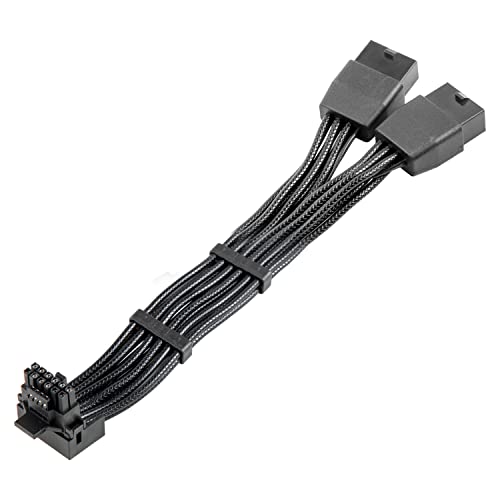
This option is a sleeved cable extension, not a plug-in adapter for an existing 12VHPWR cable: it takes two 8-pin inputs to a 16-pin 12+4-pin GPU connector. The cable uses 16 AWG tinned copper wire and the maker says it supports up to 600W. Its Type B right-angle GPU end is aimed at RTX 40-series cards. Buyers whose power supply already has a native 12VHPWR cable should note the different cable arrangement; check that the required two 8-pin inputs are available.
Bottom line: Choose this when you need a two-8-pin-to-16-pin cable extension with a Type B right-angle end.
How to choose a 12VHPWR 90 degree adapter
Choose by connector direction first, then by cable source and physical clearance. Type A and Type B describe different plug orientations; they are not interchangeable just because both are angled. Compare the GPU socket with the adapter orientation diagram, and plan the cable path before installation. A direct adapter uses an existing GPU power cable, while a two-8-pin extension adds a cable assembly and requires two compatible 8-pin connections. For a tight build, measure the gap from the GPU power socket to the side panel; a 11 mm or 7 mm projection describes only the adapter’s card-side extension, not the total cable bend space.
Check that the adapter is made for the GPU’s connector format, whether 12VHPWR or 12V-2×6, and follow the applicable power-supply and GPU requirements. Do not force a mismatched connector or use a side panel to press the cable into place.
Adapter types and cable arrangements
A direct angled adapter redirects an existing cable, while a 2×8-pin extension changes the cable arrangement as well as its direction. That distinction matters because a power supply may provide a native 12VHPWR cable or separate 8-pin leads, and those setups are not equivalent at the plug end. The table shows the practical decision; connector orientation still needs to match the GPU socket.
| Style | Input arrangement | Best fit |
|---|---|---|
| 90-degree direct adapter | Existing GPU cable | Right-angle routing |
| 180-degree direct adapter | Existing GPU cable | Opposite-direction routing |
| 2×8-pin extension cable | Two 8-pin inputs | Builds needing a cable conversion |
A cable extension also adds cable length and connections, so it can require different routing than a compact adapter. A direct adapter is not a replacement for a missing power-supply cable.
Clearance and cable routing
Measure the full path from the GPU connector to the case panel, not just the adapter’s projection. A compact adapter can reduce the space occupied at the card, but the cable still needs a relaxed route without pressure from the panel. The 11 mm and 7 mm projections in this comparison are product-specific measurements, not a universal clearance target. If the connector or cable touches the panel when closed, choose a different direction or a case with more space rather than compressing the cable.
High-power GPU connectors need a fully seated connection; a loose or partially inserted plug can create a heat hazard. Seat the plug completely and inspect that there is no visible gap before powering the system. Avoid sharp bending or twisting right at the connector, and do not repeatedly flex the plug to force a preferred route.
Installation checks and common mistakes
Before installation, shut the computer down and disconnect power, then confirm that the GPU end and cable end are the correct connector types. A common mistake is choosing Type A or Type B from the product name alone without comparing the GPU socket direction. Another is confusing a 2×8-pin-to-16-pin cable extension with a direct adapter for an existing 16-pin cable. Connector fit, orientation, and power-supply cable compatibility all matter.
After connecting, check that the plug is fully seated and that the cable is not pulled sideways by the case panel. Do not assume a wattage rating makes an incorrectly oriented or poorly seated connection safe. If the adapter or plug becomes unusually hot, smells of burning, or shows discoloration, stop using the system and inspect the connection.
Frequently Asked Questions
How do I tell Type A from Type B adapters?
Type A and Type B refer to the direction of the angled connector, so compare the GPU socket and the adapter’s orientation diagram before ordering. The plug should route the cable in the direction your case allows without twisting it at the connector.
Can a 12VHPWR adapter work with 12V-2×6?
Compatibility depends on the specific adapter and GPU connector. The EZDIY-FAB option here names 12V-2×6 support and 12VHPWR compatibility; verify the connector format for other adapters rather than assuming the names guarantee a match.
How much room should I leave beside the GPU?
Leave enough room that the cable does not press against the side panel or bend sharply at the plug. Compare the available gap with the adapter’s projection measurement, then account for the cable’s own route; the 7 mm and 11 mm figures here describe only the adapter projection.
Is a 2×8-pin extension the same as a direct adapter?
No. A direct adapter redirects an existing GPU power cable, while a 2×8-pin extension takes two 8-pin inputs to a 16-pin GPU connector. Choose the extension only if your power setup has the required compatible 8-pin connections.
How should I check a 16-pin GPU power connection?
Make sure the plug is fully seated with no visible gap, then ensure the cable is not pulling sideways or sharply bending at the connector. A loose high-power connection can overheat, so stop using the system if the plug shows discoloration or unusual heat.