
3.5mm Jack Mobile Splitters: 5 Options Compared

For a mobile 3.5mm jack splitter with one female jack and two male plugs, choose Monoprice 110146 6-Inch Mobile Splitter; its slim connector heads are designed to fit through a phone case. Choose a one-male-to-two-female splitter instead if you want two headphones connected to one phone, or a headset-to-PC adapter for separate mic and headphone ports.
We earn a commission if you buy through links on this page. As an Amazon Associate I earn from qualifying purchases. Products are compared on manufacturer specifications, not hands-on testing.
- Best overall: Monoprice 110146 6-Inch Mobile Splitter – One female jack and two slim male plugs suit the mobile splitter configuration.
- Best for sharing: ONXE 1-to-4 Headphone Splitter – One male plug feeds up to four female outputs for multiple listeners.
- Best for two outputs: ONXE 2-Pack 3.5mm Splitters – One male plug and two female jacks connect two output devices.
| Product | Best for | Connector layout | Cable length | Pack count | Shop |
|---|---|---|---|---|---|
| Monoprice 110146 6-Inch Mobile Splitter | Phone case fit | 1 female, 2 male | 6 inches | 1 cable | Check Price on Amazon |
| ONXE 1-to-4 Headphone Splitter | Group listening | 1 male, 4 female | 11.81 inches | 1 cable | Check Price on Amazon |
| ONXE 2-Pack 3.5mm Splitters | Two output devices | 1 male, 2 female | — | 2 adapters | Check Price on Amazon |
| D & K Headset-to-PC Y Adapter | Separate PC ports | 1 female, 2 male | 4.8 inches | 1 cable | Check Price on Amazon |
| 3.5mm Y Splitter 3-Pack | Multiple adapters | Conflicting layouts | — | 3 adapters | Check Price on Amazon |
3.5mm Jack Mobile Splitters
Compare connector direction and output count first, since splitters with different plug layouts serve different jobs.
Monoprice 110146 6-Inch Mobile Splitter

Monoprice 110146 6-Inch Mobile Splitter is the closest match for a mobile splitter with one female jack and two male plugs. Its slim connector heads are designed to fit through a phone case, and the cable has gold-plated connectors. Use this layout when connecting a headset plug to separate headphone and microphone ports; it is not the usual one-phone-to-two-headphones sharing layout. The cable is 6 inches long, so it offers little reach between devices. The maker says the cable carries a lifetime warranty.
Bottom line: Pick this when your phone case is tight around the jack and you need the female-to-two-male layout.
ONXE 1-to-4 Headphone Splitter
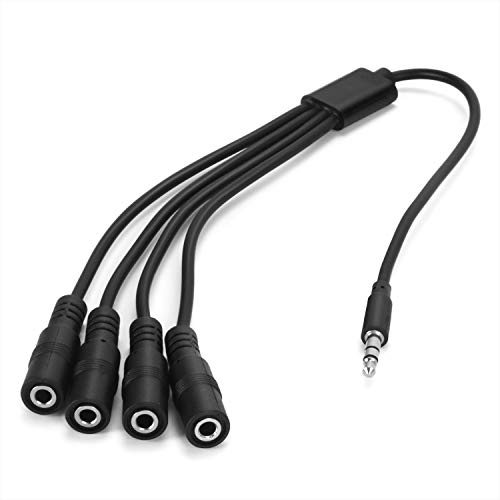
ONXE 1-to-4 Headphone Splitter differs from the mobile headset adapter by taking one 3.5mm male plug and providing four female outputs. That makes it the relevant choice for sharing one audio source with several listeners using separate headphones. The cable is 11.81 inches long, and the maker says it works with MP3 and portable DVD players as well as phones and computers. Its four outputs are more than needed for two listeners, and the features do not establish a microphone pass-through, so do not choose it to split a headset mic and headphone signal.
Bottom line: Choose this to share a single audio source with up to four output plugs.
ONXE 2-Pack 3.5mm Splitters

ONXE 2-Pack 3.5mm Splitters uses the opposite plug direction from Monoprice 110146 6-Inch Mobile Splitter: each adapter has one male plug and two female jacks. That layout can feed two output devices, such as headphones and external speakers, from one 3.5mm source. The pack contains two adapters, and the slim connector design is intended to accommodate devices enclosed in a case or jacket. The features also mention microphone additions, but do not clarify support for combined headset audio and mic wiring. Buyers needing a dedicated PC headset adapter should compare the connector wiring before choosing this style.
Bottom line: Pick this for two output jacks and a spare adapter in the pack.
D & K Headset-to-PC Y Adapter
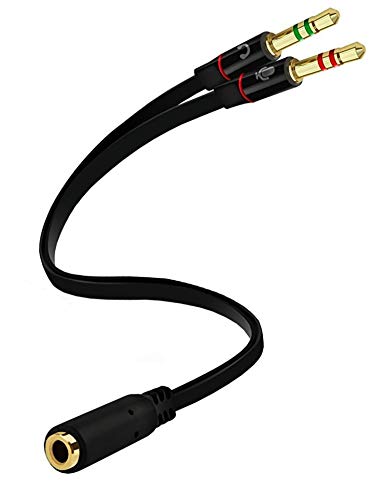
D & K Headset-to-PC Y Adapter is aimed at connecting a newer headset to a computer with separate headphone and microphone ports, rather than at sharing phone audio. It has one 3.5mm female connection and two male plugs, one for the PC headphone jack and one for the mic jack. The cable is 4.8 inches long and has gold-plated connectors. The maker says it is compatible with computers and laptops that have 3.5mm jacks. That computer-oriented use is its limitation for mobile buyers: the two male plugs are intended for separate PC ports.
Bottom line: Choose this when a headset needs separate headphone and microphone connections on a computer.
3.5mm Y Splitter 3-Pack

3.5mm Y Splitter 3-Pack is a three-piece set of 3.5mm Y adapters, with gold-plated connectors and claimed compatibility with phones, tablets, laptops, and MP3 players. Its name describes a male plug with two female jacks, but its maker describes a female port splitting to two male plugs. Those are opposite layouts: one connects two listening devices to a source, while the other separates headset audio and microphone connections. This conflict makes it hard to match the adapter to a mobile jack without checking the actual connector layout first. The set is useful only after confirming that layout.
Bottom line: Consider this only after confirming which connector direction each adapter uses.
How to choose a 3.5mm mobile splitter
Choose by connector direction before counting outputs: one male to two or more female jacks shares a source, while one female to two male plugs usually separates a headset’s headphone and microphone connections. A standard stereo headphone plug uses three conductors (TRS); a headset plug with mic commonly uses four (TRRS). A splitter’s shape alone does not guarantee that microphone wiring will pass through. For two people listening to one phone, choose a source-side male plug and multiple headphone-side female jacks. For separate computer mic and audio ports, choose the headset adapter layout. Confirm the phone has a 3.5mm port; many newer phones use USB-C or Lightning instead, requiring a compatible audio adapter before a 3.5mm splitter can connect.
Phone case clearance and cable reach
Case clearance depends on the opening around the phone jack and the thickness of the plug housing, not just the 3.5mm pin diameter. A low-profile plug is useful when a case opening is narrow or recessed, but compare the housing shape with the cutout before relying on a snug fit. Cable length affects where connected headphones or speakers can sit: a 6-inch lead provides less separation than a longer cable, while extra slack can snag or tangle in a pocket. A headphone splitter also does not add wireless or charging functionality. Check that the phone’s audio output remains accessible with its case installed, and avoid putting sideways strain on the jack when two cables are attached.
Sharing audio versus splitting a headset
Audio sharing and headset splitting are different jobs even though both products are often called Y splitters. A shared-output adapter takes one source and provides two or more headphone sockets; a headset adapter takes one combined headset socket and divides its audio and mic contacts for separate ports. Stereo splitting sends the same left and right program to listeners rather than creating independent volume controls or separate audio streams. Phone volume controls the source, while individual headphone controls only change levels if the headphones provide them. For group listening, select the number of female sockets needed and account for the headphones’ plug size. For calls or recording, verify TRRS microphone compatibility rather than assuming every 3.5mm splitter carries mic audio.
Using 3.5mm splitters safely
Keep listening volume moderate, especially when sharing audio with children; prolonged loud headphone exposure can damage hearing. A passive splitter does not normally give each listener independent source volume, and adding multiple headphones can change the electrical load seen by the device, lowering volume or affecting sound. Avoid forcing a plug into a jack: 3.5mm connectors should seat smoothly, and a bent plug can damage the phone port. Disconnect by gripping the plug rather than pulling the cable, and keep adapters dry. If sound cuts in and out, remove the splitter and test the headphones directly; this helps distinguish a loose connector from a wiring mismatch. Stop using a cable with exposed conductors or a damaged plug.
Frequently Asked Questions
Can a 3.5mm splitter connect two headphones to a phone?
Yes, use a splitter with one male plug for the phone and two female headphone sockets. A one-female-to-two-male adapter has the reverse layout and is generally for splitting a headset connection, not sharing phone audio.
Will a headphone splitter carry a microphone signal?
Only a splitter with compatible headset wiring can carry the mic signal. A common stereo TRS plug has three conductors, while a combined headset TRRS plug has four; check the wiring purpose rather than relying on the 3.5mm size alone.
Does a 3.5mm splitter work with every phone?
It works only with a phone that provides compatible analog audio through a 3.5mm jack, or with a suitable digital-to-3.5mm adapter. A splitter itself does not convert USB-C or Lightning audio.
Why does sound get quieter with two headphones?
A passive splitter lets multiple headphones share one output, so the phone is driving a different combined electrical load. If the level becomes too low, use fewer headphones or a powered headphone amplifier designed for the setup.
Can two listeners control volume separately?
Usually not through a passive splitter; the phone’s volume controls the shared source level. Separate adjustment requires headphones with their own volume controls or a splitter/amplifier that provides individual controls.