
Xbox Matrix SSD Adapter Options Compared by Fit

No product here is explicitly identified as an Xbox Matrix SSD adapter; for an Xbox Series X|S adapter, M.2 2230 to CFexpress Type-B Adapter is the clearest match if you have a Western Digital CH SN530 2230 SSD. These adapters convert the console’s CFexpress Type-B slot for a compatible M.2 2230 NVMe drive, and the drive is sold separately.
Choose Aluminum Xbox Expansion Enclosure or Aluminum Xbox SSD Enclosure, 60 × 30 mm instead only if your drive is one of the XA1 or CH SN530 capacities; the other options are limited to CH SN530.
We earn a commission if you buy through links on this page. As an Amazon Associate I earn from qualifying purchases. Products are compared on manufacturer specifications, not hands-on testing.
- Best overall: M.2 2230 to CFexpress Type-B Adapter – Clearly names Western Digital CH SN530 2230 compatibility and PCIe 4.0 Gen4 x2.
- Best for XA1 drives: Aluminum Xbox Expansion Enclosure – Supports the CH SN530 and XA1 512GB or 1TB drives.
- Best for compact form: cablecc M.2 2230 to CFexpress Adapter – Gives enclosure dimensions of 2.36 × 1.18 × 0.28 inches.
| Product | Best for | Supported SSD | Interface | Shop |
|---|---|---|---|---|
| M.2 2230 to CFexpress Type-B Adapter | CH SN530 owners | WD CH SN530 2230 | PCIe 4.0 Gen4 x2 | Check Price on Amazon |
| NGFF CFexpress Type-B to M.2 Adapter | CH SN530 owners | CH SN530 | PCIe 4.0 Gen4 x2 | Check Price on Amazon |
| cablecc M.2 2230 to CFexpress Adapter | Compact adapter | WD CH SN530 | PCIe 4.0 Gen4 x2 | Check Price on Amazon |
| Aluminum Xbox Expansion Enclosure | XA1 drive owners | CH SN530 or XA1, 512GB/1TB | M.2 NVMe 2230 | Check Price on Amazon |
| Aluminum Xbox SSD Enclosure, 60 × 30 mm | Small enclosure | CH SN530 or XA1, 512GB–1TB | M.2 NVMe 2230 | Check Price on Amazon |
Xbox Matrix SSD Adapters
Compare drive compatibility first; these adapters are not universal M.2 enclosures.
M.2 2230 to CFexpress Type-B Adapter

M.2 2230 to CFexpress Type-B Adapter is the straightforward choice for a Western Digital CH SN530 2230 drive: it converts the Xbox Series X|S CFexpress Type-B interface to an M.2 NVMe 2230 port. The adapter supports PCIe 4.0 Gen4 x2, and the SSD must be purchased separately. Its compatibility is narrow, so it is not a fit for owners of other SSD models. Confirm the exact drive model before ordering rather than relying on the 2230 size alone; the product is designed specifically for CH SN530.
Bottom line: Choose this if your drive is a WD CH SN530 2230.
NGFF CFexpress Type-B to M.2 Adapter
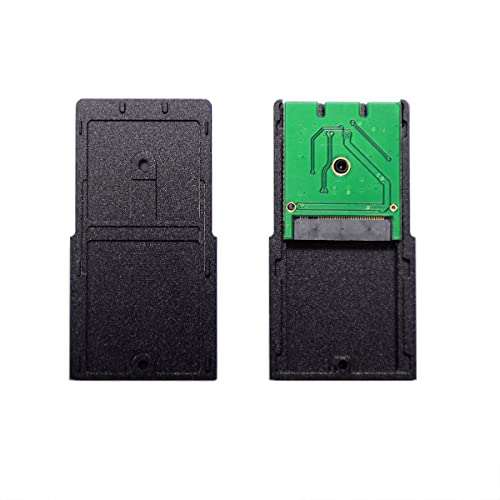
NGFF CFexpress Type-B to M.2 Adapter distinguishes itself with gold-plated connectors and a precision-crafted PCB, alongside its CFexpress Type-B-to-M.2 NVMe 2230 conversion. Its interface is PCIe 4.0 Gen4 x2, and its console compatibility is limited to CH SN530. The SSD is not included, so this is a conversion adapter rather than a complete storage card. The product also describes desktop CFexpress-card use, but Xbox buyers should focus on the named CH SN530 support and verify their drive model before choosing it.
Bottom line: Pick this for a CH SN530 drive if the connector and PCB construction matter to you.
cablecc M.2 2230 to CFexpress Adapter

cablecc M.2 2230 to CFexpress Adapter is the only option with enclosure dimensions provided: 2.36 × 1.18 × 0.28 inches. It converts an M.2 NVMe 2230 drive to CFexpress Type-B for Xbox Series X|S, supports PCIe 4.0 Gen4 x2, and is specified for Western Digital CH SN530 only. Its weight is about 0.04 pounds. No SSD is included, and the narrow compatibility makes this a poor choice for someone who has not confirmed the drive model. Check that model before relying on the adapter’s console fit.
Bottom line: Choose this when you have a CH SN530 and want the dimensions before buying.
Aluminum Xbox Expansion Enclosure

Aluminum Xbox Expansion Enclosure is the only option that names both CH SN530 and XA1 drives, and it gives supported capacities as 512GB or 1TB. The aluminum enclosure is a conversion housing for Xbox Series X|S and does not include an SSD. Its setup notes describe creating a single 4096-sector partition for an MBR drive, or using GUID partitioning, before completing formatting on the console. That setup requirement makes it less plug-and-play for buyers unfamiliar with partition tools; confirm both the drive model and capacity first.
Bottom line: Choose this if your CH SN530 or XA1 drive is 512GB or 1TB.
Aluminum Xbox SSD Enclosure, 60 × 30 mm

Aluminum Xbox SSD Enclosure, 60 × 30 mm pairs an aluminum-alloy case with dimensions of 2.36 × 1.18 × 0.28 inches (60 × 30 × 7 mm). Its compatibility is framed around CH SN530 and XA1 drives in 512GB–1TB capacities, making it broader than the CH SN530-only adapters but still far from universal. The product describes the case as protecting the drive; the SSD itself is not included. The limitation is its specific drive and capacity range, so owners of other 2230 NVMe models should not assume compatibility.
Bottom line: Pick this if the CH SN530 or XA1 capacity and compact case fit your needs.
How to choose an Xbox Matrix SSD adapter
Start with the exact SSD model, not just the M.2 2230 size. These products identify CH SN530 as their supported drive; two options also name XA1 in 512GB or 1TB capacities. An M.2 2230 NVMe label alone does not establish compatibility with the console’s CFexpress Type-B expansion slot. The table separates the compatible drive families and whether the drive comes with the adapter; all five are adapter-only.
| Drive you have | Choices by compatibility | Capacity condition |
|---|---|---|
| WD CH SN530 | M.2 2230 to CFexpress Type-B Adapter, NGFF CFexpress Type-B to M.2 Adapter, cablecc M.2 2230 to CFexpress Adapter, Aluminum Xbox Expansion Enclosure, Aluminum Xbox SSD Enclosure, 60 × 30 mm | Aluminum Xbox Expansion Enclosure and Aluminum Xbox SSD Enclosure, 60 × 30 mm name 512GB or 1TB |
| XA1 | Aluminum Xbox Expansion Enclosure or Aluminum Xbox SSD Enclosure, 60 × 30 mm | 512GB or 1TB |
| Another SSD model | None of these listed as compatible | Verify before purchase |
Choose an option that explicitly covers the drive in hand; if the model is not CH SN530 or the specified XA1 capacity, do not assume the adapter will work.
Xbox Series X|S expansion fit and setup
The console expansion slot uses a CFexpress Type-B form factor, while these adapters provide an M.2 NVMe 2230 socket. That physical conversion does not make every 2230 drive compatible: the adapter makers identify particular SSD families, and Aluminum Xbox Expansion Enclosure further describes partition setup for some drives. For an MBR-partitioned SSD using Aluminum Xbox Expansion Enclosure, the setup guidance calls for one partition with a 4096 sector size before console formatting. A GUID-partitioned drive follows a different path in that guidance. Check the partition style and supported model before starting, and treat on-console formatting as a setup step rather than assuming a bare drive is ready to use.
PCIe bandwidth and what it tells you
PCIe 4.0 Gen4 x2 appears in the specifications for M.2 2230 to CFexpress Type-B Adapter, NGFF CFexpress Type-B to M.2 Adapter, and cablecc M.2 2230 to CFexpress Adapter, and Aluminum Xbox Expansion Enclosure and Aluminum Xbox SSD Enclosure, 60 × 30 mm describe NVMe 2230 enclosures without that same bandwidth figure. A bandwidth label describes the interface capability, not a guarantee that every SSD or game will achieve a particular transfer rate. Match the drive model first; interface generation is secondary when compatibility is limited. These products convert the console slot to an M.2 connection, but none includes the SSD, so a buyer needs both the compatible drive and the adapter. Do not treat a general M.2 NVMe drive as interchangeable with the named models.
Frequently Asked Questions
Does an Xbox Series X|S SSD adapter include a drive?
No; each of these five products is an adapter or enclosure, and the drive must be supplied separately. Confirm the compatible SSD model before buying the enclosure.
Will any M.2 2230 NVMe SSD fit these adapters?
No; the products identify CH SN530 as their main supported drive, while Aluminum Xbox Expansion Enclosure and Aluminum Xbox SSD Enclosure, 60 × 30 mm also name XA1 in 512GB or 1TB capacities. Check the exact model and, for those two enclosures, the capacity.
What does PCIe 4.0 Gen4 x2 mean here?
It identifies a two-lane PCIe 4.0 interface, a figure named by M.2 2230 to CFexpress Type-B Adapter, NGFF CFexpress Type-B to M.2 Adapter, and cablecc M.2 2230 to CFexpress Adapter. It does not guarantee a particular game loading time or make an unsupported SSD compatible.
What partition setup does the aluminum enclosure require?
The setup guidance for Aluminum Xbox Expansion Enclosure says an MBR drive should have one partition with a 4096 sector size before console formatting. It also describes GUID partition setup, so identify the drive’s partition style before preparing it.
Can I use an XA1 drive with every adapter here?
No; only Aluminum Xbox Expansion Enclosure and Aluminum Xbox SSD Enclosure, 60 × 30 mm explicitly name XA1 support, and both specify 512GB or 1TB. The other adapters identify CH SN530 compatibility instead.