
USB Joystick for PC SNES: 4 Gamepads Compared

For a wired pair of SNES-style USB controllers, KIWITATA Classic SNES USB Controller is the strongest fit because it names Windows, Mac, Linux, and Raspberry Pi compatibility. Choose a different option if you want wireless play or a controller with a cable length.
These gamepads use a directional pad and buttons for classic console-style controls, but emulator button mapping may still be needed.
We earn a commission if you buy through links on this page. As an Amazon Associate I earn from qualifying purchases. Products are compared on manufacturer specifications, not hands-on testing.
- Best overall: KIWITATA Classic SNES USB Controller – Wired two-pack with compatibility listed for Windows, Mac, Linux, and Raspberry Pi.
- Best for cable length: Rii Classic Retro USB Controller – Includes a 1.5-meter cable and lists compatibility with several Raspberry Pi models.
- Best for wireless play: ZAMPAM Wireless SNES Controllers – 2.4GHz wireless connection with a range of up to 10 meters.
- Best for button remapping: miadore SNES USB Classic Gamepad – Six digital buttons and an eight-way directional pad suit configurable emulator controls.
| Product | Best for | Connection | Compatibility | Shop |
|---|---|---|---|---|
| KIWITATA Classic SNES USB Controller | Wired two-player setups | Wired USB | Windows, Mac, Linux, Raspberry Pi | Check Price on Amazon |
| Rii Classic Retro USB Controller | Longer wired reach | Wired USB | Windows, Mac, Raspberry Pi, Linux, Android | Check Price on Amazon |
| ZAMPAM Wireless SNES Controllers | Wireless living rooms | 2.4GHz wireless | Windows, Mac, Linux, Raspberry Pi, Switch 1 | Check Price on Amazon |
| miadore SNES USB Classic Gamepad | Button mapping | Wired USB | Windows, Mac, Linux, Raspberry Pi | Check Price on Amazon |
USB Joysticks for PC SNES Gaming
Compare wired and wireless SNES-style USB gamepads by connection, pack size, and supported platforms.
KIWITATA Classic SNES USB Controller

KIWITATA Classic SNES USB Controller stands out for listing Linux alongside Windows, Mac, and Raspberry Pi support, making it a practical wired pair for mixed retro-gaming setups. The set has two gray and purple controllers, with a concave, frosted directional pad and function buttons. The maker says the design is intended for classic SNES-style games on a computer or laptop. It is not compatible with an original SNES console, so choose a console-specific controller if that is your target.
Bottom line: Pick this pair for wired PC play when Linux support and two controllers matter.
Rii Classic Retro USB Controller
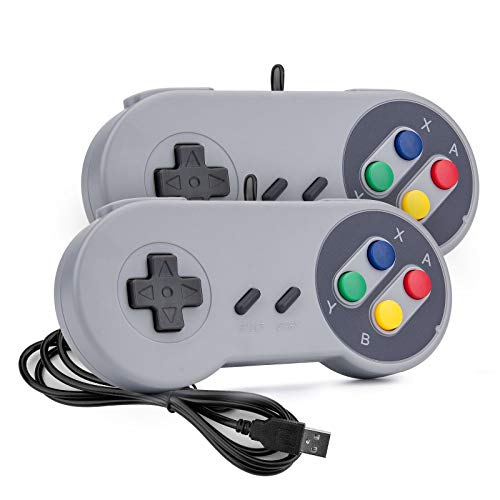
Rii Classic Retro USB Controller separates itself with a 1.5-meter cable, useful when the computer or USB hub is not beside the player. The gray set includes two wired controllers and lists Windows, Mac, Linux, Android, and Raspberry Pi compatibility, including several Pi models. The maker says no driver or patch is needed when an application accepts USB controller input. Emulator support still depends on the program recognizing a standard USB gamepad, and the buttons may need mapping. Its cable reach is fixed, so players who want to move freely should consider a wireless option instead.
Bottom line: Choose this pair when a measured 1.5-meter wired reach suits your setup.
ZAMPAM Wireless SNES Controllers
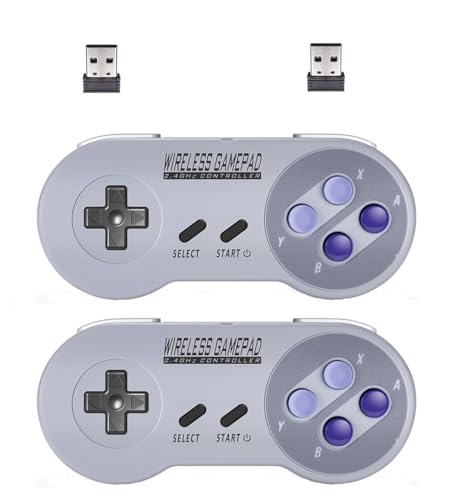
ZAMPAM Wireless SNES Controllers is the wireless choice in this group: it uses a 2.4GHz connection and a USB receiver rather than a cable between each controller and the computer. The maker gives a range of up to 10 meters (about 32 feet) and says setup requires no drivers or software. It comes as a two-pack and lists Windows, Mac, Linux, Raspberry Pi, RetroPie, Recalbox, and Nintendo Switch 1 support; the maker excludes Switch 2. Wireless play requires keeping the receiver connected and staying within usable range, so a wired model is simpler when uninterrupted USB connection is preferred.
Bottom line: Pick this pair when wireless movement and its range fit the room.
miadore SNES USB Classic Gamepad
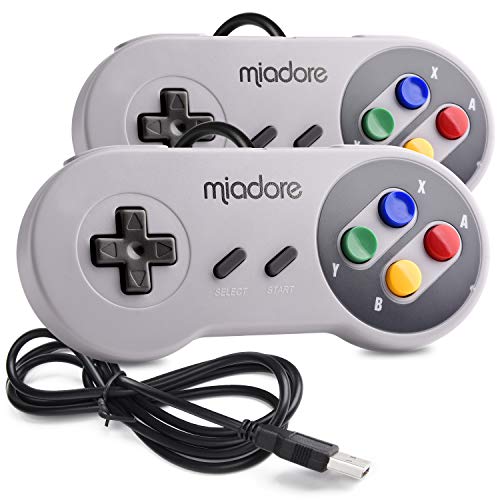
miadore SNES USB Classic Gamepad distinguishes itself with an eight-way directional pad and six digital buttons, giving emulator users a defined control layout to map. The white set contains two wired USB gamepads and lists Windows, Mac, Linux, and Raspberry Pi compatibility. The maker recommends connecting the controller before opening the emulator and notes that input settings may require button mapping. The controller is for USB-based retro gaming rather than a direct connection to an original SNES console.
Bottom line: Choose this pair if a six-button layout and emulator remapping suit your games.
How to choose a PC SNES USB controller
Choose by connection first: wired models connect directly by USB, while the wireless pair here uses a 2.4GHz receiver. For a wired setup, measure the distance from the USB port to the usual seat; the Rii cable is 1.5 meters, while the other wired options do not give a cable measurement. For wireless play, the maximum range is 10 meters, but walls and receiver placement can affect practical reach. Check that your computer or retro-gaming device is among the supported platforms, then confirm the emulator accepts USB gamepad input. If the game controls do not match the buttons, open the emulator’s input settings and map each action before playing.
SNES-style controls and emulator fit
SNES-style gamepads use a directional pad and face/function buttons, a layout suited to games designed around directional movement and discrete button presses. These products differ in the control details they identify: one specifies six digital buttons and an eight-way pad, while another highlights a concave directional surface. Emulator support is not identical to operating-system support: a computer can recognize a USB controller while a particular emulator still needs configuration. A useful decision rule is to choose a model with a button layout if you need to plan a specific mapping; otherwise, verify that your emulator offers an input-configuration menu. Do not assume that a PC USB model plugs into an original SNES console.
Wired versus wireless USB gamepads
Wired controllers avoid a separate wireless receiver link, while wireless controllers reduce the cable between the player and the device. The Rii wired pair specifies 1.5 meters of cable; the ZAMPAM wireless pair gives a maximum range of 10 meters. Use this comparison to match the connection to the room rather than treating one style as universally better.
| Need | Connection to consider | Concrete measure |
|---|---|---|
| Fixed computer desk | Wired USB | Rii cable: 1.5 m |
| More room to move | 2.4GHz wireless | Stated maximum: 10 m |
| Two players | Two-pack | Two controllers per set |
Keep the wireless receiver connected and place it where the controller can maintain a clear link.
Compatibility and setup checks
Compatibility depends on both the operating system and the game or emulator, so check both before settling on a controller. The products here list combinations of Windows, Mac, Linux, Raspberry Pi, and, for the wireless pair, Switch 1; support for one platform does not establish support for every emulator on it. USB gamepads commonly appear as controller inputs, but game emulators may require manual mapping or a controller profile. Connect a wired pad before launching the emulator when input is not detected, then use its input settings to assign the directional pad and buttons. For wireless play, connect the receiver before troubleshooting controller recognition. These USB models are computer-oriented gamepads, not direct replacements for console-specific SNES controllers.
Frequently Asked Questions
Do USB SNES controllers work with every PC emulator?
No; the emulator must accept USB gamepad input, and some programs require manual mapping. If buttons fail to respond, connect the controller before launching the emulator and check its input settings.
How far can a wireless SNES controller reach?
The wireless pair here gives a maximum range of 10 meters, or about 32 feet. Treat that as an upper limit, since room layout and receiver placement can reduce usable range.
Can a PC USB SNES controller connect to an original console?
Not by default; these are USB controllers made for computers and compatible devices. An original SNES console uses a console-specific controller connection, so verify the connection type before buying.
Should I plug in a controller before opening an emulator?
Yes, connecting a wired controller before launching can help an emulator detect it at startup. If the controls still do not match, map the directional pad and buttons in the emulator’s input settings.