
Turtle Beach Mic for Headset: 5 Options Compared

For a Turtle Beach headset mic replacement, CLANMOU 3.5 mm Replacement Boom Mic is the direct match because it is a detachable 3.5 mm boom mic listed for several Turtle Beach models. Choose a complete headset instead if you need the earcups and speakers too; Turtle Beach Recon 50 through Turtle Beach Stealth 600 for PlayStation are headsets with microphones, not replacement booms.
We earn a commission if you buy through links on this page. As an Amazon Associate I earn from qualifying purchases. Products are compared on manufacturer specifications, not hands-on testing.
- Best overall: CLANMOU 3.5 mm Replacement Boom Mic – A standalone detachable 3.5 mm boom mic, with compatibility listed for several Turtle Beach headset models.
- Best for wired play: Turtle Beach Recon 50 – A wired headset with a removable mic and an in-line mute control.
- Best for flip-to-mute: Turtle Beach Recon 70 – A wired headset with a microphone that mutes when flipped up.
- Best for wireless Xbox use: Turtle Beach Stealth 600 Wireless – A wireless headset listing Xbox compatibility, Bluetooth and a flip-to-mute mic.
| Product | Best for | Product type | Microphone | Connection | Shop |
|---|---|---|---|---|---|
| CLANMOU 3.5 mm Replacement Boom Mic | Boom mic replacement | Replacement boom mic | Omnidirectional, detachable | 3.5 mm plug | Check Price on Amazon |
| Turtle Beach Recon 50 | Wired headset setup | Complete wired headset | Removable mic | 3.5 mm connection | Check Price on Amazon |
| Turtle Beach Recon 70 | Flip-to-mute control | Complete wired headset | Flip-to-mute mic | Wired | Check Price on Amazon |
| Turtle Beach Stealth 600 Wireless | Xbox wireless play | Complete wireless headset | Flip-to-mute mic | 2.4 GHz, Bluetooth 5.4 | Check Price on Amazon |
| Turtle Beach Stealth 600 for PlayStation | PlayStation wireless play | Complete wireless headset | Flip-to-mute mic | 2.4 GHz, Bluetooth 5.2 | Check Price on Amazon |
Turtle Beach mic options for headsets
Choose a replacement boom if you already own a compatible headset, or a complete headset if you need the speakers and headband as well.
CLANMOU 3.5 mm Replacement Boom Mic

Unlike the other options here, this is a standalone replacement boom rather than a complete headset. The package includes one detachable 3.5 mm microphone and two foam covers; the seller names Turtle Beach XO Three, XO Four, Recon 150, several Recon 50 variants, and multiple Ear Force models as compatible. Its adjustable boom angle can help position the mic, and the product claims omnidirectional pickup and noise cancellation. The key limitation is model fit: the compatibility list does not cover every Turtle Beach headset, so confirm that your exact headset model accepts this boom before ordering.
Bottom line: Choose this if you need a replacement boom for a model on its compatibility list.
Turtle Beach Recon 50

Unlike the standalone replacement boom, this option supplies a complete wired headset with 40 mm speakers and a removable microphone. Its in-line controls put master volume and mic mute within reach, and the 3.5 mm connection is listed for PlayStation, Xbox, PC and mobile devices. That makes it a better fit when you need both headphones and a mic, rather than a spare mic for an existing headset. The tradeoff is that the microphone is part of a headset purchase; it does not serve as a replacement boom for a different Turtle Beach model.
Bottom line: Choose this when you want a wired headset and removable mic together.
Turtle Beach Recon 70

The Recon 70 differs from the other wired option by using a flip-to-mute microphone instead of an in-line mic-mute control. It is a complete headset with 40 mm speakers, soft earpads, on-ear volume control and compatibility across multiple platforms. Its microphone arrangement suits someone who wants a quick physical mute action without relying on a separate mute button.
Bottom line: Choose this for a complete wired headset with a flip-up mute mic.
Turtle Beach Stealth 600 Wireless
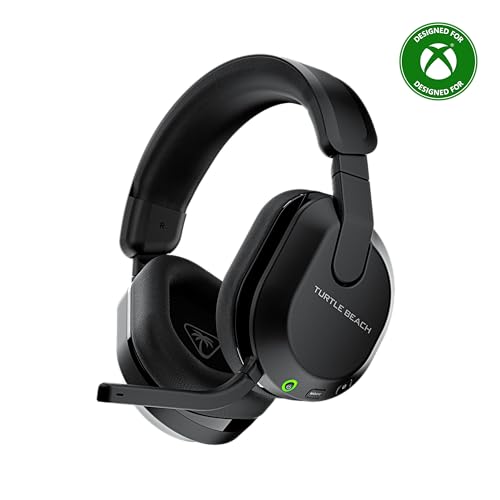
Unlike the wired headset choices, this Stealth 600 pairs low-latency 2.4 GHz wireless with Bluetooth 5.4 and lists Xbox, PlayStation, PC and mobile compatibility. It has 50 mm drivers, a flip-to-mute mic with AI-based noise reduction, memory foam cushions and an 80-hour battery claim from Turtle Beach. Its mappable wheel and mode button add controls beyond basic volume and mute. This is an all-in-one wireless headset, not a detachable replacement mic; it will not solve a broken boom on a headset you already own.
Bottom line: Choose this if you want a wireless headset with Xbox support and Bluetooth.
Turtle Beach Stealth 600 for PlayStation

This Stealth 600 version is the wireless alternative specifically listing PlayStation 5, PlayStation 4, PC and mobile devices, while the other Stealth 600 option also names Xbox. Its features include 50 mm drivers, an 80-hour battery claim, a flip-to-mute mic with AI-based noise reduction, Bluetooth 5.2 and a 10-band EQ in the Swarm II app. The mic is integrated into a full headset rather than sold as a spare part. Buyers who need only a replacement boom should first verify compatibility with a standalone mic instead.
Bottom line: Choose this for a complete wireless headset intended for PlayStation and PC.
How to choose a Turtle Beach headset mic
A replacement boom is the right choice only when its plug and physical fit match your existing headset. The 3.5 mm connector describes the plug size, not a guarantee that every headset’s mic jack uses the same wiring or shape. Check the headset’s exact model name and compare it with the replacement’s compatibility list; a family name alone may cover different revisions. If you need speakers, a headband or a new cable as well, select a complete headset rather than a mic part. A flip-to-mute mic is attached to its headset, while a removable boom is designed to detach from a compatible headset. The word “removable” by itself does not establish compatibility with other models.
Check the plug and microphone fit
Mic fit depends on both the connector and the headset’s boom socket, so matching 3.5 mm plugs alone is not enough. Headsets may use a combined audio-and-microphone connection or separate audio and mic connections; a PC with separate ports can require a splitter when the headset has a single combined plug. Verify which arrangement your device and headset use before connecting a replacement. Boom sockets can also differ in shape and retention, even among headsets from one brand. For a replacement, use the exact headset model as the deciding check; if that model is absent from the compatibility list, do not assume the mic will seat securely or transmit audio correctly.
Replacement mic or complete headset
A replacement boom keeps a working headset in service, while a complete headset replaces the listening hardware too. Use the following distinction to avoid buying the wrong category.
| Need | Choose | What to check |
|---|---|---|
| Mic for an existing headset | Detachable replacement boom | Exact headset model and connector fit |
| Headphones and mic together | Complete wired or wireless headset | Platform connection and mic controls |
Wired headsets use a physical audio connection, while wireless models require the supported radio or Bluetooth connection and battery charging. A complete headset’s mic features do not make its mic a spare part for a different headset. Match the product type to what has failed: replace only the boom when the headset otherwise works, and replace the whole unit when you also need its speakers or controls.
Microphone care and common mistakes
Keep a headset mic dry and avoid pulling it by the cable; moisture and strain can damage the connector or wiring. Foam covers reduce wind noise at the microphone but do not establish that the mic will cancel room sounds or keyboard noise. Position a boom close to the corner of the mouth rather than directly in front of the breath path to reduce plosive bursts. A flip-to-mute control only changes the mic state when moved to its mute position, so confirm the mic is muted before speaking privately. Most importantly, do not force an incompatible boom into a headset jack: a tight fit can damage the socket and still fail to produce microphone audio.
Frequently Asked Questions
Will any 3.5 mm mic fit a Turtle Beach headset?
No; 3.5 mm specifies plug diameter, not universal headset compatibility. Check the exact headset model and the replacement mic’s fit before connecting it.
How can I tell if my Turtle Beach mic is muted?
Check the headset’s mute control: a flip-to-mute boom should be raised to mute, while an in-line mute control must be set to mute. Verify the device’s mic indicator as well, since control behavior varies by headset.
Can a replacement boom work on a PC?
It can if the mic matches the headset and the PC accepts its microphone connection. Some PCs separate headphone and microphone ports, so a combined headset plug may need a splitter.
Should I replace only the boom or the whole headset?
Replace only the boom when the headset still works and the replacement is compatible with its exact model. Choose a complete headset when you also need its speakers, headband or controls.