
GT-U7 GPS Module Arduino: USB and Antenna Compared

For Arduino projects, GT-U7 GPS Module, 2-Pack is the named GT-U7 option with USB connectivity and a two-module pack; choose it if you want a pair and direct computer access. hiBCTR GT-U7 GPS Module, 2-Pack is another GT-U7 two-pack with USB, while GT-U7 GPS Module, 1-Piece is a single module that specifies 3.6–5 V operation.
Choose a different module type if your project specifically requires a NEO-6M board rather than a GT-U7; software compatibility does not make those module names interchangeable.
We earn a commission if you buy through links on this page. As an Amazon Associate I earn from qualifying purchases. Products are compared on manufacturer specifications, not hands-on testing.
- Best overall: GT-U7 GPS Module, 2-Pack – A two-module GT-U7 pack with USB connectivity and an active-antenna interface.
- Best for USB setup: hiBCTR GT-U7 GPS Module, 2-Pack – The two-pack includes an onboard USB port for direct PC or laptop connection.
- Best for one module: GT-U7 GPS Module, 1-Piece – A single GT-U7 with a 3.6–5 V operating range.
| Product | Best for | Pack size | Shop |
|---|---|---|---|
| GT-U7 GPS Module, 2-Pack | Two-module projects | 2 modules | Check Price on Amazon |
| hiBCTR GT-U7 GPS Module, 2-Pack | USB-first setup | 2 modules | Check Price on Amazon |
| GT-U7 GPS Module, 1-Piece | Single-module builds | 1 module | Check Price on Amazon |
GT-U7 GPS modules for Arduino
Compare pack size, computer connection and the specifications that matter for a serial GPS setup.
GT-U7 GPS Module, 2-Pack

GT-U7 GPS Module, 2-Pack stands out for pairing a two-module quantity with an IPX antenna interface and USB access. USB connection provides a serial port on a computer, so it can be used to view positioning output without a separate serial adapter. This suits projects needing a spare module or separate builds.
Bottom line: Pick this if you want two modules and direct computer access.
hiBCTR GT-U7 GPS Module, 2-Pack
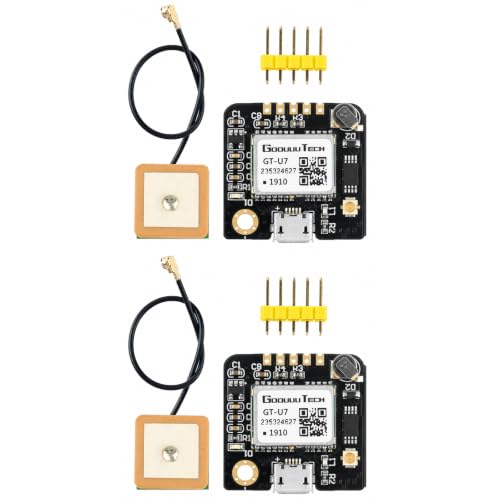
hiBCTR GT-U7 GPS Module, 2-Pack is the clearest fit for a USB-first setup: its onboard port connects to a PC or laptop without an external USB-to-serial adapter. The product says the module is recognized as a standard serial port on most operating systems, and it pairs that connection with an active antenna. The two-module pack suits a pair of Arduino or STM32 projects. Its features also claim rapid outdoor satellite acquisition, but reception time depends on conditions such as sky visibility and antenna placement.
Bottom line: Choose this for onboard USB and a two-module quantity.
GT-U7 GPS Module, 1-Piece
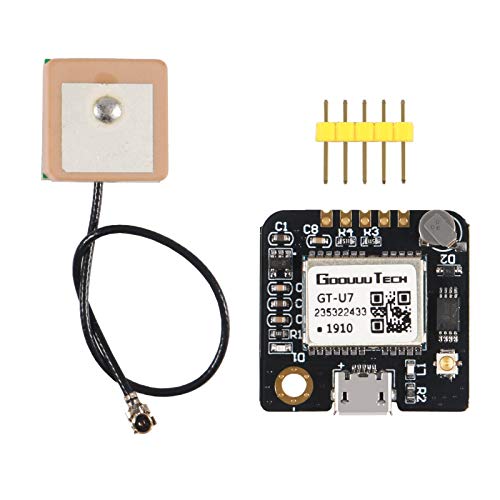
GT-U7 GPS Module, 1-Piece differs from the two-packs by supplying one GT-U7 module and stating a 3.6–5 V operating range, or USB power. It also has a USB interface that connects to a computer without an external serial module, plus an IPX antenna interface. This is a straightforward match for a single build where its voltage suits the controller. The pack does not indicate an included antenna, so verify antenna needs before planning a standalone GPS setup.
Bottom line: Pick this for a one-board project whose power fits 3.6–5 V.
How to connect a GT-U7 to Arduino
A GT-U7 communicates with a controller over a serial connection, while USB can expose a serial port for a computer. For a microcontroller hookup, match the module’s TX output to the board’s RX input and the module’s RX input to the board’s TX output; connect ground, and check voltage compatibility before powering the module. The product guidance here specifies 9600 baud rather than 4800, so set the sketch or serial monitor to 9600 to read output correctly. USB is useful for initial computer-side checks, but a USB connection to a computer is not the same as wiring the module to an Arduino. Keep the antenna clear of metal and give it a view of open sky for satellite reception.
Choosing USB, UART and antenna connections
Choose USB when you want a direct computer connection, and choose UART wiring when the GPS receiver needs to send data to an Arduino or other controller. A USB serial port can simplify bench setup; a microcontroller’s UART still needs crossed TX/RX lines and a shared ground. Antenna placement affects reception: an active antenna should have an unobstructed view of the sky rather than sitting beneath a metal enclosure. The maker identifies IPX antenna connections and active-antenna features on some options, but package contents differ in the information. Before building an enclosure, verify that the antenna connector and antenna arrangement match your intended installation.
GT-U7 and NEO-6M compatibility
Treat compatibility as a software or protocol convenience, not proof that boards have identical pinouts, dimensions or electrical limits. For Arduino projects, compare the module’s actual labels and wiring before substituting one board for another. GPS receiver updates commonly use NMEA sentences over serial; a typical default baud rate is 9600, but a module’s configuration can change it. If a sketch receives unreadable characters or no parsed fixes, first check the serial baud setting and TX/RX direction, then move the antenna into open sky.
GPS reception and safe installation
GPS reception works best with a clear view of the sky; roofs, buildings, vehicle metalwork and dense tree cover can weaken or block satellite signals. A first satellite fix may take longer after a cold start or when the receiver has moved far from its previous location, so allow time outdoors before concluding that wiring has failed. For vehicle use, secure the board and antenna against movement, protect exposed electronics from moisture, and keep wiring away from hot or moving parts. Never treat a GPS position as a safety-critical navigation source by itself. Confirm power and antenna requirements before installation, especially if the module will be mounted inside a vehicle enclosure.
Frequently Asked Questions
What baud rate should I use with a GT-U7?
Use 9600 baud for the setup described for these GT-U7 modules, rather than 4800. If serial output is garbled, make sure the Arduino sketch and the computer-side monitor use the same rate.
Does a GT-U7 need a clear view of the sky?
Yes, GPS reception generally improves with an unobstructed view of open sky. Metal enclosures, roofs and buildings can block signals, so test the antenna outdoors before troubleshooting software.
Can I connect a GT-U7 directly to Arduino over USB?
The onboard USB interface is described as a computer serial connection, not a direct Arduino hookup. For microcontroller communication, use the serial wiring and confirm voltage compatibility before powering the module.
What does the PPS pin do on a GPS module?
A PPS output provides a pulse aligned to a timing reference and is mainly useful for precision timekeeping projects. The product guidance says it is unnecessary unless the GPS is driving a high-precision hardware clock.