
TI Nspire CX II Charger: 5 Options Compared by Fit

The Texas Instruments Rapid Charger is the clearest fit for a TI-Nspire CX II because its name explicitly includes that model. Choose a cable instead if you need a longer or shorter cord, but confirm the connector and exact calculator variant before ordering.
We earn a commission if you buy through links on this page. As an Amazon Associate I earn from qualifying purchases. Products are compared on manufacturer specifications, not hands-on testing.
- Best overall: Texas Instruments Rapid Charger – The Texas Instruments charger explicitly names TI-Nspire CX II compatibility.
- Best for a 3-foot cable: 3 ft USB Charger Cord – Its 3-foot USB cable names the TI-Nspire CX II Color Graphing Calculator.
- Best for a longer cable: 5 ft Mini Cable – Its 5-foot mini cable is the longest cord option here, though its model wording is less direct.
| Product | Best for | Product type | Cable length | Named TI-Nspire fit | Shop |
|---|---|---|---|---|---|
| Texas Instruments Rapid Charger | Direct model match | Rapid charger | — | CX II, CX, CX CAS | Check Price on Amazon |
| 3 ft USB Charger Cord | Short cable reach | USB power/data cable | 3 ft | CX II Color, CX, CX CAS | Check Price on Amazon |
| 3.3 ft USB-to-Mini-B Cable | Portable cable | USB-to-Mini-B cable | 3.3 ft | CX II CAS, CX, CX CAS | Check Price on Amazon |
| 5 ft Mini Cable | Longer cable reach | USB-to-mini cable | 5 ft | CX CAS II C Silver Edition | Check Price on Amazon |
| 3 ft USB 2.0 Cable | Basic replacement cord | USB 2.0 cable | 3 ft | CX, CX CAS | Check Price on Amazon |
TI Nspire CX II Charger Options
Start with the model name and charging format, then choose a cord length that suits where you charge.
Texas Instruments Rapid Charger

This is the only option whose name explicitly includes the TI-Nspire CX II, making it the clearest match when model fit is the priority. Texas Instruments identifies it as a genuine charger and also names TI-Nspire CX, CX CAS, TI-84 Plus CE, TI Touchpads, and TI-84 Plus C Silver Edition. Its compact charger format differs from the loose USB cords below. The limitation is that no cable length is given, so it may not suit a setup that specifically needs a longer reach.
Bottom line: Choose this if you want a charger explicitly named for the TI-Nspire CX II.
3 ft USB Charger Cord
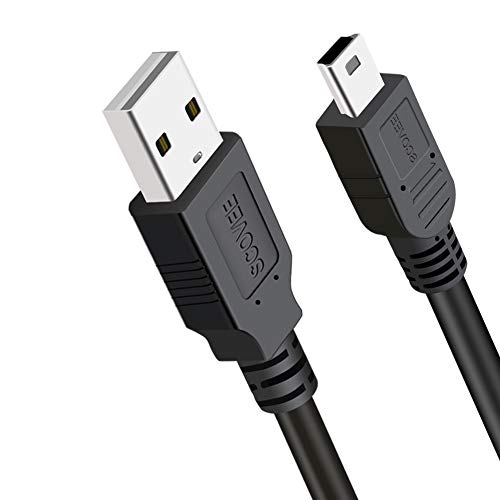
This cord is the most direct cable-style match because its compatibility text names the TI-Nspire CX II Color Graphing Calculator. It is a 3-foot USB power and data-sync cable, so it suits a desk or outlet close to the calculator. The cord is also described as compatible with TI-84 Plus CE, TI-84 Plus C Silver Edition, and TI-89 Titanium calculators. Unlike the Texas Instruments Rapid Charger, this is a replacement cable rather than a dedicated charger unit; buyers needing a complete wall charger should account for that distinction.
Bottom line: Pick this when a 3-foot replacement cable and CX II Color compatibility fit your setup.
3.3 ft USB-to-Mini-B Cable

This option is a 3.3-foot USB 2.0 Type-A-to-Mini-B cable, with compatibility text that includes TI-Nspire CX II CAS as well as CX and CX CAS. The modest cord length makes it a portable choice for a backpack or pencil case, and the copper-wire construction is a feature. Its model wording calls out the CX II CAS rather than the CX II Color by itself, so confirm which calculator variant you have before selecting it. It is a replacement cord, not a dedicated wall charger.
Bottom line: Choose this for a portable cable if your calculator is the CX II CAS variant.
5 ft Mini Cable

This cable offers the longest reach among these options at 5 feet, and its compatibility text names TI-Nspire CX CAS II C Silver Edition along with several TI-84 and TI-83/85/89 models. It is a USB-to-mini cable intended for charging and data transmission. The wording does not clearly name the TI-Nspire CX II Color model, so model-specific buyers should verify the calculator variant and connector before choosing it. Its longer reach is useful only when the extra cord length is needed.
Bottom line: Pick this if the 5-foot reach matters and your calculator matches its named variant.
3 ft USB 2.0 Cable

This is a straightforward 3-foot USB 2.0 power and data cable. Its TI-Nspire compatibility includes CX and CX CAS, but it does not explicitly name the CX II, making it a less direct fit than the charger and cable options that mention that model family. The cable also names TI-84 Plus CE, TI-84 Plus C Silver Edition, and TI-89 Titanium calculators. Its limitation is the lack of a CX II-specific compatibility claim, so check your exact model and port before relying on it.
Bottom line: Consider this only if a 3-foot cord suits you and your calculator variant is confirmed compatible.
How to choose a TI Nspire CX II charger
Choose by matching the calculator variant first, then the charging format and cord reach. TI-Nspire CX II, CX II CAS, CX, and CX CAS are distinct names in the products’ compatibility claims; a cord mentioning one should not automatically be assumed to fit every other variant. A cable is also different from a charger unit: the cable transfers power from a compatible USB source, while a charger is the power adapter itself. For a direct model match, select an option that names CX II explicitly. If your existing adapter is sound and you only need a replacement cord, compare cable lengths and connector wording instead.
Need-to-choice guide
| Need | Choice criterion |
|---|---|
| Explicit CX II match | Choose a product naming TI-Nspire CX II |
| Replace a cable only | Choose a cable and verify its connector |
| Reach to a nearby outlet | Compare 3 ft, 3.3 ft, and 5 ft cords |
TI Nspire CX II charger cables and lengths
Cable reach differs by as much as 2 feet across the cord options here, from 3 feet to 5 feet. A 3-foot cable is generally easier to keep tidy at a close outlet, while a 5-foot cable gives more placement flexibility; measure the route from the power source to the calculator before deciding. Connector wording matters as much as length: one option specifies USB Type-A to Mini-B, while other products use looser USB-to-mini language. Match the existing cable ends and calculator port rather than assuming all USB cables fit. Avoid using a cable with damaged insulation or bent connectors.
Charger versus replacement cable
A charger unit and a charging cable solve different problems: a charger supplies power from an outlet, while a cable connects the calculator to a compatible power source. The genuine Texas Instruments Rapid Charger is named for TI-Nspire CX II, while the other choices are replacement cables with different stated lengths. If replacing only a cable, keep the existing adapter if it is undamaged and compatible. Do not force a plug into the calculator port; stop if the connector does not seat easily, since a mismatch can damage the port. Confirm the exact CX II variant and connector before ordering when product wording names only CX II CAS, CX, or CX CAS.
Safe charging and cable care
Use an undamaged cable and charger, and disconnect them if a connector becomes unusually hot, frayed, or loose. Keep cords away from liquids and avoid pulling a cable out by its wire; grip the connector instead. A bent or contaminated charging port can prevent a secure connection, so inspect the plug and port before repeated charging attempts. Coil a cable loosely rather than tightly around the calculator, which reduces stress near the connector ends. For a replacement, matching the original plug shape and charger type is safer than relying on broad calculator-family claims alone.
Frequently Asked Questions
Does a TI-Nspire CX II use the same charger as CX CAS?
The product options name TI-Nspire CX II, CX, and CX CAS in overlapping but not identical compatibility claims. Match the full model label on your calculator and the connector before using a replacement.
How long should a calculator charging cable be?
A 3-foot cable typically suits a nearby outlet, while a 5-foot cord provides 2 feet more reach. Measure the distance along the route you plan to use rather than estimating straight-line distance.
Can a USB data cable charge a TI-Nspire calculator?
Some replacement cords are described as supporting both power and data, but connector compatibility still matters. Use a cable whose plug matches your calculator and a compatible USB power source.
Is a charger adapter the same as a charging cable?
No: an adapter provides power from an outlet, while a cable connects the calculator to that power source. Replace only the component you need, and do not use damaged cords or adapters.
What should I check before plugging in a replacement cable?
Check the exact calculator variant and compare the cable plug with the original connector. Stop if the plug does not seat easily; forcing a mismatch can damage the calculator port.