
IDE to USB Converter: 4 Adapters Compared by Fit

For most people, Unitek USB 3.0 IDE/SATA Adapter is the clearest IDE to USB converter choice because it includes both 40-pin and 44-pin IDE connectors, plus SATA and a 12V/2A power adapter. Choose Vorodcip USB 3.0/Type-C IDE/SATA Adapter instead if your computer needs USB-C connectivity; verify that its connector setup matches your drive before ordering.
An IDE-to-USB adapter connects an older parallel ATA drive to a computer over USB, and some models also support SATA drives.
We earn a commission if you buy through links on this page. As an Amazon Associate I earn from qualifying purchases. Products are compared on manufacturer specifications, not hands-on testing.
- Best overall: Unitek USB 3.0 IDE/SATA Adapter – Its 40-pin and 44-pin IDE connectors cover desktop and laptop IDE drives, and it also has a SATA port.
- Best for USB-C: Vorodcip USB 3.0/Type-C IDE/SATA Adapter – It includes a USB-C-to-USB adapter for connecting with USB-C or USB devices.
- Best for multiple drives: FIDECO USB 3.0 SATA/IDE Adapter – It supports connecting three drives simultaneously, including two IDE drives and one SATA drive.
| Product | Best for | IDE connectors | USB connection | Shop |
|---|---|---|---|---|
| Unitek USB 3.0 IDE/SATA Adapter | Broad drive support | 40-pin and 44-pin | USB-A | Check Price on Amazon |
| Vorodcip USB 3.0/Type-C IDE/SATA Adapter | USB-C computers | IDE and SATA | USB and USB-C adapter | Check Price on Amazon |
| FIDECO USB 3.0 SATA/IDE Adapter | Simultaneous drives | IDE and SATA | USB 3.0 | Check Price on Amazon |
| YINNCEEN USB 3.0 IDE/SATA Adapter | 5Gbps interface | IDE and SATA | USB 3.0 | Check Price on Amazon |
IDE to USB converters
Compare the connector options and drive support first, then match the adapter to your computer’s available USB port.
Unitek USB 3.0 IDE/SATA Adapter
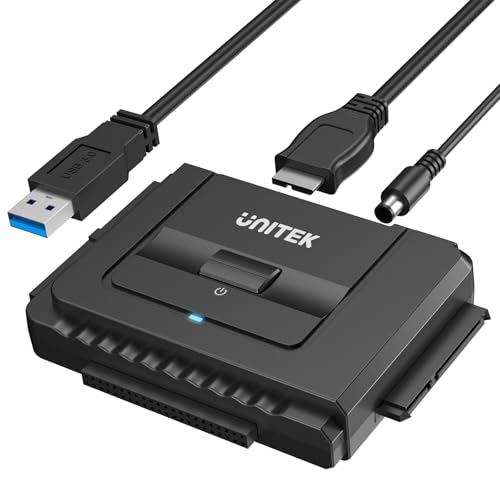
The 40-pin and 44-pin IDE connectors make this adapter a fit for both desktop-style and laptop-style IDE drives, while a SATA port adds support for SATA HDDs and SSDs. It can connect one IDE drive and one SATA drive simultaneously, and it also supports optical drives. Unitek says its SATA III interface supports up to 6Gbps; the USB connection is USB 3.0 and backward compatible with USB 2.0 and 1.1. The included 12V/2A power adapter suits buyers who need external drive power. Its USB connection is USB-A, so it does not directly suit a computer with only USB-C ports.
Bottom line: Choose this if you need both IDE pin formats, SATA support and a USB-A host connection.
Vorodcip USB 3.0/Type-C IDE/SATA Adapter

The USB-C-to-USB adapter distinguishes this kit for people whose computer uses USB-C as well as for USB users. It supports 2.5- and 3.5-inch IDE and SATA HDDs and SSDs, plus internal Blu-ray drives, and comes with a 12V/2A power supply. The maker positions it for file retrieval, backup, cloning and recovery. The maker does not give a complete transfer-rate figure, so choose it for its connector and drive compatibility rather than a speed comparison. Buyers should confirm the included IDE connector type is compatible with their drive before ordering.
Bottom line: Choose this when USB-C access matters and the drive matches its IDE or SATA support.
FIDECO USB 3.0 SATA/IDE Adapter

The standout feature is simultaneous connection of three drives: one 2.5-inch IDE, one 3.5-inch IDE and one 2.5- or 3.5-inch SATA drive. FIDECO also supports SATA SSDs and several optical-drive formats, including CD-ROM and DVD-RW. The maker gives a USB 3.0 speed claim of up to 5Gbps and backward compatibility with USB 2.0. Its compact form is useful when portability matters.
Bottom line: Choose this if you want to connect the combination of three IDE and SATA drives.
YINNCEEN USB 3.0 IDE/SATA Adapter

The USB 3.0 interface speed of up to 5Gbps is the clearest differentiator for this adapter. It supports 2.5- and 3.5-inch IDE and SATA drives, and the package includes a 12V/2A power adapter. YINNCEEN says it is backward compatible with USB 2.0 and USB 1.1, with actual transfer speed dependent on the connected device setup. That makes this a straightforward option for common drive sizes. The maker names Windows XP, Vista and 7 support; buyers using another operating system should confirm compatibility before choosing it.
Bottom line: Choose this for its USB 3.0 speed claim and support for common IDE and SATA drive sizes.
How to choose an IDE to USB converter
Start with the drive connector: IDE/PATA drives use a wide ribbon-style connector, while SATA drives use a narrow data connector and a separate power connection. Desktop IDE drives commonly use 40 pins; laptop 2.5-inch IDE drives commonly use 44 pins, combining data and power in one connector. If you need both formats, select an adapter that names both 40-pin and 44-pin support, such as Unitek USB 3.0 IDE/SATA Adapter. Also check the host connection: USB-A and USB-C are different physical plugs, and a USB-A-only adapter needs a compatible port or a suitable adapter. For three simultaneous drives, FIDECO USB 3.0 SATA/IDE Adapter specifically describes that combination; do not assume other kits offer the same arrangement.
IDE and SATA connector fit
IDE and SATA are not interchangeable connectors, so match the adapter port to the drive before plugging anything in. A 40-pin IDE connection is typical of desktop PATA drives, while 44-pin connections are common on 2.5-inch laptop PATA drives. SATA uses separate data and power connectors; a SATA III interface has a theoretical link rate of 6Gbps, but the drive, USB version and computer also affect actual transfer speed. A 5Gbps USB 3.0 link is a different limit from SATA’s 6Gbps interface. Check the drive’s label and connector shape: if your drive has 44 pins, choose a model that explicitly includes that connector rather than assuming a 40-pin port will fit.
Power and setup for older hard drives
Most 3.5-inch desktop hard drives need external power, while many 2.5-inch drives can use 5V power; use a kit with an appropriate supply when the drive requires it. Unitek USB 3.0 IDE/SATA Adapter, Vorodcip USB 3.0/Type-C IDE/SATA Adapter and YINNCEEN USB 3.0 IDE/SATA Adapter include a 12V/2A power adapter, but that rating alone does not establish support for every drive. Before connecting a PATA drive, check its jumper setting: drives designed for shared IDE cables may offer master, slave or cable-select modes, and the correct choice depends on the drive and setup. Connect the drive securely before powering it, keep the drive on a stable surface, and avoid disconnecting it during active file transfers to reduce the risk of data loss.
USB transfer speeds and old-drive expectations
USB 3.0 has a nominal signaling rate of 5Gbps, while USB 2.0 tops out at 480Mbps; actual file-copy speed is lower and depends on the drive and host connection. A SATA III port’s 6Gbps figure describes its interface ceiling, not a guaranteed USB transfer rate. Mechanical IDE drives are usually slower than these interface ceilings, so a high adapter speed claim does not make an old disk faster. For large copies, connect through the fastest USB port both the computer and adapter support, and avoid hubs that share bandwidth with other active devices. For irreplaceable files, copy them to a separate destination and confirm the files open before wiping or reusing the source drive.
Frequently Asked Questions
Can I connect a 44-pin laptop IDE drive?
Yes, but the adapter needs a 44-pin IDE connector; a 40-pin desktop connector is a different fit. Check the pin count before connecting the drive.
Does USB 3.0 guarantee 5Gbps file copies?
No. USB 3.0’s nominal signaling rate is 5Gbps, but the drive, host port and connection path reduce real copy speeds. An older mechanical IDE disk may be the limiting component.
Do 3.5-inch IDE hard drives need external power?
Most 3.5-inch desktop hard drives need external power, unlike many 2.5-inch drives that can use 5V. Check the drive’s power rating and use a compatible supply.
Can an IDE to USB adapter read SATA drives too?
Some adapters support both IDE and SATA, but confirm that the model has both connector types. SATA uses separate data and power plugs, unlike IDE’s ribbon-style connection.
Should I change the IDE jumper before connecting?
Check the drive’s jumper setting, since PATA drives can have master, slave or cable-select modes. The appropriate setting depends on the drive and connection arrangement.