
Bluetooth Adapter for iPod Classic 160GB Compared

30-Pin Bluetooth Transmitter for iPod Classic 160GB is the clearest match for an iPod Classic 160GB because its name explicitly includes that capacity and it uses a 30-pin connector. Choose a different adapter if you need Bluetooth for a speaker dock rather than wireless audio from the iPod, or if your player does not have a compatible 30-pin port.
We earn a commission if you buy through links on this page. As an Amazon Associate I earn from qualifying purchases. Products are compared on manufacturer specifications, not hands-on testing.
- Best overall: 30-Pin Bluetooth Transmitter for iPod Classic 160GB – Its name explicitly identifies the iPod Classic 160GB and its 30-pin connector.
- Best for 2007-and-later models: Bluetooth Transmitter for iPod Classic 2007+ – Its compatibility is described for iPod Classic models manufactured from 2007 onward.
- Best for Bose docks: INVERY DockLinQ Pro Bluetooth Receiver – It is a 30-pin Bluetooth receiver intended for Bose SoundDock and other docking stations.
| Product | Best for | Compatibility | Connector | Dimensions | Shop |
|---|---|---|---|---|---|
| 30-Pin Bluetooth Transmitter for iPod Classic 160GB | 160GB Classic owners | iPod Classic 160GB; iPod Nano | 30-pin | 1.57 × 1.57 × 0.31 in | Check Price on Amazon |
| Bluetooth Transmitter for iPod Classic 2007+ | 2007+ Classic models | iPod Classic, 2007 and later | 30-pin | 1.57 × 1.57 × 0.31 in | Check Price on Amazon |
| 30-Pin Bluetooth Transmitter for iPod (C1) | Broad 30-pin devices | Classic among supported iPods; year conflict | 30-pin | 4.29 × 0.51 × 0.34 in | Check Price on Amazon |
| INVERY DockLinQ Pro Bluetooth Receiver | Bose SoundDock owners | Bose SoundDock and 30-pin docks | 30-pin dock | 1.77 × 1.77 × 0.39 in | Check Price on Amazon |
Bluetooth adapters for iPod Classic 160GB
Compare direct 30-pin transmitters with a dock receiver, and verify that the adapter suits your particular use.
30-Pin Bluetooth Transmitter for iPod Classic 160GB

30-Pin Bluetooth Transmitter for iPod Classic 160GB is the only option here whose name explicitly calls out the iPod Classic 160GB. The compact black transmitter uses a 30-pin connector and is intended to send audio to Bluetooth headphones, earbuds, speakers, and car audio systems. The maker says it supports stable wireless transmission and reduced audio delay. Its dimensions are 1.57 × 1.57 × 0.31 inches. Choose it when the 160GB match is the priority; the maker does not identify a Bluetooth version or supported audio profiles, so buyers who need a particular protocol should confirm that before ordering.
Bottom line: Pick this when you want a direct 30-pin transmitter explicitly named for the 160GB Classic.
Bluetooth Transmitter for iPod Classic 2007+

Bluetooth Transmitter for iPod Classic 2007+ covers iPod Classic models manufactured from 2007 onward, making its generation-based compatibility claim broader than a single capacity. It connects through the 30-pin port and is described as a plug-and-play transmitter for wireless speakers and headphones. The maker says it maintains high-fidelity sound transmission. Its dimensions are 1.57 × 1.57 × 0.31 inches. This is a reasonable alternative if your Classic is from 2007 or later, but the product name does not specifically identify the 160GB capacity; confirm the exact model fit if capacity-specific compatibility matters.
Bottom line: Choose this if your Classic is a 2007-or-later model and generation-based compatibility suits your needs.
30-Pin Bluetooth Transmitter for iPod (C1)

30-Pin Bluetooth Transmitter for iPod (C1) is a broad 30-pin iPod transmitter rather than a product clearly matched to the 160GB Classic. Its compatibility text names iPod Classic along with Nano, Video, Mini, and select Touch models, and it supports A2DP and AVRCP. The text conflicts about post-2007 iPods: the product name says it is compatible with Classic models made after 2007, while the compatibility text excludes iPods made after 2007. Because that conflict directly affects fit, confirm compatibility for your exact 160GB model before ordering. Its dimensions are about 4.29 × 0.51 × 0.34 inches.
Bottom line: Consider it only after confirming compatibility with your exact post-2007 Classic.
INVERY DockLinQ Pro Bluetooth Receiver
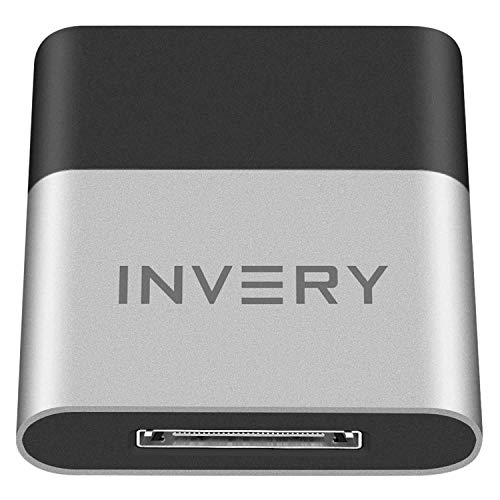
INVERY DockLinQ Pro Bluetooth Receiver serves a different purpose: it adds Bluetooth reception to a Bose SoundDock or another 30-pin music docking station, rather than transmitting audio from an iPod to wireless headphones. The maker names several Bose SoundDock versions and says the receiver can pair with iOS and Android devices. Its dimensions are about 1.77 × 1.77 × 0.39 inches, with a weight of 0.2 pounds. It may suit someone trying to stream from a phone to a compatible dock, but it is not the direct iPod Classic Bluetooth transmitter to choose for wireless listening; its name also excludes car and motorcycle use.
Bottom line: Pick this for streaming to a compatible 30-pin Bose dock, not for iPod-to-headphone transmission.
How to choose a Bluetooth adapter for iPod Classic 160GB
Start by matching the adapter’s role to your audio path: a transmitter sends sound from the iPod to Bluetooth headphones or speakers, while a receiver takes Bluetooth audio from a phone and feeds a dock. The 30-pin connector is the key physical match for a Classic of this generation. Bluetooth audio to headphones generally uses the A2DP profile; AVRCP is a separate profile for playback control, and support for it should not be assumed. If an adapter names the 160GB Classic directly, that is a more specific compatibility claim than a generic 30-pin iPod claim. When the maker gives conflicting generation rules, confirm the exact model before ordering rather than relying on connector fit alone.
Transmitter versus dock receiver
A 30-pin transmitter is the right type when the iPod itself must send music wirelessly to headphones or a speaker. A dock receiver has the reverse job: a phone sends Bluetooth audio to the receiver, which plugs into a compatible powered music dock. Both types can have a 30-pin connector, so the connector alone does not tell you the signal direction. Use this quick decision guide:
| Your goal | Adapter type | Fit check |
|---|---|---|
| Listen from iPod on Bluetooth headphones | Transmitter | 30-pin and exact iPod model support |
| Play phone audio through a dock | Receiver | Dock compatibility and intended use |
Do not choose a dock receiver just because it fits the port; it may accept audio from another device instead of transmitting the iPod’s output.
Check the 30-pin fit and compatibility
Confirm that the iPod has the wide 30-pin dock connector, not a later Lightning connector, before selecting an adapter. A connector that physically attaches does not by itself establish that the adapter will work with every model or capacity. Compare the compatibility wording against the exact Classic generation, especially when a product makes both an after-2007 claim and an exclusion for post-2007 devices. Also check whether the adapter is meant to attach directly to the iPod or to a speaker dock. For a named 160GB match, prioritize explicit model wording over a general reference to “iPod” or “30-pin.”
Bluetooth audio and control expectations
A2DP is the common Bluetooth profile for stereo music streaming, while AVRCP carries playback-control commands such as play and pause. A transmitter can send audio without offering remote track controls, so check for profile support when controlling the iPod from headphones matters. Wireless audio also adds some latency compared with a wired connection; that difference is usually less important for music than for watching video in sync. If the adapter maker claims reduced delay or stable transmission, treat that as a performance claim rather than a guarantee for every headphone, speaker, or environment. Pairing behavior and controls can differ across the receiving device, so select based on the feature you actually need.
Frequently Asked Questions
Does an iPod Classic 160GB use a 30-pin connector?
Yes, the iPod Classic 160GB uses Apple’s 30-pin dock connector. Match the adapter to that port, and still verify model compatibility because a physical fit alone does not confirm operation.
Can a Bluetooth transmitter connect to AirPods?
A transmitter can send audio to Bluetooth headphones when it supports a compatible audio profile such as A2DP. Check the transmitter’s compatibility and pairing instructions for the headphone model you plan to use.
What is the difference between A2DP and AVRCP?
A2DP carries stereo Bluetooth audio, while AVRCP supports playback control between devices. A transmitter may support audio streaming without providing remote track controls.
Will a 30-pin Bluetooth receiver send iPod audio to headphones?
Not necessarily; a receiver typically accepts Bluetooth audio from a phone and passes it to a dock or speaker. For iPod-to-headphone listening, choose a transmitter and verify the supported iPod model.