
Cables for Nintendo 64: 5 Options Compared by Fit

For a standard Nintendo 64 hookup, N64/GameCube/SNES RCA Cable, 6 ft is a straightforward 6-foot composite RCA cable with yellow video and red-and-white stereo audio plugs. Choose a longer cord if you need more reach, or an HDMI converter if your TV lacks RCA inputs.
These cables connect the N64’s multi-out port to a TV; converter options change the output connection rather than providing only a direct RCA cord.
We earn a commission if you buy through links on this page. As an Amazon Associate I earn from qualifying purchases. Products are compared on manufacturer specifications, not hands-on testing.
- Best overall: N64/GameCube/SNES RCA Cable, 6 ft – A 6-foot direct RCA cable connects the N64 multi-out to yellow, red, and white TV inputs.
- Best for extra reach: N64/GameCube/SNES AV Cable, 8.2 ft – Its 8.2-foot length gives more distance between the console and the TV.
- Best for HDMI conversion: COMeap RCA-to-HDMI Converter Set – The package combines an RCA-to-HDMI converter with USB power and an HDMI cable.
| Product | Best for | TV connection | Cable length | Included equipment | Shop |
|---|---|---|---|---|---|
| N64/GameCube/SNES RCA Cable, 6 ft | Direct RCA hookup | Composite RCA | 6 ft | AV cable | Check Price on Amazon |
| N64/GameCube/SNES AV Cable, 8.2 ft | Longer RCA reach | Composite RCA | 8.2 ft | AV cable | Check Price on Amazon |
| COMeap RCA-to-HDMI Converter Set | RCA to HDMI | HDMI output | — | Converter, USB power, HDMI cable | Check Price on Amazon |
| yoxxzus N64 HDMI Adapter | Simple HDMI adapter | HDMI output | — | Adapter, HDMI cable | Check Price on Amazon |
| N64 Power Supply and AV Cable Set | Power and AV set | Composite RCA | 6 ft AV cable | Power supply, AV cable | Check Price on Amazon |
Nintendo 64 Cables and Adapters
Match the console-side cable to your TV inputs, then choose a length that reaches without pulling on the console.
N64/GameCube/SNES RCA Cable, 6 ft

For a direct connection to a TV with RCA inputs, this 6-foot cable uses the N64 multi-out port and three color-coded plugs: yellow for composite video, red and white for stereo audio. It is also compatible with GameCube and SNES, so it suits households using more than one of those systems. The cable is a simple cord, not a converter, and therefore needs a TV or other display with matching RCA inputs. Choose a longer option if 6 feet will not reach comfortably.
Bottom line: Choose this for a direct, 6-foot N64-to-RCA connection.
N64/GameCube/SNES AV Cable, 8.2 ft
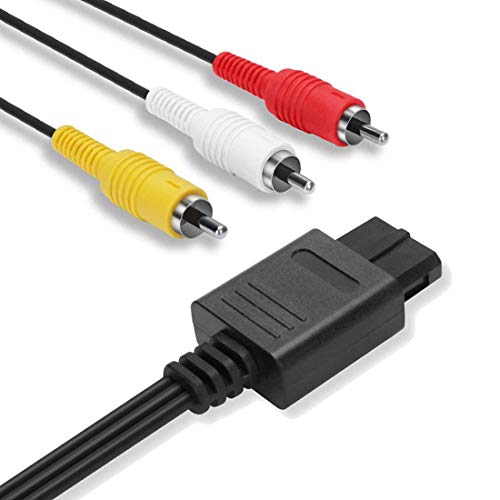
The 8.2-foot length is the distinguishing feature here, giving more placement flexibility than a 6-foot cord when the console sits farther from the screen. Red, yellow, and white RCA plugs connect stereo audio and composite video, while the console-side connector is made for the N64, GameCube, and SNES. This is a direct AV cable rather than an HDMI adapter, so it suits a display with RCA inputs. Extra slack can help with reach, but keep the cord clear of walkways and avoid tension at the console port.
Bottom line: Pick this when a direct RCA cable needs more than 6 feet of reach.
COMeap RCA-to-HDMI Converter Set

Unlike a plain AV cord, this set adds an RCA-to-HDMI converter for connecting an N64, SNES, or GameCube to an HDMI input. The converter supports PAL/NTSC and requires its included USB power cable to connect to a 5 V power source. The manufacturer describes the converter’s output as 1080p. This option is for a TV or display with HDMI rather than RCA inputs, but it adds a powered conversion step; it is not the simplest choice when the screen already has RCA jacks.
Bottom line: Choose this when the display has HDMI input and you can provide 5 V USB power.
yoxxzus N64 HDMI Adapter

This adapter is a compact HDMI-oriented alternative for N64, GameCube, or SNES setups, and an HDMI cable is included. Its manufacturer says no separate power supply is required and advertises 16:9 conversion for HDTVs. That makes it distinct from the USB-powered converter set, but the features do not identify an RCA cord or give a conversion resolution. Buyers who need a known output specification should verify compatibility with their display before choosing this adapter; those who only need a direct RCA connection should use a plain AV cable instead.
Bottom line: Choose this for an HDMI setup where a no-extra-power adapter is preferred.
N64 Power Supply and AV Cable Set

This package combines an AC power adapter with a 6-foot composite AV cable, rather than supplying video and audio wiring alone. The AV lead has yellow video and red-and-white audio plugs, and the set is compatible with Nintendo 64. Its power adapter accepts 100–245 V input at 50/60 Hz and 0.5 A, so this bundle may suit someone replacing both connections at once. It is more than needed if the existing N64 power supply works; check that your console and outlet setup are appropriate before connecting replacement power equipment.
Bottom line: Pick this if you need both an N64 power adapter and a 6-foot RCA cable.
Choose the cable by your TV inputs
Start with the ports on the screen: yellow, red, and white RCA inputs take a direct composite cable, while an HDMI-only display needs a converter or adapter. A direct N64 AV cord carries composite video and stereo audio; it does not change the connector type. An RCA-to-HDMI converter changes the connection path and may need separate USB power, as with the COMeap set. HDMI adapters can differ in power needs and advertised output features, so do not assume every converter works the same way. If the screen has RCA inputs, the simple cable avoids an additional powered device. If it has only HDMI, select an HDMI solution and check its power and compatibility requirements before setup.
Measure cable reach before choosing
Measure the route from the N64’s multi-out port to the TV’s RCA inputs, allowing slack at both ends; a cable that is just long enough can pull on the console connector. For a straight, unobstructed route, the 6-foot cable is shorter, while an 8.2-foot cord offers additional reach. Keep excess cable away from walkways and sharp edges, and do not stretch it taut. These lengths describe the AV cord, not necessarily every cable bundled with a converter. Where product packaging gives conflicting length figures, confirm the exact cable length before ordering. For HDMI adapter setups, measure the console-to-adapter and adapter-to-display runs separately.
Understand composite and HDMI setups
Composite AV sends video through the yellow RCA plug and stereo audio through the red and white plugs; HDMI uses one digital connection for audio and video. The N64 uses its multi-out port for compatible AV leads, while the TV side determines whether a direct cable is enough. A converter adds an active device between console and screen, and some designs need USB power. HDMI packaging may advertise output modes such as 16:9 or 1080p, but those labels do not mean every converter has identical processing. Keep the console, converter, and TV connections secure, then select the matching TV input. Avoid forcing any plug into a port that does not fit.
Connect N64 power safely
Use a power supply intended for the N64 rather than treating an AV cable as a power cord; the console’s AV and power connections serve different purposes. The bundled adapter here specifies 100–245 V input, 50/60 Hz, and 0.5 A, while the separate USB-powered converter calls for a 5 V source. Keep those power requirements distinct: a USB supply for an HDMI converter does not replace the console’s AC adapter. Inspect plugs and cables for damage before use, keep power connections dry, and disconnect power before changing the console’s setup. Do not connect a supply if its markings or connector do not match the device.
Frequently Asked Questions
Can an N64 cable plug into a modern HDMI TV?
A direct composite AV cable needs RCA inputs, not HDMI. For an HDMI-only TV, use an RCA-to-HDMI converter or an HDMI adapter, and check whether that device needs USB power.
What do the red, white, and yellow plugs do?
Yellow carries composite video, while red and white carry the two stereo audio channels. Match each plug to its corresponding RCA input on the TV or converter.
How long should an N64 AV cable be?
Choose a cable long enough to reach the TV without tension at either connector. The options here include 6-foot and 8.2-foot cords; measure the actual route and leave slack.
Does an N64 HDMI converter need USB power?
Power needs depend on the adapter: the COMeap converter requires its USB cable connected to a 5 V source, while yoxxzus says its adapter needs no additional power supply. Check the specific adapter’s requirements before connecting it.
Can one N64 AV cable work with SNES or GameCube?
Some compatible multi-out AV cables support N64, SNES, and GameCube, as the 6-foot and 8.2-foot options here specify. Check the console compatibility because not every AV cable supports every system.