
Silicon Power 4TB US75 SSD: Models Compared by Fit

The Silicon Power 4TB US75 is the right pick if you want a PCIe Gen4 M.2 2280 drive with read speeds up to 7,000 MB/s and write speeds up to 6,500 MB/s. Choose Silicon Power XS70 4TB if you need its built-in PS5 heatsink, or Silicon Power A55 4TB SATA if your device takes a 2.5-inch SATA drive instead of an M.2 NVMe SSD.
We earn a commission if you buy through links on this page. As an Amazon Associate I earn from qualifying purchases. Products are compared on manufacturer specifications, not hands-on testing.
- Best overall: Silicon Power US75 4TB – PCIe Gen4x4 and NVMe 1.4, with read/write speeds up to 7,000/6,500 MB/s.
- Best for PS5: Silicon Power XS70 4TB – Built-in PS5 heatsink and read/write speeds up to 7,200/6,800 MB/s.
- Best for SATA upgrades: Silicon Power A55 4TB SATA – A 7mm-thick 2.5-inch SATA III drive for systems that do not accept M.2 NVMe.
| Product | Best for | Interface and form factor | Max read/write | TBW | Shop |
|---|---|---|---|---|---|
| Silicon Power US75 4TB | Gen4 M.2 systems | PCIe Gen4x4, M.2 2280 | 7,000/6,500 MB/s | 2,400 TBW | Check Price on Amazon |
| Silicon Power XS70 4TB | PS5 expansion | PCIe Gen4x4, M.2 2280 | 7,200/6,800 MB/s | 3,000 TBW | Check Price on Amazon |
| Silicon Power A55 4TB SATA | 2.5-inch SATA | SATA III, 2.5-inch | — | — | Check Price on Amazon |
| Silicon Power ES75 4TB | High endurance | PCIe Gen4x4, M.2 2280 | 7,000/6,500 MB/s | 4,100 TBW | Check Price on Amazon |
Silicon Power 4TB SSDs
Compare interface, rated transfer speeds and endurance to find the drive that fits your system.
Silicon Power US75 4TB
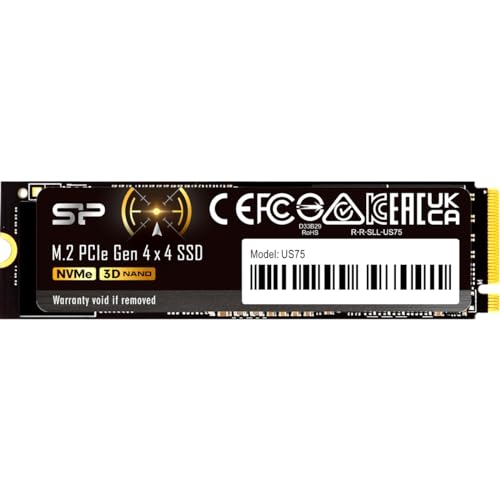
The US75 gives a mainstream Gen4 M.2 2280 option without the attached heatsink featured on Silicon Power XS70 4TB. Silicon Power rates its sequential read and write speeds at up to 7,000 and 6,500 MB/s, and it supports NVMe 1.4. The 4TB capacity suits a desktop or laptop with an M.2 2280 NVMe slot; the maker also gives it a 5-year limited warranty tied to TBW or time.
Its limitation is the lower 2,400 TBW rating than Silicon Power XS70 4TB and Silicon Power ES75 4TB. For heavy write workloads, compare endurance as well as speed before choosing.
Bottom line: Pick this for a 4TB Gen4 M.2 system when you do not need a built-in heatsink.
Silicon Power XS70 4TB

The XS70 is the console-oriented alternative: its built-in heatsink is designed for PS5, and its maximum read/write speeds are 7,200/6,800 MB/s. It remains a PCIe Gen4x4, NVMe 1.4 M.2 2280 drive, while its 3,000 TBW rating is higher than the US75’s. Silicon Power’s 5-year limited warranty is capped by the 3,000 TBW limit, whichever comes first.
The heatsink makes the drive thicker and wider than the US75, so its dimensions matter in tight M.2 bays. Choose this when the heatsink is useful, not simply for a small rated-speed increase.
Bottom line: Choose this for a PS5 expansion where the built-in heatsink fits your setup.
Silicon Power A55 4TB SATA

The A55 is the distinct form-factor option: a 2.5-inch SATA III SSD, not a Gen4 M.2 drive. Its 7mm thickness is intended for slim notebooks, and its 3D NAND with SLC cache is aimed at boosting transfer performance. That makes it relevant when replacing a 2.5-inch drive or filling a SATA bay, rather than when shopping for an M.2 NVMe upgrade.
It also carries a 3-year limited warranty; the maker notes registration is needed for complete warranty services.
Bottom line: Choose this only for a system with a 2.5-inch SATA bay.
Silicon Power ES75 4TB

The ES75 shares the US75’s maximum 7,000/6,500 MB/s read/write ratings and PCIe Gen4x4 M.2 2280 format, but its 4,100 TBW endurance rating is higher than the other drives. It uses TLC 3D NAND and has a 5-year limited warranty tied to either the TBW limit or warranty period. For a system that accepts a standard-length NVMe M.2 drive, its distinguishing factor is the endurance figure rather than a higher claimed speed.
It has no heatsink called out, unlike Silicon Power XS70 4TB, so it may not be the right fit where an integrated heatsink is needed. Compare your slot and cooling requirements first.
Bottom line: Pick this when its higher TBW rating matters more than a built-in heatsink.
Choosing a 4TB M.2 NVMe SSD
Start with the slot and interface: M.2 describes the card shape, while NVMe and PCIe describe how it communicates. A 2280 drive is 22 mm wide and 80 mm long; a system must support an M.2 NVMe PCIe drive, not merely have an M.2 slot. Gen4x4 drives reach the upper thousands of MB/s in maker-rated sequential transfers, but real speeds depend on the host, workload and cooling. For game libraries and general storage, capacity and fit may matter more than a small difference in peak speed. If the system only has a 2.5-inch SATA bay, choose a SATA drive such as Silicon Power A55 4TB SATA, not an M.2 model.
Checking PS5 SSD fit and cooling
A PS5 M.2 expansion drive must meet Sony’s size and performance requirements, including a PCIe Gen4 x4 NVMe interface and at least 5,500 MB/s sequential read speed. Sony recommends a heatsink, and the total drive-plus-heatsink dimensions must fit the console bay; the common 2280 board size is only one part of that measurement. The XS70 includes a built-in heatsink, unlike the US75 and ES75 as described here. A heatsink can help manage heat, but it does not make an incompatible drive fit. Before ordering for a console, confirm the complete height and width against the PS5 bay limits.
M.2 NVMe versus 2.5-inch SATA
NVMe M.2 and 2.5-inch SATA SSDs serve different physical connections, so interface fit comes before benchmark comparisons. SATA III tops out at a 6 Gb/s signaling rate, while PCIe Gen4x4 has substantially more bandwidth; actual performance also depends on the computer and task. A 2.5-inch SATA drive typically connects by a SATA data cable and separate power connector in a desktop, or a compatible internal bay in a laptop. The 7mm A55 targets that style of replacement. Use the following fit check before comparing speeds.
| System connection | Drive category | Fit cue |
|---|---|---|
| M.2 NVMe PCIe Gen4x4 | US75, XS70, ES75 | 2280 slot with NVMe support |
| 2.5-inch SATA III | A55 | 2.5-inch SATA bay |
Understanding TBW and warranty limits
TBW means terabytes written: it estimates the total write workload covered by the drive’s endurance rating, not its storage capacity. A 4TB SSD holds 4TB of data at once, while TBW describes cumulative writes over time. The Gen4 models list ratings from 2,400 to 4,100 TBW, and their limited warranties also have a five-year period or TBW condition. Warranty terms may end at whichever limit arrives first, as explicitly stated for the XS70. For a write-heavy workstation, compare TBW alongside capacity and warranty terms rather than treating peak sequential speed as the only selection factor.
Frequently Asked Questions
What does M.2 2280 mean on an SSD?
M.2 2280 means the card is 22 mm wide and 80 mm long. The code describes physical size, not whether the drive uses SATA or NVMe, so verify the system’s supported interface.
Can any M.2 SSD work in a PS5?
No; the PS5 expansion bay requires a PCIe Gen4 x4 NVMe drive and Sony specifies at least 5,500 MB/s sequential read speed. The drive and heatsink must also fit within the console’s size limits.
Is a 2.5-inch SATA SSD interchangeable with M.2 NVMe?
No, the connections and interfaces differ. A 2.5-inch SATA drive needs a compatible SATA bay and connection, while an M.2 NVMe drive needs a supported M.2 PCIe slot.
What does SSD TBW tell me?
TBW is the total terabytes written associated with an endurance rating or warranty condition. It is cumulative writes, not the amount of data the SSD can store at one time.
Does a faster rated SSD always load games faster?
No; peak sequential transfer rates do not predict every task. Game loading also depends on the console or PC, the software workload and whether the system can use the drive’s interface.