
Computer Keyboard Letter Stickers: 4 Options Compared

For most people, English Keyboard Stickers, 5-in-1 is the practical choice because it includes two sticker sheets and tools for cleaning and placement. Choose English Keyboard Stickers, 2 Pack if residue-free removal matters more, 3D Letter Transfer Stickers, 2PCS for a letter-only transfer style, or Purple Keyboard Stickers with Tweezers for purple backgrounds.
Keyboard letter stickers cover or mark keytops to make worn characters easier to see; check that the sticker layout matches your keyboard before applying.
We earn a commission if you buy through links on this page. As an Amazon Associate I earn from qualifying purchases. Products are compared on manufacturer specifications, not hands-on testing.
- Best overall: English Keyboard Stickers, 5-in-1 – Includes two sheets, tweezers, a brush and a microfiber cloth.
- Best for removal: English Keyboard Stickers, 2 Pack – Designed to come off without leaving residue, with F and J notches.
- Best for letter-only transfers: 3D Letter Transfer Stickers, 2PCS – Applies raised characters rather than full keytop stickers.
- Best for purple keys: Purple Keyboard Stickers with Tweezers – Pairs white lettering with a purple background and includes tweezers.
| Product | Best for | Pack | Color | Application style | Shop |
|---|---|---|---|---|---|
| English Keyboard Stickers, 5-in-1 | Cleaning tools included | 2 sheets | White on black | Full keytop sticker | Check Price on Amazon |
| English Keyboard Stickers, 2 Pack | Residue-free removal | 2 sheets | White on black | Full keytop sticker | Check Price on Amazon |
| 3D Letter Transfer Stickers, 2PCS | Letter-only finish | 2 pieces | White letters | Letter transfer | Check Price on Amazon |
| Purple Keyboard Stickers with Tweezers | Purple key color | 2 pieces | Purple with white letters | Full keytop sticker | Check Price on Amazon |
Computer Keyboard Letter Stickers
Compare the options by how they apply, what color they add and which extras come in the set.
English Keyboard Stickers, 5-in-1

English Keyboard Stickers, 5-in-1 stands out for including application and cleaning tools alongside two sheets of white-on-black English stickers. Each sticker measures 0.43 by 0.51 inches, a useful reference when checking keytop coverage before applying. The maker says the matte alphabet stickers resist fading, and the set is intended for laptop, desktop and tablet keyboards. It suits someone refreshing multiple worn characters who wants tweezers, a brush and a microfiber cloth together. The limitation is the single color scheme, which may not suit a keyboard whose keytops are not black.
Bottom line: Pick this set if you want cleaning and placement tools bundled with two sheets.
English Keyboard Stickers, 2 Pack
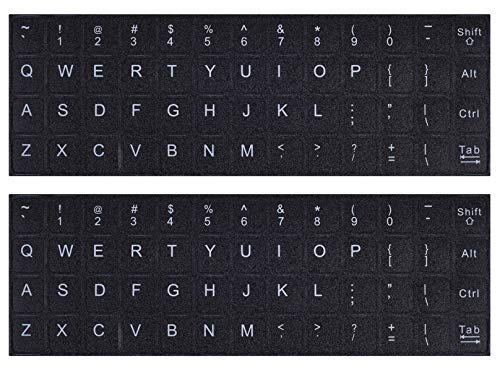
English Keyboard Stickers, 2 Pack is the option to consider when removing stickers cleanly is a priority: the maker says they lift without residue and include notches for the F and J keys. The set contains two sheets of matte English alphabet stickers intended for laptops, desktops and other computer keyboards. That removal claim makes this a sensible fit for a keyboard that may later be returned to its original appearance. The tradeoff is that no placement tools are included in the product name or features, so careful alignment may take more patience than with a set that supplies tweezers.
Bottom line: Choose this if you may want to remove the overlays without residue.
3D Letter Transfer Stickers, 2PCS

3D Letter Transfer Stickers, 2PCS differs from full keytop overlays: its maker describes characters that transfer onto the keypad while leaving the rest of the keytop uncovered. The letters have a micro-convex raised design, which may appeal to typists who want a tactile character rather than a patch covering the key. The maker says the adhesive is intended to hold during daily use. This format suits buyers who prefer a borderless appearance, but it offers less background coverage than an ordinary sticker; it will not conceal worn or discolored areas around the letters.
Bottom line: Choose this when you want raised letters and an uncovered keytop.
Purple Keyboard Stickers with Tweezers

Purple Keyboard Stickers with Tweezers is the color-specific alternative, using white lettering on a purple background rather than the white-on-black look of English Keyboard Stickers, 5-in-1 and English Keyboard Stickers, 2 Pack. Its features identify the material as nontransparent vinyl with a matte surface coating, and the set includes tweezers. The maker says the stickers are intended for notebook, desktop, wired and wireless keyboards. It suits someone who wants a visible color change as well as replacement characters. The limitation is that the purple background will remain conspicuous on keytops where a close match to the original color is the goal.
Bottom line: Pick this if a purple background is part of the look you want.
How to choose keyboard letter stickers
Start with the keytop coverage you want: full-key stickers cover more worn surface, while letter-only transfers leave the surrounding keytop visible. Measure a representative alphabet key before choosing; keycap tops vary by keyboard, and English Keyboard Stickers, 5-in-1 gives a sticker size of 0.43 by 0.51 inches. Check the layout as well as the character style, since keyboard layouts can place punctuation and symbols differently even when the alphabet letters match. For a strongly worn or discolored keytop, choose an overlay that covers the area; for a clean keytop with faded characters, a transfer style may be enough. Color matters too: contrast between lettering and key background helps characters stand out.
Prepare keytops before applying stickers
Clean and dry each keytop before applying an adhesive sticker; dust, skin oil and moisture can interfere with adhesion. Use a lightly damp lint-free cloth, then let the surface dry completely, taking care not to let liquid run between keys. Apply one sticker at a time and align it within the flat keytop area, not over the edges where it could catch during typing. Keyboard keys move when pressed, so an overlay should not bridge the gap between neighboring keys. Tweezers can help position small pieces, while a fingernail or soft tool can smooth the sticker from the center outward to reduce trapped air.
Match stickers to keyboard layout and key shape
Confirm the sticker legends match your keyboard before placement, especially for punctuation and function keys. A US ANSI layout commonly has a wide left Shift key and a horizontal Enter key; other layouts may use different shapes and symbol positions. Stickers for alphabet keys may still fit across layouts, but the complete character set can be wrong. Compare each sticker with its target key and keep the edges inside the keytop; curved or textured key surfaces can make flat stickers lift sooner. If your keyboard has nonstandard key shapes or very small keys, test one inconspicuous key first and check that the sticker does not interfere with neighboring keys.
Keep keyboard stickers readable and secure
Wipe stickered keys with a soft, barely damp cloth rather than soaking them; excess liquid can enter the keyboard. Avoid abrasive pads and harsh solvents, which can damage keycap coatings or loosen adhesive. High-use keys such as A, S, E and the space bar experience more rubbing than rarely used keys, so inspect those areas periodically for lifted corners or obscured legends. If a sticker edge catches during typing, stop and smooth or replace it instead of pressing harder. Raised transfer letters and full overlays have different profiles, so choose a format that preserves the feel and clearance you need on your keyboard.
Frequently Asked Questions
How do I know if a sticker will fit my keys?
Measure the flat top of an alphabet key and compare it with the sticker dimensions; one set gives a sticker size of 0.43 by 0.51 inches. Keep the sticker within the keytop so edges do not catch neighboring keys.
Can keyboard stickers go on a laptop keyboard?
Many computer keyboard stickers are designed for laptops as well as desktops, but laptop keys can have shallow travel and varied shapes. Test one key first and confirm the sticker stays within the flat surface without touching adjacent keys.
How should I clean keys before applying stickers?
Wipe keytops with a lightly damp lint-free cloth and let them dry fully before applying adhesive. Keep liquid away from the gaps between keys, where it can reach the keyboard mechanism.
Will stickers change how my keyboard feels?
Full keytop stickers add a thin surface layer, while raised transfer letters create a more tactile character. If key feel and clearance are important, test one key before applying a full set.
How can I avoid covering the wrong letters?
Compare the legends against your keyboard layout one key at a time, with special attention to punctuation and symbol keys. Layouts can differ even when the alphabet positions match.