
ARRIS SURFboard SBG8300: 4 Modems Compared

The ARRIS SURFboard SBG8300 is a DOCSIS 3.1 cable modem and Wi-Fi router combo, so it suits buyers who want both functions in one unit. Choose a different model if you need a modem-only device for an existing router or want Wi-Fi 6 features clearly identified in the product specifications.
ARRIS SURFboard SBG8300 is the named SBG8300; the other options differ in model, form, or wireless features.
We earn a commission if you buy through links on this page. As an Amazon Associate I earn from qualifying purchases. Products are compared on manufacturer specifications, not hands-on testing.
- Best overall: ARRIS SURFboard SBG8300 – The SBG8300 combines a DOCSIS 3.1 cable modem with an AC2350 dual-band Wi-Fi router.
- Best for renewed gear: ARRIS SURFboard DOCSIS 3.1 Renewed – This renewed ARRIS combo specifies four Gigabit Ethernet ports and AC2350 dual-band Wi-Fi.
- Best for a separate router: ARRIS SURFboard S34 – The S34 is a DOCSIS 3.1 modem only, with 2.5Gbps and 1Gbps Ethernet ports.
- Best for Wi-Fi 6: ARRIS SURFboard G34 – The G34 combines its DOCSIS 3.1 modem with AX3000 Wi-Fi 6 and four 1GbE ports.
| Product | Best for | Device type | Wi-Fi | Ethernet ports | Shop |
|---|---|---|---|---|---|
| ARRIS SURFboard SBG8300 | All-in-one setup | Modem/router combo | AC2350 dual-band | — | Check Price on Amazon |
| ARRIS SURFboard DOCSIS 3.1 Renewed | Four wired devices | Modem/router combo | AC2350 dual-band | 4 Gigabit | Check Price on Amazon |
| ARRIS SURFboard S34 | Separate router setup | Modem only | None; modem only | 2.5Gbps + 1Gbps | Check Price on Amazon |
| ARRIS SURFboard G34 | Wi-Fi 6 combo | Modem/router combo | AX3000 Wi-Fi 6 | 4 x 1GbE | Check Price on Amazon |
ARRIS SURFboard SBG8300 and alternatives
Compare each model’s modem and router configuration before choosing for your cable service.
ARRIS SURFboard SBG8300

The SBG8300 is the named cable modem-router combo, pairing a DOCSIS 3.1 modem with AC2350 dual-band Wi-Fi. That makes it a fit for someone who wants cable access and wireless networking in one device rather than a separate modem and router. The product name cites Xfinity, Cox, and Spectrum compatibility, but service eligibility can vary by provider and plan. One point to weigh is that the specifications conflict on wireless generation: the name says AC2350 while a feature calls it Wi-Fi 6. Confirm the wireless specification that applies to the unit before choosing it for a Wi-Fi 6 requirement.
Bottom line: Choose this if you want the named SBG8300 combo and its AC2350 specification.
ARRIS SURFboard DOCSIS 3.1 Renewed
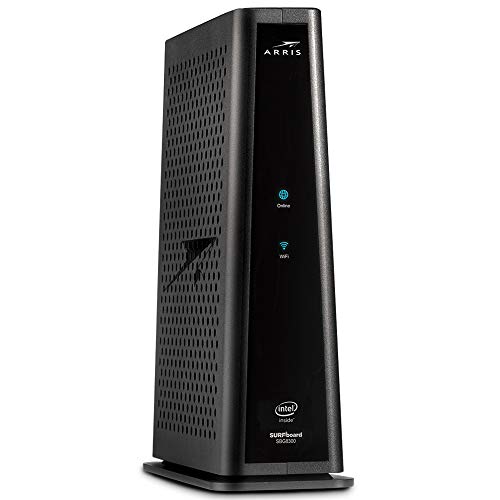
The renewed SURFboard combo stands apart with four specified Gigabit Ethernet ports and explicit DOCSIS channel counts: 32 downstream by 8 upstream DOCSIS channels, plus 2 by 2 DOCSIS 3.1 OFDM channels. It also pairs the cable modem with concurrent Wave 2 AC2350 dual-band Wi-Fi. This suits a buyer who wants several wired connections and is considering a renewed unit rather than the specifically named SBG8300. Cable service is required; the specifications exclude DSL and fiber providers and say digital voice service is unsupported. Its plan-speed capability is not a guarantee of a provider’s actual available tier.
Bottom line: Choose this if four wired Gigabit ports and the renewed condition suit your setup.
ARRIS SURFboard S34

The S34 differs from the SBG8300 by being a modem only, with no Wi-Fi router built in. Its two Ethernet ports are specified as 2.5Gbps and 1Gbps, and the specifications describe DOCSIS 3.1 support for cable plans up to 2.5Gbps. It fits a home that already has a router or where the owner wants to select one separately. The tradeoff is an additional device and connection step for wireless coverage: a router must be connected to provide Wi-Fi. Provider compatibility and plan support should be confirmed before purchase, particularly for the multi-gig tier.
Bottom line: Choose this if you already have a router or plan to add one.
ARRIS SURFboard G34

The G34 is the clearest alternative for a buyer prioritizing Wi-Fi 6 in a modem-router combo: it specifies dual-band AX3000 wireless and four 1GbE ports. The specifications describe DOCSIS 3.1 cable service support and Wi-Fi coverage up to 2,500 square feet, while the name identifies compatibility with Xfinity, Cox, and Spectrum. This is a different model from the SBG8300 and suits someone seeking a Wi-Fi 6 specification in one unit. The specifications also limit the modem to plans up to 1Gbps despite a separate claim of DOCSIS 3.1 support for plans up to 2.5Gbps, so verify plan fit with the provider.
Bottom line: Choose this if Wi-Fi 6 and an integrated router are priorities.
How to choose a cable modem and router combo
A combo makes sense when you want one device to handle the cable connection and home Wi-Fi; a modem-only model needs a separate router for wireless access. DOCSIS 3.1 is the newer cable-modem generation in these options, while Wi-Fi labels describe the wireless side, not the cable connection. Compare the plan-speed ceiling, wireless generation, and wired ports separately rather than treating one speed figure as a promise of whole-home performance. A plan above 1Gbps calls for careful checking of modem capability and Ethernet handoff; a 1GbE port has a theoretical link ceiling of 1Gbps before overhead. For a home that already has a router, a modem-only unit avoids paying for a second router feature set.
Check cable provider and plan compatibility
A cable modem must be activated on a compatible cable provider; DSL and fiber services do not use a cable modem. Provider approval can depend on the specific model and the subscribed speed tier, so check the provider’s approved-device list and confirm the plan ceiling before ordering. Gigabit Ethernet is common on combo devices, but a multi-gig plan needs a suitable modem port and a matching router or computer connection to use speeds above 1Gbps. A device’s maximum is a capability ceiling, not a guarantee of the speed delivered to each device. If voice service is part of the cable package, verify support separately: the renewed combo here specifies that digital voice is not supported.
What Wi-Fi and Ethernet specifications mean
AC2350 and AX3000 are Wi-Fi class labels, not guaranteed speeds for one device; actual throughput changes with distance, walls, interference, client hardware, and the internet plan. Wi-Fi 6 is the newer wireless generation compared with Wave 2 802.11ac, but a Wi-Fi 6 router cannot make an older client use Wi-Fi 6. Ethernet ports provide a more predictable wired connection, especially for stationary computers, game consoles, and network storage. One 1GbE port has a 1Gbps link rate; the G34’s four 1GbE ports are separate connections, not a single combined 4Gbps path. Choose based on the devices that need wired connections, not just total port count.
Choose a modem-only unit or an all-in-one
Choose a combo if you want to reduce the number of home-network devices, cables, and power supplies; choose a modem-only unit if you already own a router or need a different Wi-Fi system. A separate router can be replaced or upgraded independently, while an integrated combo ties the modem and wireless hardware together. Measure the shelf or cabinet before placing a modem: leave space around the enclosure and keep ventilation openings clear, since enclosed electronics need airflow to shed heat. Cable modems also need a coaxial connection and nearby power, while a combo needs a usable location for the Wi-Fi signal. Put the router portion in an open, central area rather than behind a television or inside a closed cabinet.
Frequently Asked Questions
Can the SBG8300 work with fiber internet service?
No; cable modems connect to cable internet service, not fiber or DSL. Check the provider’s approved-device list for the exact model and plan before activation.
Does a cable modem provide Wi-Fi by itself?
A modem-only device does not provide Wi-Fi; it needs a connected router for wireless coverage. Combo models include router hardware, although Wi-Fi coverage varies with walls, placement, and client devices.
Does Wi-Fi 6 make every connected device faster?
No; a device needs Wi-Fi 6 client hardware to use Wi-Fi 6 features. Range, interference, walls, and the internet plan also affect usable speeds.
What does a 1GbE port mean for internet speed?
A 1GbE port has a 1Gbps theoretical link rate, so it can constrain a single wired connection on a faster plan. The modem, router, client port, and plan all need compatible capacities to exceed that rate.
Can a modem-only model replace a Wi-Fi router?
No; a modem-only model provides the cable connection but not wireless networking. Connect a separate router to share the connection with Wi-Fi devices.