
Vivitar Podcasting Microphone Kit: 5 Options Compared

For a Vivitar podcasting microphone kit, the Vivitar Streaming Microphone Accessory Kit is the closest fit because it combines a desk-clamped adjustable arm, shock mount, and pop filter. It is an accessory kit, not a complete microphone, so choose the Vivitar MIC918 or another USB mic if you need a microphone included.
We earn a commission if you buy through links on this page. As an Amazon Associate I earn from qualifying purchases. Products are compared on manufacturer specifications, not hands-on testing.
- Best overall: Vivitar Streaming Microphone Accessory Kit – The accessory kit pairs a desk-clamped arm with a shock mount and pop filter.
- Best for a standalone Vivitar mic: Vivitar MIC918 Podcast Microphone – The MIC918 is a USB plug-and-play microphone with noise suppression.
- Best for a boom-arm USB kit: FIFINE T669 USB Microphone Kit – The T669 combines a USB microphone kit with an adjustable boom arm and shock mount.
| Product | Best for | Type | Connection | Included setup | Shop |
|---|---|---|---|---|---|
| Vivitar Streaming Microphone Accessory Kit | Mic accessory setup | Accessory kit | — | Arm, shock mount, pop filter | Check Price on Amazon |
| Vivitar MIC918 Podcast Microphone | Standalone Vivitar mic | Microphone | USB | — | Check Price on Amazon |
| TONOR TC-777 USB Microphone | Desktop mute control | Microphone kit | USB | Tripod stand, pop filter | Check Price on Amazon |
| FIFINE T669 USB Microphone Kit | Adjustable boom arm | Microphone kit | USB | Boom arm, shock mount | Check Price on Amazon |
| MAONO AU-A04H USB Microphone Kit | Headphone bundle | Microphone kit | USB 2.0 | Headphone included | Check Price on Amazon |
Vivitar Podcasting Microphone Kit Options
These picks range from a Vivitar accessory bundle to standalone microphones and complete USB recording kits.
Vivitar Streaming Microphone Accessory Kit

Unlike the other options, this Vivitar kit supplies microphone-positioning and noise-control accessories rather than a microphone. The manufacturer describes an adjustable arm that clamps to a desk, a shock mount for most studio condenser microphones, and a pop filter intended to reduce plosive sounds, wind, and interference. It suits someone who already has a compatible condenser mic and wants a hands-free recording arrangement. The limitation is important: buyers starting without a microphone will need to choose one separately, and the shock-mount fit is described broadly rather than tied to a specific mic model.
Bottom line: Choose this if you already own a studio condenser mic and need an arm, shock mount, and pop filter.
Vivitar MIC918 Podcast Microphone

Unlike the accessory-only Vivitar kit, the MIC918 is a microphone with a USB plug-and-play connection and noise suppression. Vivitar includes a 3-year USA warranty. This is the more direct fit for someone looking for a Vivitar microphone rather than a boom-arm bundle, and the compact stated dimensions are 8.86 inches long, 5.36 inches wide, and 2.49 inches high. Its features do not include a desk arm, shock mount, or pop filter, so buyers who need those physical accessories should look at an accessory bundle instead.
Bottom line: Pick this if your priority is a standalone Vivitar USB microphone.
TONOR TC-777 USB Microphone

The TONOR TC-777 stands out for desktop controls: its features include one-click mute and volume control alongside a tripod stand and pop filter. TONOR says its cardioid pickup captures voice in front of the mic while suppressing unwanted background noise, and identifies compatibility with Windows, Mac, PS4, and PS5. It suits a compact desk setup for calls, streaming, or podcasting. Unlike the Vivitar accessory kit, this is a microphone package; unlike an arm-mounted setup, its non-slip tripod occupies desk space and does not provide an adjustable boom arm.
Bottom line: Choose this for a desktop USB mic setup with built-in mute and volume controls.
FIFINE T669 USB Microphone Kit
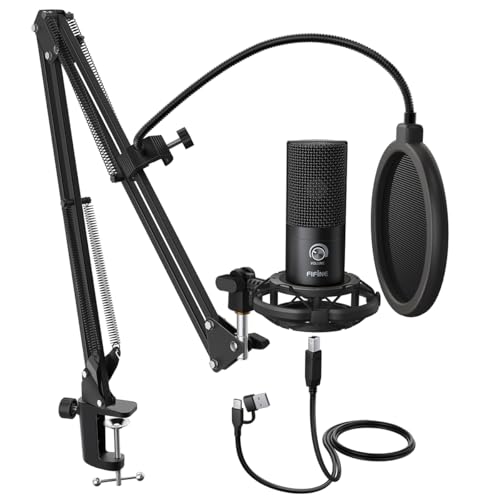
The FIFINE T669 is the other arm-based microphone kit here, but unlike the Vivitar accessory bundle it includes a USB condenser microphone. Its features describe plug-and-play connection to a PC or laptop without additional hardware or drivers, plus an adjustable boom arm and shock mount. FIFINE says the cardioid condenser capsule captures audio for vocals and recordings. This kit suits a buyer who wants the mic and positioning hardware together. The compatibility excludes Xbox, so it is not the right pick for someone planning to connect directly to that console.
Bottom line: Pick this when you want a USB microphone bundled with an adjustable arm and shock mount.
MAONO AU-A04H USB Microphone Kit
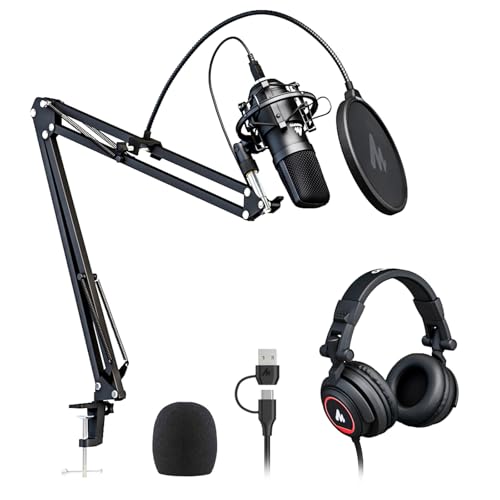
The MAONO AU-A04H is the only option here whose name specifies an included headphone, and its features give a 192 kHz/24-bit sampling rate and 30 Hz–16 kHz frequency response. MAONO says the USB 2.0 microphone connects to computers and Linux without extra driver software or an external sound card. It suits creators who want a microphone-and-headphone bundle and care about the audio specifications.
Bottom line: Choose this if the included headphone and specified sampling rate fit your setup.
How to Choose a Podcasting Microphone Kit
Start by deciding whether you need a microphone or only the accessories around one. A mic bundle is the simpler route when you are starting from scratch; an accessory kit makes sense when you already own a mic with a compatible mount. For voice recording, a cardioid pickup pattern favors sound from the front and reduces pickup from other directions, but it does not eliminate room noise. A pop filter sits between speaker and capsule to soften plosive bursts, while a shock mount helps isolate mechanical vibration. If you record at a desk with under 4 inches of clear space beneath its edge, measure the clamp area before choosing a desk-clamped arm.
| Need | Choose | Check |
|---|---|---|
| Positioning accessories for an owned mic | Accessory kit | Mic and shock-mount fit |
| Mic included with a desktop footprint | USB microphone kit | Stand and controls |
| Mic included with adjustable positioning | Boom-arm microphone kit | Desk clearance and connection |
USB Microphones and Accessory Kits Compared
A USB microphone kit combines an audio device with a computer connection, while an accessory kit adds mounting or filtering pieces to a microphone you already have. USB microphones commonly send a digital audio signal directly to a computer, which avoids a separate audio interface for basic recording; compatibility still depends on the device and operating system. A cardioid condenser mic is a common voice-recording choice because it emphasizes sound in front, but room reflections can still reach the capsule. A desk arm helps position a microphone closer to the speaker and off the work surface; a tripod is simpler but takes up desk area. Match the included pieces to your workflow rather than assuming every kit contains a microphone.
Microphone Fit, Placement, and Desk Clearance
Measure the desk edge and the mic body before assembling a recording setup. Desk clamps need a clear, accessible edge, and a boom arm needs room to swing without striking a monitor or wall. Microphone mounts also vary in diameter and thread, so confirm mount compatibility before combining an arm, shock mount, and microphone. For speech, place the capsule several inches from the mouth and angle it slightly off-axis to reduce breath blasts; a pop filter adds another barrier against plosives. Keep the microphone away from keyboard taps and fan airflow where possible. A stand that fits the desk but positions the capsule too far away can produce more room sound relative to the voice.
Podcast Microphone Setup and Recording Safety
Set the microphone input level so ordinary speech is strong without clipping: digital meters should not hit 0 dBFS, the maximum level in a digital recording. Test a short spoken phrase at the position you will use, then adjust input gain before recording a full session. A pop filter can reduce plosive bursts, but it does not replace sensible microphone placement or correct overload. Secure clamp-mounted arms before attaching a mic, and keep cables routed so they cannot snag or pull the stand over. Condenser microphones need a clean, stable connection; avoid repeatedly yanking a USB plug or allowing liquid near computer ports and powered audio equipment.
Frequently Asked Questions
Do I need a microphone with the Vivitar accessory kit?
Yes, the Vivitar Streaming Microphone Accessory Kit is an accessory bundle rather than a complete microphone. Check that your condenser mic fits its shock mount before ordering.
What does a cardioid microphone pickup pattern do?
A cardioid pattern is most sensitive toward the front of the microphone and less sensitive toward the rear. It can reduce some off-axis sound, but it will not remove room echo or nearby noise.
How far should a podcast microphone be from your mouth?
A practical starting distance is about 4 to 8 inches for close spoken voice. Adjust the angle and distance if plosives or room sound are prominent, then set gain so peaks stay below 0 dBFS.
Can I connect a USB microphone to any computer?
Not always; connection and operating-system compatibility vary by model. Check that the computer has a suitable USB port and that the microphone supports its operating system before buying.
Why use a shock mount on a podcast microphone?
A shock mount helps isolate the microphone from vibration transmitted through its stand or arm. It cannot block airborne sounds such as a fan, so placement and room noise still matter.