
Phone Holder for Videos: 5 Stands Compared by Setup

For most video recording, EUCOS 62-Inch Phone Tripod is the strongest all-around choice because it extends to 62 inches while folding into a compact tripod and selfie stick. Choose MAGIPEA 30-Inch Gooseneck Mount instead for overhead filming from a bed or desk, or COOPER ChatStand Desk Phone Stand for a weighted desk base; the right holder depends on where you need the phone positioned.
We earn a commission if you buy through links on this page. As an Amazon Associate I earn from qualifying purchases. Products are compared on manufacturer specifications, not hands-on testing.
- Best overall: EUCOS 62-Inch Phone Tripod – Extends to 62 inches and works as both a tripod and selfie stick.
- Best for tall framing: Victiv 86-Inch Flexible Phone Tripod – Reaches 86 inches with a flexible gooseneck for angle adjustment.
- Best for overhead video: MAGIPEA 30-Inch Gooseneck Mount – Its 30-inch gooseneck arm and clamp support overhead positioning.
| Product | Best for | Maximum height | Mounting style | Phone width | Shop |
|---|---|---|---|---|---|
| EUCOS 62-Inch Phone Tripod | Everyday video setup | 62 in | Freestanding tripod | 2.2–3.6 in | Check Price on Amazon |
| Liphisy 50-Inch Remote Tripod | Travel recording | 50 in | Freestanding tripod | — | Check Price on Amazon |
| MAGIPEA 30-Inch Gooseneck Mount | Overhead recording | 30 in arm | Clamp mount | 3.5–7 in | Check Price on Amazon |
| COOPER ChatStand Desk Phone Stand | Desk-level video | 9–13 in | Weighted desk base | — | Check Price on Amazon |
| Victiv 86-Inch Flexible Phone Tripod | Elevated video angles | 86 in | Tripod with gooseneck | — | Check Price on Amazon |
Phone Holders for Videos Compared
Match the holder’s height and mounting style to the framing and surface your videos require.
EUCOS 62-Inch Phone Tripod

EUCOS 62-Inch Phone Tripod combines a floor-standing tripod with a selfie-stick format, reaching 62 inches for standing or group framing. Its phone clamp fits devices 2.2 to 3.6 inches wide, and its modified Nylon PA6/6 construction is designed for all-weather durability. At 0.8 pound, it is a portable option for creators who want one holder for handheld-style shots and stationary recording. The tradeoff is that its maximum height is lower than Victiv 86-Inch Flexible Phone Tripod, so choose a taller stand if you need an elevated camera angle above a seated or standing subject.
Bottom line: Choose this if you want a portable tripod that can also serve as a selfie stick.
Liphisy 50-Inch Remote Tripod

Liphisy 50-Inch Remote Tripod prioritizes travel and angle changes, with an adjustable height from 9 to 50 inches and a 300-degree rotating head plus a 360-degree phone holder. Its aluminum-alloy and plastic construction weighs 0.5 pound, and a wireless remote is included for starting recordings without reaching the phone. This lighter, shorter option suits travel clips and seated or tabletop-height framing. The maximum height is 12 inches below EUCOS 62-Inch Phone Tripod and 36 inches below Victiv 86-Inch Flexible Phone Tripod, so it is less suited to high camera placement.
Bottom line: Pick this for a lightweight travel tripod with an included remote.
MAGIPEA 30-Inch Gooseneck Mount
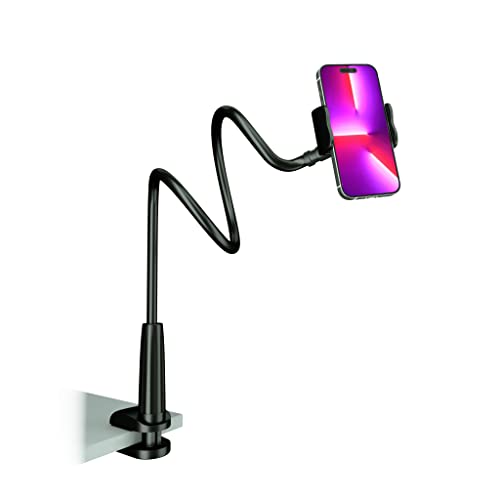
MAGIPEA 30-Inch Gooseneck Mount mounts to a surface rather than standing on the floor, making it the distinct option for overhead recording over a bed, desk, or craft area. The 30-inch reinforced aluminum-alloy core arm is intentionally stiff to reduce sagging, and its base clamp opens to 3 inches. The phone clamp rotates 360 degrees for portrait or landscape framing and accepts 3.5- to 7-inch devices. It requires a suitable edge to clamp onto, so choose a freestanding tripod if the recording spot has no accessible surface edge.
Bottom line: Choose this for hands-free overhead filming from a compatible edge.
COOPER ChatStand Desk Phone Stand

COOPER ChatStand Desk Phone Stand is designed for stable, face-level desk recording rather than flexible room placement: its stand adjusts from 9 to 13 inches and rotates between portrait and landscape. A weighted metal base with non-slip padding helps keep it from slipping across a desk, while the wide holder accommodates phones. Its compact height works for calls, close-up desk videos, and recording while seated. Unlike EUCOS 62-Inch Phone Tripod or Liphisy 50-Inch Remote Tripod, it is not a tall tripod for full-body or standing shots, so it suits a fixed desk setup better than travel or wide framing.
Bottom line: Pick this for seated video calls and recording at a desk.
Victiv 86-Inch Flexible Phone Tripod

Victiv 86-Inch Flexible Phone Tripod reaches the tallest position in this group at 86 inches, including its 13.78-inch bendable gooseneck, which gives more freedom to position the phone above or beside the tripod. Its reinforced aluminum-alloy frame and 360-degree swivel phone clip support portrait and landscape framing; a remote and cold-shoe phone holder are included. At 1.35 pounds, it is heavier than EUCOS 62-Inch Phone Tripod and Liphisy 50-Inch Remote Tripod, a consideration when carrying it between locations. The tall, flexible setup fits creators who need elevated or varied angles more than a compact travel footprint.
Bottom line: Choose this when maximum height and flexible angle placement matter most.
How to Choose a Phone Holder for Videos
Start with the camera position: floor-level tripods suit standing subjects, desk stands suit seated framing, and gooseneck clamps work for overhead angles. A phone holder’s height alone does not determine framing; the camera’s distance from the subject changes how much of the scene appears. For a seated talking-head video at a desk, a 9-to-13-inch support can keep the lens near face height, while a floor tripod is more adaptable for full-body shots. Choose a freestanding holder if you need to reposition across rooms, and a clamp only when the filming surface has a firm, accessible edge.
Match the holder to your shot
| Recording need | Useful holder style | Key constraint |
|---|---|---|
| Standing or full-body video | Tall floor tripod | Needs clear floor space |
| Desk calls or close framing | Weighted desk stand | Limited height range |
| Overhead craft or cooking view | Clamp with gooseneck arm | Needs a secure edge |
Phone Clamp Fit and Video Orientation
Measure the phone’s width across the side edges, not diagonally across the screen, and compare it with the holder’s supported width. A case adds bulk, so measure the phone with its usual case attached before choosing a clamp. Portrait framing is common for short-form clips and vertical calls; landscape framing suits conventional widescreen scenes. Rotating heads and phone clamps can change orientation, but they do not guarantee level framing, so check the phone’s alignment before recording. Leave buttons and charging ports clear where possible, and avoid forcing a phone into a clamp that grips its case unevenly.
Tripod Stability and Safe Placement
Set a floor tripod on a flat surface and spread its legs fully before raising the phone; height increases leverage, so a narrow or uneven stance is easier to tip. Keep the phone centered over the base, and avoid placing a tall stand where people or pets can catch its legs. A desk stand’s weighted base helps resist sliding, but the desk itself must be stable. For gooseneck mounts, attach the clamp to a rigid edge rather than a flexible cushion or thin unsupported panel. When adjusting a stiff flexible arm, use both hands and support the phone so the mount does not twist suddenly.
Remote Controls and Recording Setup
A wireless remote lets a creator begin or stop a shot without touching the phone, reducing the chance of shifting a tripod during a take. Pairing and shutter compatibility can vary by phone and camera app, so test the remote before setting up a long recording. Compose the scene with the lens at the subject’s eye level for direct-to-camera clips, and check the background edges for clutter before filming. A remote does not provide lighting or sound control; keep the phone’s microphone unobstructed and place any separate lighting or audio gear where it will not pull the holder off balance.
Frequently Asked Questions
How tall should a phone tripod be for videos?
For standing or full-body video, a tripod that reaches roughly 60 inches or higher gives more framing flexibility than a desk stand. For seated desk recording, a 9-to-13-inch holder may be enough when the desk places the camera near eye level.
Can a gooseneck phone holder record overhead video?
Yes, a gooseneck arm can position a phone above a desk or bed when its base is firmly clamped to a stable edge. Keep the phone centered and do not mount over people or fragile items, since leverage and movement can loosen a clamp.
Is a remote useful for phone video recording?
A remote is useful when the phone is out of reach because it can trigger recording without touching the stand. Check that it pairs with the phone and works with the intended camera app before arranging the shot.
Should I film videos in portrait or landscape?
Use portrait orientation for vertical social clips and most phone-first stories, and landscape for widescreen scenes or standard horizontal playback. Match the orientation to the intended screen before positioning the holder, since reframing later may crop the subject.
How do I stop a phone tripod from tipping?
Place the tripod on a level surface, spread its legs fully, and keep the phone centered over the base. Tall stands are more vulnerable to side impacts, so keep their legs out of walkways and away from pets or children.