
Add-On CD Player for Car: 5 Options Compared

An add-on CD player for a car without a built-in disc drive should match the stereo’s connection support; Portable USB/AUX Car CD Player offers USB and AUX connections and lists several CD formats. Choose another option if you need a specific footprint, an extension cable, or a USB-C adapter.
These portable external players connect to a car stereo rather than installing inside the dashboard, but a USB port alone does not guarantee compatibility: confirm that the stereo can recognize the player, or use a compatible AUX connection.
We earn a commission if you buy through links on this page. As an Amazon Associate I earn from qualifying purchases. Products are compared on manufacturer specifications, not hands-on testing.
- Best overall: Portable USB/AUX Car CD Player – USB and AUX connections plus support for CD, CD-R, CD-RW, MP3, WMA and WAV discs.
- Best for flexible placement: POSSPO Jupiter USB CD Player – Includes a USB extension cable and measures 6.3 × 6.1 × 2.0 inches.
- Best for a compact fit: ENVYCLOUD Portable Car CD Player – Measures 4.5 × 4.5 × 0.85 inches and has USB and AUX connections.
- Best for USB-C access: DDup USB-C Adapter Car CD Player – Includes a USB-C adapter and extension cable, along with USB and AUX connections.
| Product | Best for | Connections | Supported formats | Dimensions | Shop |
|---|---|---|---|---|---|
| Portable USB/AUX Car CD Player | Format flexibility | USB, AUX | CD, CD-R, CD-RW, MP3, WMA, WAV | — | Check Price on Amazon |
| POSSPO Jupiter USB CD Player | Flexible placement | USB; AUX | — | 6.3 × 6.1 × 2.0 in | Check Price on Amazon |
| ENVYCLOUD Portable Car CD Player | Compact dimensions | USB, AUX | — | 4.5 × 4.5 × 0.85 in | Check Price on Amazon |
| Portable External Car CD Player with Remote | Remote operation | USB, AUX | — | 5.16 × 5.16 × 0.94 in | Check Price on Amazon |
| DDup USB-C Adapter Car CD Player | USB-C adapter | USB, AUX; USB-C adapter | CD, CD-R/RW, MP3, WMA, WAV | — | Check Price on Amazon |
Add-On CD Players for Car
Compare connection options, stated disc formats and physical size before choosing a player for your stereo.
Portable USB/AUX Car CD Player

Portable USB/AUX Car CD Player stands out for its format range, including CD-R and CD-RW as well as MP3, WMA and WAV. Its USB and AUX connections give buyers two connection paths to consider, and the player is described as USB-powered. It may suit drivers whose stereo supports the matching input and who want to play more than standard audio CDs. The player does not support DVD discs, so it is the wrong fit for anyone expecting a DVD drive; confirm your stereo’s compatibility before ordering.
Bottom line: Pick this if its broad listed format support matches your disc collection.
POSSPO Jupiter USB CD Player

POSSPO Jupiter USB CD Player is the placement-focused option: it includes a USB extension cable and measures 6.3 × 6.1 × 2.0 inches, so a buyer can plan space around the player and cable. Its USB connection is intended for a car stereo’s USB port; the product also describes AUX use with a decoder. Choose it if the cable reach matters more than having a compact stated footprint. The available format support is not clear enough to match a particular disc collection, so verify the player’s supported formats and your stereo’s USB recognition before buying.
Bottom line: Choose this when an included extension cable helps position the player.
ENVYCLOUD Portable Car CD Player
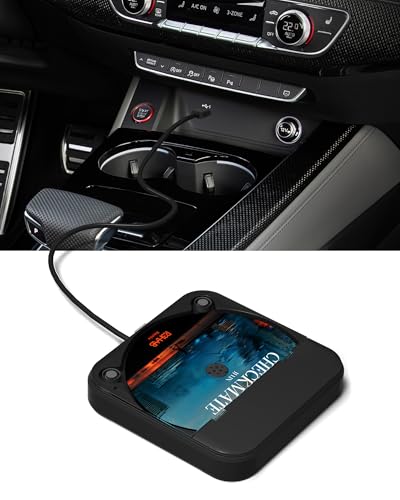
ENVYCLOUD Portable Car CD Player has the smallest footprint among these choices at 4.5 × 4.5 × 0.85 inches, useful when console or glove-box space is limited. It connects through USB or AUX and is also described for use with a laptop, TV or computer. The product claims support for touchscreen and steering-wheel controls after connection; those controls depend on the vehicle and stereo setup.
Bottom line: Pick this when the compact stated size is the deciding factor.
Portable External Car CD Player with Remote

Portable External Car CD Player with Remote is the only option whose name and features specifically call out a remote, alongside USB and AUX connections. Its dimensions convert to about 5.16 × 5.16 × 0.94 inches, which helps when checking a storage spot before purchase. The product also claims anti-skip protection for use on the road and laptop compatibility. No supported disc formats are identified in the specifications, so buyers with CD-R or MP3 discs should verify those formats first. Its remote does not remove the need to set up playback before driving.
Bottom line: Choose this if a remote and its dimensions suit your setup.
DDup USB-C Adapter Car CD Player

DDup USB-C Adapter Car CD Player is distinct for including a USB-C adapter and extension cable, while also offering USB and AUX connections. It supports CD, CD-R/RW, MP3, WMA and WAV playback, making it a format-specific choice for buyers with those discs. The product describes anti-skip construction, rubber feet, a magnetic cover and an internal locking mechanism. Those features do not establish compatibility with every car stereo; check the stereo’s USB or AUX support and whether the included adapters match your connection needs.
Bottom line: Pick this if you need its included USB-C adapter and listed formats.
How to Choose an Add-On CD Player for a Car
Choose by matching the player’s connection to an input your car stereo can use. A USB port may be intended for charging or flash drives rather than an external optical player, so a USB plug alone does not establish compatibility. AUX is a separate analog audio input; when present, it can be a practical alternative, but the player and stereo still need a compatible audio connection. Check the stereo manual for USB device support or look for an AUX input, then confirm whether the player needs a decoder or adapter. If your stereo has neither supported USB playback nor AUX input, a portable USB/AUX player may not work as intended.
Disc format matters too: standard audio CDs differ from recordable CD-R and CD-RW discs, and MP3 or WMA files require compatible playback. Select only a format combination that matches the discs you actually own.
Check Stereo Compatibility Before Connecting
Compatibility depends on the stereo’s USB implementation, not just the shape of the connector. USB car stereos commonly support USB mass-storage devices, but that does not mean they will control or decode every external CD drive. Check the stereo manual for supported USB audio devices and file formats; a USB port labeled for charging may not play audio at all. An AUX input carries audio from an external source, while USB can carry data or power, so the two connections are not interchangeable.
If the stereo does not recognize a USB-connected player, stop and verify the player’s connection method instead of assuming a faulty disc. For a compact installation, measure the intended console or glove-box space in inches and allow room for cables and disc access. Do not place a player where it could interfere with pedals, the shifter, airbags or the driver’s view.
USB and AUX Connections Compared
USB is the cleaner setup when the stereo specifically supports the external player; AUX is useful when the stereo has an audio input but does not recognize the player over USB. USB may also supply power, while AUX is an audio path and may require a separate power connection. The exact setup depends on the player and vehicle, so check both manuals before connecting.
The table summarizes which connection path to prioritize based on what the stereo supports.
| Stereo capability | Connection to consider | Check before use |
|---|---|---|
| USB supports external CD players | USB | Device recognition and supported disc formats |
| USB does not recognize the player; AUX input available | AUX | Required decoder, cable and power |
| No confirmed compatible USB or AUX input | Neither until verified | Manual and available stereo inputs |
Never handle discs or adjust a portable player while driving. Set up playback while parked, and keep cables secured away from controls.
Disc Formats and Safe In-Car Use
Check the disc type as well as the connection: CD-R and CD-RW are recordable discs, and support for standard CDs does not automatically mean support for either. MP3, WMA and WAV are file formats, so the player must support the format and the stereo must be able to play the output. If a collection includes mixed disc types, choose a player whose format support explicitly covers them.
Road movement can interrupt playback, and anti-skip claims are not a guarantee against every bump or installation issue. Keep the player on a stable surface, secure cables, and do not let the device obstruct an airbag deployment zone. Insert or change discs only when safely parked; driver distraction is a greater concern than uninterrupted music.
Frequently Asked Questions
Will any car USB port play an external CD player?
No; some car USB ports provide charging or support flash drives without recognizing an external optical player. Check the stereo manual for external CD-player compatibility before connecting.
Can an AUX input power a portable CD player?
AUX carries analog audio and generally is not a power connection. Check whether the player needs USB power or another power source, and use any required decoder or adapter.
Do car CD players support CD-R and CD-RW discs?
Some do, but support is model-specific; a player that reads standard CDs may not read recordable discs. Check for explicit CD-R and CD-RW support if those are in your collection.
Can I use an add-on CD player while driving?
Set up the player and start playback while parked, then avoid handling discs or controls in motion. Keep the device and cables clear of pedals, the shifter, airbags and the driver’s view.
How much space should I allow for a portable car CD player?
Measure the storage area in inches and leave additional room for the cable, disc insertion and removal. A tight fit can make connections difficult or interfere with vehicle controls.