
Silicone Covers for Keyboards: Fit and Material Guide

For most buyers, Universal Clear Desktop Cover, 17.52 × 5.51 in is the most flexible choice because its 17.52-by-5.51-inch size can be checked against a standard desktop keyboard before ordering. Choose a model-specific skin instead if your Logitech keyboard is among its compatible models; laptop users should choose a cover intended for their laptop size.
A silicone keyboard cover is a removable skin that sits over the keys to help shield them from dust and spills.
We earn a commission if you buy through links on this page. As an Amazon Associate I earn from qualifying purchases. Products are compared on manufacturer specifications, not hands-on testing.
- Best overall: Universal Clear Desktop Cover, 17.52 × 5.51 in – Its dimensions let desktop keyboard owners compare the cover against their keyboard before choosing.
- Best for Logitech models: Logitech Desktop Cover, Clear – It names several compatible Logitech desktop models and is designed for the US layout.
- Best for larger laptops: Laptop Cover, Clear, 15–17.6 in – Its size selection is for laptops from 15 to 17.6 inches.
| Product | Best for | Fit type | Size or models | Thickness | Shop |
|---|---|---|---|---|---|
| Universal Clear Desktop Cover, 17.52 × 5.51 in | Measured desktop keyboards | Universal desktop | 17.52 × 5.51 in | — | Check Price on Amazon |
| Logitech Desktop Cover, Clear | Clear Logitech protection | Model-specific desktop | MK370, MK270, K200, K260, K270 | — | Check Price on Amazon |
| Logitech Desktop Cover, Black | Black Logitech skin | Model-specific desktop | MK295, MK275, MK270, K200, K260, K270 | 0.01 in | Check Price on Amazon |
| Laptop Cover, Clear, 15–17.6 in | Large laptop keyboards | Laptop | 15–17.6-in laptops | 0.01 in | Check Price on Amazon |
Silicone Covers for Keyboards
Match the cover to the keyboard’s layout and dimensions before choosing a material or color.
Universal Clear Desktop Cover, 17.52 × 5.51 in
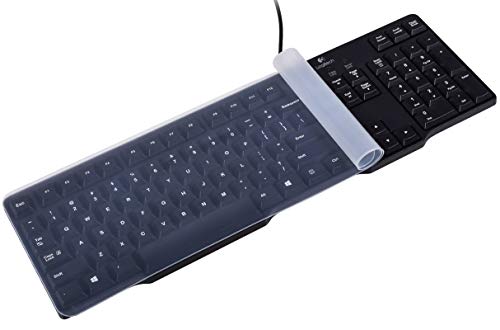
Unlike the model-specific Logitech skins, this clear cover gives an overall size to compare with a desktop keyboard. It measures 17.52 by 5.51 inches and is made from flexible silicone. The maker says it is thin and transparent, and that it can be removed and washed for cleaning. This option suits someone whose keyboard does not appear on a compatibility list but whose measured dimensions match. Its universal fit still depends on the keyboard’s shape and key placement, so matching only the outer width and length may not ensure that every key aligns.
Bottom line: Choose this if your measured desktop keyboard matches the cover’s dimensions.
Logitech Desktop Cover, Clear
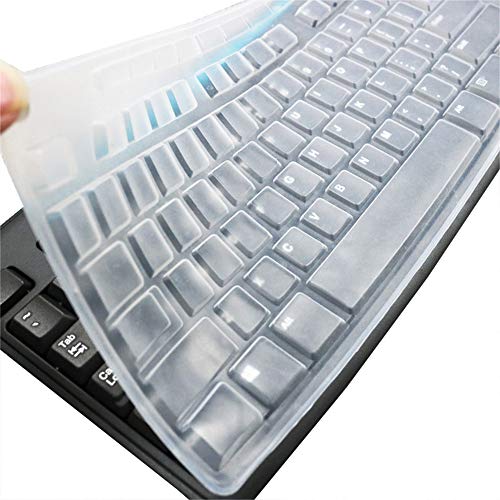
This clear skin is aimed at named Logitech desktop keyboards rather than a universal range. Compatibility includes MK370, MK270, K200, K260, K270, MK200, MK260, MK275, and MK295; the maker specifies a US keyboard layout. The soft silicone is washable and reusable, and the transparent finish keeps the underlying key labels visible. This makes it a fit-focused choice for owners of those listed models. The limitation is strict compatibility: other desktop keyboards are excluded, and an incompatible layout can leave the cover misaligned. Confirm the model and US layout before choosing it.
Bottom line: Pick this for a Logitech desktop model with a US layout.
Logitech Desktop Cover, Black

The distinguishing choice here is a black finish and a 0.01-inch thickness, compared with the clear Logitech skin. This silicone cover names Logitech MK295, MK275, MK270, K200, K260, K270, MK200, MK260, K270, and K275 keyboards, and it is designed for US layouts. The maker says each key is molded for a close fit and that the cover is washable; it also says the skin helps guard against dust and spills. This is for buyers who prefer a dark cover and have a compatible keyboard. It does not fit other keyboard models.
Bottom line: Choose this for a compatible Logitech desktop keyboard when you want a black, 0.01-inch skin.
Laptop Cover, Clear, 15–17.6 in

Unlike the desktop covers, this transparent skin is intended for laptop keyboards, with the selected size described for 15- to 17.6-inch laptops. The maker gives its thickness as 0.01 inch and says the cover is designed to fit individual keys, resist spills and dust, and allow keyboard backlighting to shine through. Its use case is a laptop owner who wants a thin, clear overlay rather than a desktop skin. Laptop screen size alone does not guarantee a match because keyboards vary in layout and key spacing, so compare the key arrangement before settling on this size.
Bottom line: Pick this for a 15- to 17.6-inch laptop only when the key layout aligns.
How to choose a silicone keyboard cover
Start with the keyboard type, then compare either the model number or the cover’s measurements. A model-specific skin is the simpler match when the exact keyboard model and layout are listed; a universal cover needs a dimension check and close key alignment. For desktop covers, measure the keyboard’s width and depth in inches, not just the computer or monitor. For laptop covers, screen diagonal is only a rough size category: keyboards on laptops with the same screen size can have different key spacing, number pads, or layouts. If the keyboard model is not named, choose a cover with explicit dimensions and verify that the key positions align before ordering.
Keyboard layout and cover fit
Layout matters as much as overall size. On a US ANSI keyboard, the Enter key is usually a wide horizontal rectangle; ISO keyboards commonly use a taller, inverted-L Enter key. The Logitech desktop covers here specify US layouts, so a European layout can misalign even when the keyboard model seems close. Keyboards also vary in modifier-key widths and bottom-row arrangements. Compare the Enter key, left Shift key, and spacebar row against the cover before use; these landmarks expose mismatches quickly. If a cover bunches around keys or leaves key tops exposed, remove it rather than forcing a fit, since an overlay should sit flat and not obstruct typing.
Desktop and laptop silicone covers compared
Desktop skins generally match a specific model or a measured keyboard footprint, while laptop covers are selected for laptop-size ranges and key layout. The table groups the main matching approaches, not a promise that one size fits every keyboard.
| Cover type | Best matching method | Common mismatch risk |
|---|---|---|
| Model-specific desktop | Confirm exact model and layout | Similar model name, different key arrangement |
| Universal desktop | Measure width and depth in inches | Correct footprint but misaligned keys |
| Laptop | Check laptop size and key layout | Same screen size, different keyboard geometry |
Choose by the row that matches your setup, then check the specific cover’s fit restrictions. A numerical laptop size range or desktop footprint narrows the choices but does not replace checking the key map.
Cleaning and using a keyboard cover
Removable silicone skins can be washed, but they should be fully dry before being placed back on a keyboard. Water and electronics do not mix, so unplug a wired keyboard or power down a laptop before removing the cover for cleaning, and avoid letting moisture reach the keys. Dust and crumbs trapped beneath a cover can rub against key surfaces, so lift the skin periodically and clean both surfaces with a dry, soft cloth. A thin cover can still change the feel of keystrokes; if typing becomes difficult or keys fail to return freely, remove the overlay. Covers are a barrier, not a guarantee against liquid reaching the keyboard.
Frequently Asked Questions
How do I measure a keyboard for a cover?
Measure the keyboard’s full width and front-to-back depth in inches, then compare those dimensions with the cover. Also check key alignment, especially the Enter key, Shift keys, and bottom row.
Will a US keyboard cover fit an ISO layout?
Not reliably: US ANSI keyboards usually have a horizontal rectangular Enter key, while ISO layouts commonly use a taller Enter key. Check the Enter key and surrounding key positions before choosing a cover.
Can I wash a silicone keyboard cover?
Washable silicone covers should be fully dry before reuse. Remove the cover first, and power down or unplug the keyboard so moisture does not reach its electronics.
Does laptop screen size guarantee a keyboard cover will fit?
No. Laptop screen diagonal does not determine key spacing or layout, and the same screen-size class can have different keyboard designs. Compare the cover’s shape and key positions with the laptop keyboard.
Can a keyboard cover protect against spills?
A cover can help shield keys from everyday splashes, but it is not a guarantee against liquid reaching the keyboard. Remove the cover and power off the device if liquid gets underneath.