
Kindle Paperwhite 7th Generation Covers Compared

For a 6-inch Kindle Paperwhite 7th generation, Fintie Slimshell 6-inch Case is the straightforward pick because it fits model EY21 and DP75SDI and weighs 0.18 pounds. Choose KEROM 6-inch Stand Case instead if you want a foldable stand, hand strap, or card slot; verify your Kindle’s model number because newer Paperwhite generations use different case dimensions.
We earn a commission if you buy through links on this page. As an Amazon Associate I earn from qualifying purchases. Products are compared on manufacturer specifications, not hands-on testing.
- Best overall: Fintie Slimshell 6-inch Case – Fits the 6-inch 2012–2017 Paperwhite models and weighs 0.18 pounds.
- Best for hands-free reading: KEROM 6-inch Stand Case – Adds a foldable stand, hand strap, and card slot.
- Best for a screen protector: Smart Case 6-inch Paperwhite – The product name includes a screen protector and it fits the 7th generation.
| Product | Best for | Compatible models | Weight | Added feature | Shop |
|---|---|---|---|---|---|
| Fintie Slimshell 6-inch Case | Lightweight protection | EY21, DP75SDI | 0.18 lb | Magnetic closure | Check Price on Amazon |
| Smart Case 6-inch Paperwhite | Screen protector bundle | EY21, DP75SDI; 5th–7th gen | 0.24 lb | Screen protector | Check Price on Amazon |
| KEROM 6-inch Stand Case | Hands-free reading | EY21, DP75SDI, PQ94WIF | 0.22 lb | Stand, strap, card slot | Check Price on Amazon |
| MOROCK 6-inch Paperwhite Case | Water-resistant material | EY21, DP75SDI; 5th–7th gen | 0.30 lb | Waterproof material | Check Price on Amazon |
Covers for Kindle Paperwhite 7th Generation
These covers are designed for the 6-inch Paperwhite generation; check the model number on your device before choosing.
Fintie Slimshell 6-inch Case
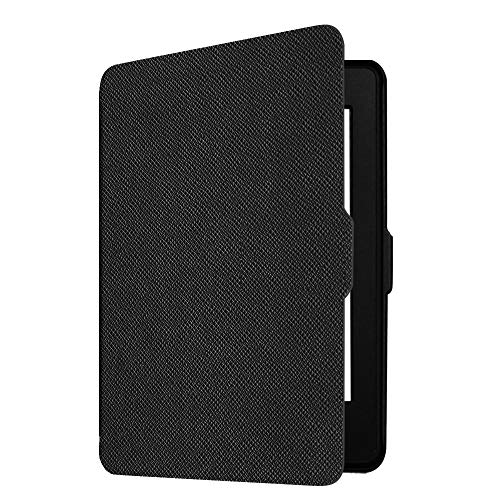
For a simple, light cover, this case weighs 0.18 pounds and fits the 6-inch Kindle Paperwhite models EY21 and DP75SDI. Its synthetic-leather exterior, soft interior, hard shell, and magnetic clasp provide a slim enclosure, while opening and closing the cover wakes or sleeps the device. The fit covers the 2012–2017 Paperwhite range rather than newer Paperwhite models. Choose it if carrying weight matters more than an integrated stand or hand strap; readers wanting those features should consider a more accessory-rich cover.
Bottom line: Choose this for a lightweight, simple cover for the 6-inch EY21 or DP75SDI.
Smart Case 6-inch Paperwhite

This option pairs a dark green 6-inch cover with a screen protector and weighs 0.24 pounds. Its fit covers Paperwhite generations 5 through 7, including model EY21 and DP75SDI, and the cover is designed to wake or sleep the reader when opened or closed. The 0.24-pound weight is higher than the 0.18-pound option, so it is less suited to buyers prioritizing the lightest carry. It is a match for someone who wants the screen protector included with a compatible 7th-generation cover.
Bottom line: Pick this if you want the included screen protector alongside a compatible cover.
KEROM 6-inch Stand Case
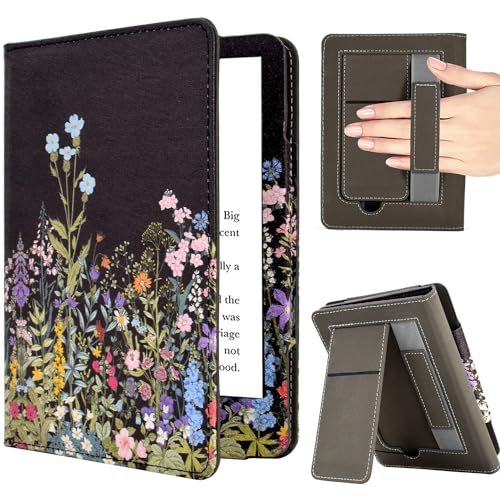
For hands-free use, this 6-inch cover adds a foldable stand, elastic hand strap, and card slot, features the simpler covers do not provide. It fits the 5th, 6th, 7th, and 10th-generation 6-inch Paperwhite models, including EY21 and DP75SDI, and supports auto sleep/wake. At 0.22 pounds, it weighs more than the 0.18-pound slim case. The fit excludes the 6.8-inch Paperwhite, so confirm the device is the older 6-inch size before choosing this accessory-rich design.
Bottom line: Choose this for a stand and hand strap, provided your Paperwhite is 6 inches.
MOROCK 6-inch Paperwhite Case

This white cover is described by its maker as using waterproof material, unlike the other options’ stated materials. It is designed for 6-inch Kindle Paperwhite generations 5 through 7, model EY21 or DP75SDI, and includes auto wake/sleep, a soft back, and a microfiber interior. At about 0.30 pounds, it is the heaviest of these choices, so it is a weaker match for buyers who want minimal carry weight. The waterproof-material claim does not establish that a covered Kindle can be submerged or used safely in wet conditions.
Bottom line: Pick this if waterproof material matters more than keeping the cover light.
How to choose a 7th-generation Paperwhite cover
Start with the Kindle model number, not just the generation name: the compatible 6-inch Paperwhite models here are EY21 and DP75SDI. Paperwhite cases are shaped to the device, so a cover for a later, larger screen may not align with its edges or cover magnets. Then choose by use: a thin cover favors easier carrying, while a stand and hand strap help with hands-free or one-handed reading. A cover’s sleep/wake function relies on its cover magnets and compatible device behavior. Keep the cover closed when carrying the reader, and avoid treating a water-resistant material claim as a waterproof Kindle.
Paperwhite size and model fit
The 7th-generation Paperwhite belongs to the 6-inch case family; these compatible products identify EY21 and DP75SDI as fit models. The product names also distinguish the 6.8-inch Paperwhite as a different size, which is a useful warning against choosing by the word “Paperwhite” alone. Check the model number in the device settings or on the device labeling before ordering. If the Kindle is a later generation or has a different model code, do not assume the older 6-inch case will fit, even if the screen appears close in size. A few millimeters at the edges can affect button, port, and cover alignment.
Cover features compared
Choose a cover feature based on how you read: a magnetic clasp keeps a front cover closed, while a stand changes the reading position and a hand strap helps maintain a grip. This table maps common needs to the feature that addresses them.
| Need | Feature to prioritize | Trade-off |
|---|---|---|
| Low carry weight | Simple slim shell | Fewer integrated accessories |
| Hands-free reading | Foldable stand | More parts and bulk |
| One-handed grip | Elastic hand strap | Strap adds material on the cover |
| Screen protection | Separate screen protector | Confirm protector matches screen size |
All covers add some thickness compared with a bare reader. For frequent travel, prioritize fit and secure closure before decorative features.
Using and caring for a Kindle cover
Keep the reader’s screen clean before closing the cover; trapped grit can rub against the display during movement. A soft interior can help limit scratches, but it cannot remove debris already inside the case. Close magnetic covers fully before placing the reader in a bag, and keep liquids away from the device even when a cover is marketed with waterproof material. For a foldable stand, use a stable, level surface and avoid pressing on the Kindle while it is propped up. Inspect the shell, clasp, and strap periodically for looseness or damage, especially if the reader is carried daily.
Frequently Asked Questions
How can I tell which Paperwhite model I have?
Find the model number in the Kindle’s device settings or on its device labeling; EY21 and DP75SDI correspond to the 6-inch older Paperwhite fit described here. Generation names alone can be confusing because cases for later Paperwhites have different dimensions.
Will a 7th-generation Paperwhite cover fit the 10th generation?
A 6-inch case may fit certain 10th-generation Paperwhites, but compatibility depends on the exact device model. For example, the KEROM cover names PQ94WIF as compatible, while the other 6-inch options specify EY21 and DP75SDI; check the code before choosing.
Does an auto sleep cover save Kindle battery?
Opening and closing a compatible smart cover can wake or sleep the reader automatically, reducing time the screen stays active. The actual battery effect depends on how often the reader is opened and the device’s settings.
Can I use a waterproof cover in the rain?
A waterproof-material claim for the cover does not establish that the Kindle itself is waterproof or safe in rain. Keep the reader dry and away from liquid, particularly around openings and edges.
What features help with reading one-handed?
An elastic hand strap provides a place to secure your hand while holding a reader, while a foldable stand supports hands-free reading on a stable surface. A strap is most useful when its position fits your grip and does not obstruct the screen.