
HD Display Car OBD: 5 Types Compared by Fit

For most drivers, 2.8-inch OBD2 LCD Gauge Display is the straightforward choice because its 2.8-inch LCD combines speed with engine readings in one display. Choose a windshield-projecting model instead if you want speed information closer to your line of sight, or a GPS-capable unit if your car’s OBD data support is limited.
OBD displays read vehicle data through the onboard diagnostics system; the readings available depend on the vehicle and device.
We earn a commission if you buy through links on this page. As an Amazon Associate I earn from qualifying purchases. Products are compared on manufacturer specifications, not hands-on testing.
- Best overall: 2.8-inch OBD2 LCD Gauge Display – Its 2.8-inch LCD combines speed, RPM, temperature, voltage and other readings.
- Best for windshield projection: MAIMEIMI Windshield OBD2 HUD – It projects speed and selectable vehicle data onto the windshield.
- Best for GPS fallback: OBD2 + GPS Dual-Mode Gauge Display – Its dual OBD and GPS modes provide a speed display when supported OBD data are limited.
| Product | Best for | Display style | Vehicle compatibility | Data modes | Shop |
|---|---|---|---|---|---|
| 2.8-inch OBD2 LCD Gauge Display | Multi-reading LCD | 2.8-inch LCD | 2010+ gasoline vehicles | OBD2 vehicle data | Check Price on Amazon |
| MAIMEIMI Windshield OBD2 HUD | Windshield projection | Windshield projection | 2008+ OBDII/EOBD gas cars | OBD vehicle data | Check Price on Amazon |
| OBD2 + GPS Dual-Mode Gauge Display | GPS speed fallback | Gauge display | 2008+ OBDII/EOBD sedans | OBD and GPS | Check Price on Amazon |
| Portable HD OBD Navigation Projector | Adjustable projection | Air-projection display | — | OBD display | Check Price on Amazon |
| 5.5-inch Multi-Color Windshield HUD | Large projected screen | 5.5-inch windshield display | OBDII/EUOBD interface | OBD vehicle data | Check Price on Amazon |
HD display car OBD options
Compare screen format and compatibility before choosing which readings to keep in view.
2.8-inch OBD2 LCD Gauge Display

Unlike windshield projectors, 2.8-inch OBD2 LCD Gauge Display keeps its information on a 2.8-inch LCD. The maker says it can show speed, RPM, turbo boost, fuel consumption, voltage, coolant temperature, trip and total mileage, and engine-fault alerts. That breadth suits drivers who want several engine and trip readings on one compact screen. The dimensions are about 2.4 inches long by 2.4 inches high. Its compatibility is narrower than a universal GPS speed display: it is specified for 2010-and-newer gasoline vehicles, so drivers of other vehicles should verify compatibility before choosing it.
Bottom line: Pick this if your gasoline vehicle meets the year range and you want multiple readings on an LCD.
MAIMEIMI Windshield OBD2 HUD

MAIMEIMI Windshield OBD2 HUD differs from the LCD gauge by projecting its display onto the windshield. The maker says it supports speed plus selectable RPM, trip, water temperature, voltage and fuel-consumption modes, and specifies OBDII/EOBD gasoline cars from 2008 onward. This format suits drivers who prefer speed data projected in front of them rather than on a separate screen.
Bottom line: Choose this if you want windshield projection and your car matches the OBDII/EOBD fit.
OBD2 + GPS Dual-Mode Gauge Display

OBD2 + GPS Dual-Mode Gauge Display stands apart by pairing OBD readings with GPS speed mode. The maker says OBD mode can read more than 100 types of vehicle information, including RPM, water temperature and voltage; its compatibility note limits OBD use to sedans made after 2008 that support OBDII or EOBD, not OBDI or JOBD. GPS mode is the alternative when OBD is unsupported. That makes the dual-mode approach relevant when speed is the priority, but GPS mode should not be mistaken for access to engine readings, which depend on OBD support.
Bottom line: Pick this if GPS speed fallback matters alongside OBD engine readings.
Portable HD OBD Navigation Projector

Portable HD OBD Navigation Projector emphasizes image positioning and brightness control rather than a named set of engine readings. Its maker says the projector uses a freeform surface to correct distortion, has an adjustable angle, and can adjust brightness automatically or manually using light sensing. Automatic start and stop are also described. This is a fit for drivers prioritizing a configurable projection experience. The product name refers to OBD speed navigation, but the fields do not establish a vehicle-year range or specific readings, so buyers who need a particular OBD metric should verify that it is supported before selecting this option.
Bottom line: Choose this if adjustable projection and brightness control are your priorities.
5.5-inch Multi-Color Windshield HUD
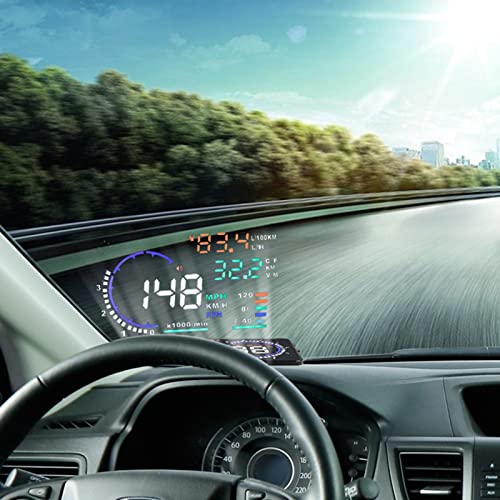
5.5-inch Multi-Color Windshield HUD is the largest screen-format option here, with a 5.5-inch windshield display rather than a small standalone LCD. The maker says it can show speed, engine speed, water temperature and battery voltage, and describes manual and automatic brightness adjustment. It suits drivers who want a larger projected display and those listed readings. The given compatibility is an OBDII/EUOBD interface, without a vehicle-year range; because protocol support and data availability differ across cars, confirm that your vehicle supports the readings you plan to use.
Bottom line: Pick this if a 5.5-inch projected screen and its OBD readings suit your setup.
How to choose an OBD car display
Start with the display format and the readings you actually need: a standalone LCD is different from a windshield projection, and an OBD connection does not guarantee every reading. US light-duty vehicles use OBD-II, but compatibility of a particular display and access to individual data parameters still vary. Check the vehicle’s manual or service data for its diagnostic system and supported readings. If speed is the only must-have and OBD compatibility is uncertain, a unit with a GPS speed mode offers a separate route for that reading. If you need engine data such as RPM or coolant temperature, prioritize a confirmed OBD match.
OBD-II fit and supported readings
Most OBD-II vehicles use a 16-pin diagnostic connector, commonly located below the dashboard near the steering column. A matching plug is only the starting point: vehicles can expose different parameters, and some displays use proprietary data or support only selected protocols. Confirm the car’s model year, fuel type and stated OBDII/EOBD support against the display’s fit range. A practical rule is to choose a GPS-capable display if your vehicle is older than 2008 or its OBD support is uncertain, but do not expect GPS mode to provide engine readings. Avoid assuming that a fuel-consumption or turbo reading will be available just because the screen advertises it.
LCD gauges versus windshield HUDs
LCD gauges show information on a separate screen, while windshield HUDs project information into the driver’s forward view. Neither format guarantees improved visibility in every vehicle: windshield angle, glare, tint and seating position affect projection, while an LCD’s location affects how far the driver looks away from the road. Choose a projector if its image is legible in the installed position; choose an LCD if you prefer a physical screen. Keep the display out of the driver’s direct view of the road and avoid adjusting settings while moving. OBD readings may update at different rates than the vehicle’s instrument cluster, so treat the car’s original warning indicators as primary.
Common OBD display setup mistakes
Connecting a display to the diagnostic port can keep the device powered, but behavior depends on the vehicle and unit. Some vehicles leave the port energized after shutdown, so check for a sleep or automatic shutoff function and unplug the unit if it drains the battery. Do not leave a diagnostic display installed if it interferes with a mechanic’s scan tool or blocks pedal, knee or airbag areas. Before relying on an alarm, compare the displayed speed and temperature with the vehicle’s own gauges under safe conditions. A display that reports a fault code is not a repair: diagnosis requires identifying the underlying cause rather than clearing the warning.
Frequently Asked Questions
Where is the OBD-II port usually located?
The 16-pin OBD-II connector is commonly beneath the dashboard near the steering column. Some vehicles place it behind a small panel, so consult the owner’s manual if it is not visible.
Will every OBD display show coolant temperature?
No, the vehicle and display must both support that parameter. Check compatibility before buying, especially for a specific engine reading rather than basic speed.
Can an OBD display work without an OBD connection?
A GPS-capable model can show speed without vehicle OBD data. GPS mode does not provide engine readings such as RPM or coolant temperature.
Does an OBD display replace the dashboard speedometer?
No, treat the factory instrument cluster and warning indicators as primary. Display update rate, supported data and visibility can differ from the vehicle’s own instruments.
Can an OBD display drain the car battery?
It can if the vehicle keeps its diagnostic port powered after shutdown and the display remains active. Check for automatic sleep behavior and unplug it if the unit does not power down.