
iPod Classic Generation 7: Models Compared by Fit

Apple iPod Classic 7th Gen 160GB is the closest match for an iPod Classic generation 7 because it is identified as a 160GB Apple 7th-generation model. Choose Compatible Classic 7th Gen 160GB or Compatible Classic 7th Gen 80GB if you are open to a compatible player rather than an Apple-branded device, or Apple-Compatible Classic Video 5th Gen 30GB if you specifically want a 5th-generation iPod.
Before choosing a compatible player, confirm its computer-sync method and supported audio formats; those can determine whether your existing music library works.
We earn a commission if you buy through links on this page. As an Amazon Associate I earn from qualifying purchases. Products are compared on manufacturer specifications, not hands-on testing.
- Best overall: Apple iPod Classic 7th Gen 160GB – It is identified as an Apple 7th-generation 160GB iPod Classic.
- Best for Rockbox: Compatible Classic 7th Gen 160GB – Its maker says Rockbox can add FLAC playback and larger sync batches.
- Best for 80GB: Compatible Classic 7th Gen 80GB – It offers 80GB capacity in a silver compatible-player option.
| Product | Best for | Capacity | Generation | Device type | Shop |
|---|---|---|---|---|---|
| Apple iPod Classic 7th Gen 160GB | Apple generation match | 160GB | 7th | Apple iPod | Check Price on Amazon |
| Compatible Classic 7th Gen 160GB | Rockbox flexibility | 160GB | 7th-compatible | Compatible player | Check Price on Amazon |
| Compatible Classic 7th Gen 80GB | Silver 80GB option | 80GB | 7th-compatible | Compatible player | Check Price on Amazon |
| Apple-Compatible Classic Video 5th Gen 30GB | Older generation fit | 30GB | 5th | Apple-compatible | Check Price on Amazon |
iPod Classic generation 7 options
Compare the closest generation match with compatible players and an older-generation alternative.
Apple iPod Classic 7th Gen 160GB
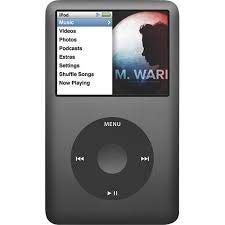
The Apple-branded 7th-generation identity makes this the closest fit for a search specifically about an iPod Classic generation 7. It has 160GB capacity, a 2.5-inch color LCD at 320 by 240 pixels, and support for AAC, MP3, Audible, Apple Lossless, AIFF, and WAV. Apple says playback can reach 36 hours of music or 6 hours of video when fully charged. The trade-off is that this unit is renewed and comes with generic accessories in non-retail packaging, so it suits buyers who prioritize the named model over original packaging.
Bottom line: Choose this if an Apple-branded 7th-generation model is your priority.
Compatible Classic 7th Gen 160GB

The clearest distinction here is the product’s compatible-player positioning rather than an Apple-branded iPod. Its 160GB capacity matches the largest capacity in this comparison, and the maker says Rockbox can enable FLAC playback and larger music-sync batches. The maker also describes its battery as high capacity, without giving a runtime figure. This suits buyers interested in firmware flexibility, but not someone who needs an Apple-original device. Confirm computer-sync compatibility before choosing it, especially if you depend on a particular library workflow.
Bottom line: Choose this if Rockbox support matters more than Apple branding.
Compatible Classic 7th Gen 80GB

The 80GB capacity is the main difference from the 160GB options, making this a fit for buyers whose music collection does not need the larger storage amount. The player is described as a compatible 7th-generation Classic-style device, with a silver finish and accessories in a plain white box. Its feature notes mention iTunes but do not describe the added FLAC and batch-sync capability associated with Compatible Classic 7th Gen 160GB. This option is less suitable for buyers who want that stated Rockbox flexibility or who specifically require an Apple-branded generation 7.
Bottom line: Choose this for a silver compatible player with 80GB storage.
Apple-Compatible Classic Video 5th Gen 30GB

This is a 5th-generation, 30GB model, not a generation 7 player, so it is the relevant alternative only for buyers whose priority is an older Classic Video device. The maker identifies it as black and includes a 180-day warranty service. Its smaller capacity separates it from the 80GB and 160GB choices, and it does not match a search for generation 7 as closely as Apple iPod Classic 7th Gen 160GB. Buyers deciding between generations should verify the exact model identity before ordering.
Bottom line: Choose this only if you want a 5th-generation Classic Video model.
How to choose an iPod Classic generation 7
Start with device identity: an Apple-branded model and a compatible player are not the same purchase. Apple iPod Classic 7th Gen 160GB is explicitly identified as an Apple 7th-generation model, while Compatible Classic 7th Gen 160GB and Compatible Classic 7th Gen 80GB are described as compatible players. Next compare capacity against the size of your music library; 160GB is twice 80GB, while the older-generation option here has 30GB. For scale, uncompressed CD-quality audio uses roughly 10MB per minute, while compressed files generally take less space; actual capacity available for music is lower than the drive’s nominal capacity because software also uses storage. If you rely on a specific sync workflow or file type, check that support before choosing a compatible model.
Capacity and music file formats
Capacity determines how much local music and other media a player can hold, but file format changes how quickly storage fills. Compressed formats such as MP3 and AAC generally use less space than lossless formats such as Apple Lossless or WAV, while exact file size depends on encoding settings and track length. Apple iPod Classic 7th Gen 160GB names support for AAC, MP3, Audible, Apple Lossless, AIFF, and WAV. The maker of Compatible Classic 7th Gen 160GB says Rockbox can enable FLAC playback, a capability not stated for the other choices. If your library contains only standard MP3 or AAC files, prioritize capacity and device identity; if it relies on FLAC, verify the player and firmware path before buying.
Generation and compatibility checks
Generation is a model-fit issue, not just a cosmetic distinction: a 5th-generation Classic Video device is not a generation 7 iPod Classic. Apple-Compatible Classic Video 5th Gen 30GB is explicitly a 5th-generation 30GB model, so it belongs only in a comparison where an older Classic is acceptable. Compatible players also require extra scrutiny because their branding does not establish Apple-original status or guarantee support for a specific syncing setup. Before ordering a compatible device, confirm how it connects to your computer, which operating systems it works with, and whether it can sync your library. That check is especially important if you use legacy desktop software or custom firmware.
Picking by need
Use this guide to narrow the choice by the requirement that matters most. A need for an Apple-branded generation 7 points to Apple iPod Classic 7th Gen 160GB; a willingness to use a compatible player opens up Compatible Classic 7th Gen 160GB and Compatible Classic 7th Gen 80GB, with capacity and firmware capability separating them. A 5th-generation device is a different fit, not a substitute for generation 7 if that generation is essential. Capacity figures are nominal storage amounts, and some of that space is occupied by system software and formatting. For a large library of lossless music, choose more storage and confirm format support; for a smaller compressed-music collection, an 80GB option may be sufficient.
| Need | Relevant fit | Key difference |
|---|---|---|
| Apple-branded generation 7 | Apple iPod Classic 7th Gen 160GB | 160GB Apple iPod |
| Compatible player with Rockbox option | Compatible Classic 7th Gen 160GB | 160GB; maker cites FLAC support via Rockbox |
| Compatible player with 80GB | Compatible Classic 7th Gen 80GB | Silver, 80GB |
| 5th-generation Classic Video | Apple-Compatible Classic Video 5th Gen 30GB | 30GB, generation 5 |
Frequently Asked Questions
How much music fits on an 80GB iPod Classic?
An 80GB player has less than 80GB available for music because software and formatting use some storage. Compressed MP3 or AAC files generally allow more tracks than lossless WAV files, and track length and encoding settings also affect the total.
Can iPod Classic generation 7 play FLAC files?
The Apple model here names AAC, MP3, Audible, Apple Lossless, AIFF, and WAV, but not FLAC. The maker of the compatible 160GB player says Rockbox can enable FLAC playback, so verify firmware support before relying on that format.
Does a 5th-generation iPod Classic count as generation 7?
No; generation 5 and generation 7 are different model generations. Apple-Compatible Classic Video 5th Gen 30GB is identified as a 5th-generation 30GB Classic Video, so it is an older-generation alternative rather than a generation 7 match.
What should I check before buying a compatible iPod player?
Confirm the computer connection, operating-system compatibility, and audio formats before ordering. If you intend to use custom firmware such as Rockbox, verify that the exact device supports the firmware and that your sync workflow will work.