
Personal Electronic Cutter Cricut Provo Craft Compared

The Cricut 29-0001 Personal Electronic Cutting Machine suits most crafters who need a compact, cartridge-based cutter for paper and vinyl, with cuts up to 5-1/2 inches tall. Choose a different machine for larger designs; the Expression cuts up to 23-1/2 inches.
These older Cricut machines use physical cartridges rather than requiring a computer, while the adapter options are power accessories, not cutters.
We earn a commission if you buy through links on this page. As an Amazon Associate I earn from qualifying purchases. Products are compared on manufacturer specifications, not hands-on testing.
- Best overall: Cricut 29-0001 Personal Cutter – It handles paper, cardstock, vellum and vinyl with cut heights from 1 to 5-1/2 inches.
- Best for large cuts: Cricut Expression – Its maximum cut height of 23-1/2 inches supports larger signage and classroom decor.
- Best for cartridge options: Cricut Create Machine – It includes Don Juan and supports all original Cricut cartridges.
| Product | Best for | Cut height | Included cartridge(s) | Shop |
|---|---|---|---|---|
| Cricut 29-0001 Personal Cutter | Small paper crafts | 1–5.5 in | George and Basic Shapes | Check Price on Amazon |
| Cricut Expression | Large-format crafts | 1/4–23.5 in | Plantin SchoolBook; Accent Essentials | Check Price on Amazon |
| Cricut Create Machine | Original cartridges | — | Don Juan | Check Price on Amazon |
Personal Electronic Cricut Provo Craft Cutters
Compare cutting range, cartridge setup and included accessories to match the machine to your craft projects.
Cricut 29-0001 Personal Cutter

The 29-0001 is the compact option for cards, scrapbooks and other paper crafts, with a cut height from 1 to 5-1/2 inches. It handles vellum, paper, cardstock and vinyl, and its cartridge-based operation does not require a computer. George and Basic Shapes is included, so the machine has a starting cartridge for letters and shapes.
Its 17-4/5-inch length and 10.03-pound weight suit a dedicated craft space or moving between projects. The 5-1/2-inch maximum matters if your designs need larger lettering; consider a machine with a taller cut range for that work.
Bottom line: Choose it for compact paper and vinyl projects that fit within 5-1/2 inches.
Cricut Expression
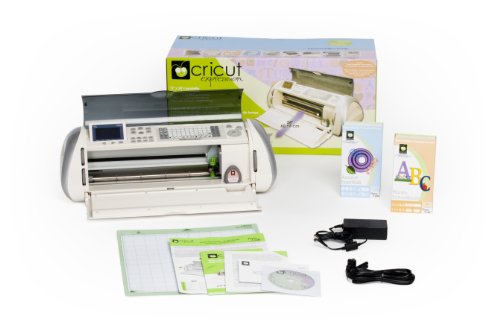
The Expression has the broadest cutting range here, from 1/4 inch to 23-1/2 inches, making it the choice for larger scrapbook elements, classroom decor and signage. Its cartridge system works without a computer, and the package includes Plantin SchoolBook and Accent Essentials cartridges.
The LCD screen, six modes, four functions and portrait or landscape orientation add ways to configure a cut. At 25.8 inches long and 20 pounds, it occupies more space and is less convenient to move than a smaller machine. Its greater range matters most when projects call for cuts above 5-1/2 inches.
Bottom line: Pick it when your projects need cuts taller than 5-1/2 inches.
Cricut Create Machine

The Cricut Create stands out for compatibility with all original Cricut cartridges and includes a Don Juan font and shape cartridge. Its functions include an 8-way directional blade, portrait mode, Fit to Page, Auto Fill, Center Point and Flip. A 6-by-12-inch cutting mat and necessary cords and manuals are included.
The features do not give a cut-height range, so compare the required design size with the machine’s manual before choosing it for a particular project. The Create suits crafters who already have original cartridges or want the included Don Juan designs; buyers who need a confirmed maximum cut height should verify that measurement first.
Bottom line: Choose it if original cartridge compatibility is your priority.
How to choose a Cricut cartridge cutter
Choose by the maximum cut height your projects require, then consider the included cartridge and workspace. The Personal cutter reaches 5-1/2 inches, while the Expression reaches 23-1/2 inches; that difference matters for large lettering and decor. Cartridge-based Cricut machines operate without a computer, but their design choices depend on cartridges you own or receive with the machine. A cutting mat secures material during cutting, so its width and length also affect usable project size. Before selecting a machine, list your largest planned design dimension and the cartridge designs you expect to use. A project that exceeds the machine’s cutting range cannot be made smaller by changing orientation alone.
Cut height and project sizing
Match the design’s height to the cutter’s range, leaving room for the machine’s feed and mat. The Personal model cuts 1 to 5-1/2 inches tall; the Expression spans 1/4 to 23-1/2 inches. For example, choose the Expression when a design must exceed 5-1/2 inches, and the Personal model when all designs fit below that limit and compact size matters. Measure the material area as well as the design itself: a 6-by-12-inch mat provides a different work area than a tall-format cut. Keep delicate paper flat and secured to reduce shifting during the cut.
Cartridges, modes and materials
Cartridges determine the available letters and shapes on these machines, while modes and functions change how a design is arranged or cut. The Personal includes George and Basic Shapes; Expression includes Plantin SchoolBook and Accent Essentials; Create includes Don Juan and supports original Cricut cartridges. The Personal supports vellum, paper, cardstock and vinyl, while the Expression is positioned for scrapbooks, classroom decor and signage. Use material made for cutting and avoid forcing thick or unsuitable stock through a blade. Cartridge compatibility is especially relevant when buying a used machine or adding older cartridges: confirm the cartridge generation and model compatibility before relying on a design collection.
Choosing a replacement Cricut adapter
Choose an adapter by exact machine model and electrical match, not by connector appearance alone. Voltage, polarity, connector and required output must match the cutter to avoid damage or unsafe operation. Check the original adapter label and the machine’s manual before plugging in a replacement. A protection feature such as over-voltage protection does not make an incompatible power supply safe. These accessories restore power only; neither replaces the cutting machine, mat or cartridge.
Frequently Asked Questions
Does the Cricut Personal cutter need a computer?
No, the 29-0001 uses a cartridge-based system and does not require a computer. Its included George and Basic Shapes cartridge supplies letters and shapes to start with.
What is the largest cut the Expression can make?
The Expression cuts up to 23-1/2 inches tall, compared with 5-1/2 inches for the Personal model. Choose the Expression if your design height exceeds the Personal cutter’s limit.
Which materials can the Cricut Personal cut?
The Personal cutter is specified for vellum, paper, cardstock and vinyl. Use a material that fits the machine’s cutting setup and secure it flat on the mat to reduce movement.
Can original Cricut cartridges work with the Create?
The Create is compatible with all original Cricut cartridges and includes a Don Juan font and shape cartridge. Confirm compatibility for any cartridge generation outside that original group before purchase.
How do I match a replacement adapter to my Cricut?
Match the adapter to the exact cutter model and verify the output voltage, polarity and connector against the original adapter or machine manual. Input range alone, such as 100–240V AC, does not establish that a supply is compatible.