
Red Tiger Dash Cam: 4 Models Compared by Coverage

REDTIGER F7NP suits most drivers who want front-and-rear recording with a 128GB card included. Choose REDTIGER F17 instead if you need an interior camera as well; REDTIGER F7N suits buyers who prefer a no-card package, while REDTIGER F7N TOUCH adds touch and voice controls.
Dash cams record to removable memory and can save footage around an incident; these four REDTIGER models differ in camera coverage, included storage and controls.
We earn a commission if you buy through links on this page. As an Amazon Associate I earn from qualifying purchases. Products are compared on manufacturer specifications, not hands-on testing.
- Best overall: REDTIGER F7NP – Records 4K front and 1080P rear video and includes a 128GB card.
- Best for cabin coverage: REDTIGER F17 – Adds a 1080P interior camera alongside the 4K front and 1080P rear cameras.
- Best for app access: REDTIGER F7N – Offers 5.8GHz WiFi and app access, with no card in the package.
- Best for touch controls: REDTIGER F7N TOUCH – Combines touch and voice controls with a 128GB card.
| Product | Best for | Camera channels | Included card | Controls | Shop |
|---|---|---|---|---|---|
| REDTIGER F7NP | Dual-camera coverage | 2 | 128GB | App control | Check Price on Amazon |
| REDTIGER F17 | Cabin recording | 3 | 64GB | App control | Check Price on Amazon |
| REDTIGER F7N | No-card package | 2 | None included | App control | Check Price on Amazon |
| REDTIGER F7N TOUCH | Touch operation | 2 | 128GB | Touch and voice | Check Price on Amazon |
Red Tiger Dash Cams
Compare camera coverage, included storage and control options to match a dash cam to your driving needs.
REDTIGER F7NP

REDTIGER F7NP pairs 4K front recording with 1080P rear recording and includes a 128GB card, so it is a practical fit for drivers wanting two-view coverage without sourcing a card separately. REDTIGER says its STARVIS 2 sensor, WDR and HDR support low-light recording; the front and rear lenses cover 170° and 140°, respectively. The maker mentions a hardwire kit in the model title, but does not establish whether it is included. Buyers planning parking surveillance should confirm kit compatibility before ordering, since many parking modes need a hardwired power connection.
Bottom line: Choose this if you want front-and-rear recording with a 128GB card included.
REDTIGER F17

REDTIGER F17 is the only three-channel option here, adding a 1080P cabin view to 4K front and 1080P rear recording. That extra angle suits rideshare drivers or families who want the cabin in recorded footage; its fields of view are 150° front, 160° interior and 155° rear. REDTIGER says the STARVIS 2 IMX675 sensor and WDR/HDR improve low-light performance. The included card is 64GB, half the capacity of the 128GB packages among these options, so drivers recording three channels should expect to manage saved clips more often.
Bottom line: Pick this for a cabin view in addition to road-facing cameras.
REDTIGER F7N

REDTIGER F7N gives the same 4K-front and 1080P-rear resolution pairing and 170°/140° lens angles as REDTIGER F7NP, but its package has no card. It also lists 5.8GHz WiFi, app control, GPS and a 3.18-inch screen, making it a fit for buyers who want phone access and route tracking and already have a compatible card. REDTIGER says the WiFi transfer rate reaches 20MB/s. A microSD card is needed to save recordings; choose a high-endurance card intended for continuous recording, and verify compatibility before use.
Bottom line: Choose this if app and GPS features matter and you will supply a card.
REDTIGER F7N TOUCH
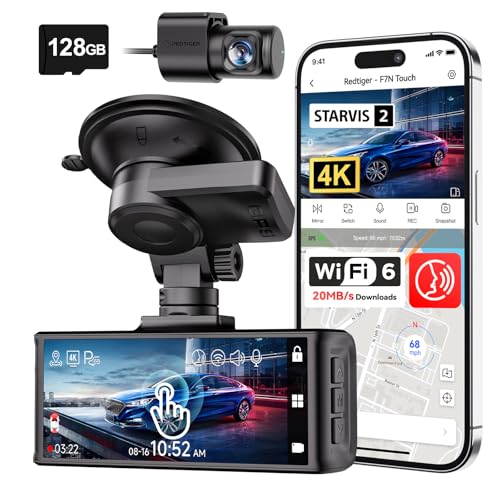
REDTIGER F7N TOUCH distinguishes itself with a touchscreen and voice control, while retaining the 4K-front and 1080P-rear configuration and 170°/140° views. It includes a 128GB card and lists GPS, loop recording, audio recording, parking mode and a supercapacitor. REDTIGER says WDR/HDR support night visibility. Touch and voice controls can make common adjustments easier, but drivers should set up the camera before moving and avoid interacting with a screen while driving. Choose another model if you want a third, cabin-facing camera; this package is a dual-camera system.
Bottom line: Pick this if you want touch and voice controls with a card included.
How to Choose a Red Tiger Dash Cam
Choose by the view you need first: dual-camera models record front and rear, while a three-channel model adds the cabin. For rideshare or family trips where cabin footage matters, REDTIGER F17 is the only option here with an interior camera. For ordinary road coverage, compare the included card and control style instead. Dash cams commonly save video in short loop-recording segments; when storage fills, the oldest unlocked footage is overwritten. A G-sensor can lock a clip after a detected impact, but a locked file still consumes card space. If you want to retain footage, copy important clips promptly rather than relying on the camera’s loop memory.
Dash Cam Storage and Memory Cards
A dash cam records continuously, so card endurance matters as much as capacity: use a high-endurance microSD card designed for repeated video writing. These models include either 64GB, 128GB or no card, but usable recording time depends on resolution, number of channels, frame rate and file settings. A three-channel camera writes more footage than a front-only camera at the same settings. Format the card in the camera when setting it up and periodically, because file-system errors can interrupt recording. Do not assume a larger card is compatible; check the camera’s supported card capacity and type before buying a replacement.
Use this selection guide to match included storage to how you plan to record.
| Need | Choice |
|---|---|
| 128GB card included | REDTIGER F7NP or REDTIGER F7N TOUCH |
| 64GB card included | REDTIGER F17 |
| Bring your own card | REDTIGER F7N |
Parking Mode and Power
Parking mode needs power while the ignition is off, so confirm the power method before relying on it. Many dash cams use a hardwire kit to connect to the vehicle fuse box, and a low-voltage cutoff helps reduce the risk of draining the car battery; verify that the kit supports the camera and provides that cutoff. A 24-hour label does not mean every car can safely power a camera continuously for 24 hours. Impact-triggered recording and time-lapse recording also work differently: one waits for an event, while the other captures at intervals. Set the intended mode and cutoff before leaving a vehicle parked for a long period.
Placement, Audio and Safe Use
Mount a dash cam high on the windshield behind the rearview mirror when that position preserves the driver’s clear view; state rules generally prohibit obstructing the windshield, and exact restrictions vary by state. Route power cables away from airbags, especially along windshield pillars, so trim or wiring does not interfere with deployment. Audio recording can raise privacy concerns when passengers are recorded; tell occupants and check the consent rules that apply where the vehicle is used. Finally, set the camera’s date and time, aim the rear camera through a clear rear window, and verify both views in a stationary vehicle before driving.
Frequently Asked Questions
How much footage fits on a 128GB dash cam card?
A 128GB card holds more footage than a 64GB card, but recording time depends on resolution, frame rate and camera channels. Three-channel 4K systems use storage faster than dual-camera systems at comparable settings.
Does parking mode need a hardwire kit?
Many parking modes need a hardwire kit or another source of power while the ignition is off. Check for a compatible low-voltage cutoff, which helps limit vehicle battery drain.
What kind of memory card should a dash cam use?
Use a high-endurance microSD card made for continuous video recording. Confirm the camera supports the card’s type and capacity, then format the card in the camera before relying on it.
Where should a dash cam go on the windshield?
Mount it where it captures the road without obstructing the driver’s view, commonly behind or beside the rearview mirror. Keep cables clear of airbag deployment paths and check local windshield-obstruction rules.
Can a dash cam record audio inside a car?
Some dash cams record audio, but recording conversations can trigger consent and privacy rules that differ by state. Tell passengers when audio recording is active and check applicable local requirements.