
WiFi Bluetooth Cards for PC: 5 Models Compared

For most Windows 11 PCs with a Wi-Fi 6E router, TP-Link Archer Wi-Fi 6E AXE5400 stands out because it adds 6 GHz support and a magnetic antenna base; choose a different card if you need Wi-Fi 7 or support for Windows 10.
These PCIe expansion cards add wireless networking to a desktop, and their Bluetooth function may require a motherboard USB connection.
We earn a commission if you buy through links on this page. As an Amazon Associate I earn from qualifying purchases. Products are compared on manufacturer specifications, not hands-on testing.
- Best overall: TP-Link Archer Wi-Fi 6E AXE5400 – Wi-Fi 6E tri-band support and a magnetic antenna base suit a Windows 11 PC and compatible router.
- Best for Wi-Fi 7: TP-Link Archer TBE552E Wi-Fi 7 – Supports Wi-Fi 7 features and up to 9.3 Gbps combined band bandwidth, but not Windows 10 or Linux.
- Best for Wi-Fi 6: TP-Link Archer TX20E Wi-Fi 6 AX1800 – Offers up to 1.8 Gbps across 2.4 GHz and 5 GHz bands.
| Product | Best for | Wi-Fi generation and bands | Peak band rates | Bluetooth | Shop |
|---|---|---|---|---|---|
| TP-Link Archer Wi-Fi 6E AXE5400 | Windows 11 6E | Wi-Fi 6E, tri-band | 2,402 Mbps (6 GHz); 2,402 Mbps (5 GHz) | 5.3 | Check Price on Amazon |
| TP-Link Archer TBE552E Wi-Fi 7 | Wi-Fi 7 upgrade | Wi-Fi 7, tri-band | 5,764 Mbps (6 GHz); 2,882 Mbps (5 GHz) | 5.4 | Check Price on Amazon |
| TP-Link Archer TX20E Wi-Fi 6 AX1800 | Wi-Fi 6 basics | Wi-Fi 6, dual-band | 1,201 Mbps (5 GHz); 574 Mbps (2.4 GHz) | 5.2 | Check Price on Amazon |
| GIGABYTE GC-WBAX210 Wi-Fi 6E | AX210 option | Wi-Fi 6E, tri-band | Up to 2,400 Mbps | 5.2 | Check Price on Amazon |
| OKN AX5400 Wi-Fi 6E PCIe Card | Windows 10 6E | Wi-Fi 6E, tri-band | 574 Mbps (2.4 GHz); 2,400 Mbps (5 GHz); 2 | 5.3 | Check Price on Amazon |
WiFi Bluetooth Cards for PC
Compare wireless generation, supported bands, and operating-system requirements before choosing a desktop card.
TP-Link Archer Wi-Fi 6E AXE5400
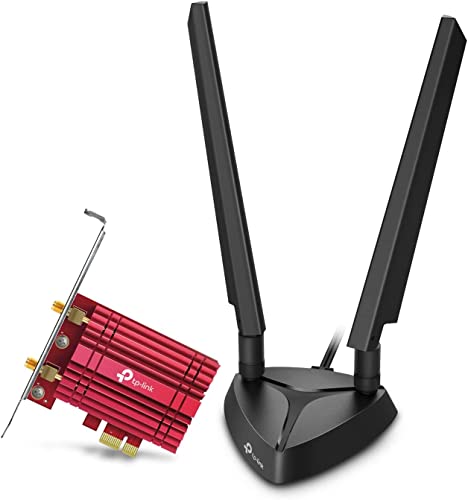
TP-Link Archer Wi-Fi 6E AXE5400 is the Wi-Fi 6E option with a magnetic antenna base, giving it a different placement setup from cards with fixed or unspecified antenna arrangements. Its Intel AX210 chipset supports 2.4, 5, and 6 GHz bands, with Bluetooth 5.3. The maker says Windows 11 is needed to use 6 GHz Wi-Fi, so this card suits a compatible Windows 11 PC and Wi-Fi 6E router. The three band figures are peak rates, not a single guaranteed connection speed; without a 6 GHz router, that extra band will not be usable.
Bottom line: Pick this for a Windows 11 PC and Wi-Fi 6E router when 6 GHz support and a magnetic antenna base matter.
TP-Link Archer TBE552E Wi-Fi 7

TP-Link Archer TBE552E Wi-Fi 7 is the Wi-Fi 7 choice, with Multi-Link Operation, Multi-RUs, and 4K-QAM features beyond the Wi-Fi 6E cards here. Its peak rates are 5,764 Mbps at 6 GHz, 2,882 Mbps at 5 GHz, and 688 Mbps at 2.4 GHz, and it includes Bluetooth 5.4. The maker says the 320 MHz 6 GHz channels require a Wi-Fi 7 router. This card suits buyers building around a Wi-Fi 7 network, but its Windows 10 and Linux incompatibility rules it out for those systems.
Bottom line: Choose this for a Wi-Fi 7 setup on a compatible Windows system, not for Windows 10 or Linux.
TP-Link Archer TX20E Wi-Fi 6 AX1800

TP-Link Archer TX20E Wi-Fi 6 AX1800 is the dual-band Wi-Fi 6 option for buyers who do not need 6 GHz; its two high-gain antennas and support for OFDMA and MU-MIMO distinguish its feature set. The maker gives peak rates of 1,201 Mbps on 5 GHz and 574 Mbps on 2.4 GHz, and Bluetooth 5.2 is included. It supports Windows 10 and 11 according to its name. This card suits a Wi-Fi 6 router and a more straightforward dual-band setup, but cannot connect to the 6 GHz band supported by Wi-Fi 6E and Wi-Fi 7 models.
Bottom line: Pick this for dual-band Wi-Fi 6 and Windows 10 or 11 when 6 GHz is not needed.
GIGABYTE GC-WBAX210 Wi-Fi 6E
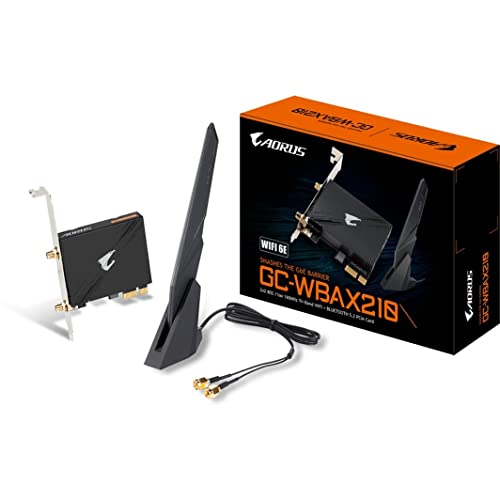
GIGABYTE GC-WBAX210 Wi-Fi 6E pairs an Intel AX210 module with tri-band Wi-Fi 6E and Bluetooth 5.2, but its band-rate figure is a single high-speed connection figure rather than a separate rate for each band. The card supports wireless on 2.4, 5, and 6 GHz and is described as a PCIe expansion card. It suits buyers seeking an AX210-based card with 6 GHz capability. Compared with TP-Link Archer Wi-Fi 6E AXE5400, it does not highlight a magnetic antenna base or Windows 11 condition in its specifications, so confirm the operating-system and antenna setup for your build before ordering.
Bottom line: Consider this if you want an AX210 Wi-Fi 6E card and its fit and operating-system compatibility check out.
OKN AX5400 Wi-Fi 6E PCIe Card
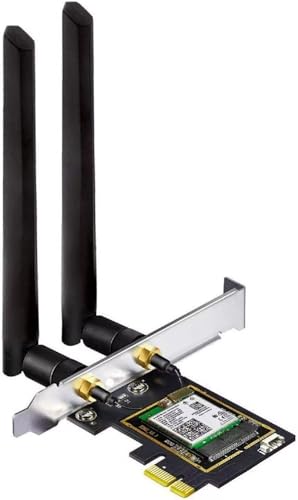
OKN AX5400 Wi-Fi 6E PCIe Card combines Wi-Fi 6E, an Intel AX210 chipset, and Bluetooth 5.3, with peaks of 574 Mbps at 2.4 GHz and 2,400 Mbps on each of 5 and 6 GHz. Its named operating-system support includes Windows 10 64-bit and Windows 11, which sets it apart from cards with narrower listed compatibility. This model fits a buyer who needs a 6 GHz-capable card for a Windows 10 64-bit PC. A compatible Wi-Fi 6E router is still required to use 6 GHz; the card’s maximum band rates are not a promise of real-world throughput.
Bottom line: Choose this for a Windows 10 64-bit PC when Wi-Fi 6E and Bluetooth 5.3 are priorities.
How to choose a WiFi Bluetooth card for a PC
Choose by matching the card’s Wi-Fi generation to both the desktop’s operating system and the router. A Wi-Fi 6 card uses the 2.4 and 5 GHz bands; Wi-Fi 6E adds 6 GHz, while Wi-Fi 7 adds features such as Multi-Link Operation and can use 320 MHz channels on 6 GHz with a compatible router. The router and PC card must support the same band and generation to use those capabilities. For a Windows 11 PC with a Wi-Fi 6E router, a 6E model can access 6 GHz; if the network is Wi-Fi 6, a 6E or 7 card can still use its lower supported bands. Confirm the operating system before buying, especially for the Wi-Fi 7 model here.
What 6 GHz support changes
6 GHz gives compatible Wi-Fi 6E and Wi-Fi 7 devices another band, but it is useful only when the router and operating system support it too. The maker says the TP-Link Wi-Fi 6E card needs Windows 11 for 6 GHz use; the OKN card names Windows 10 64-bit and Windows 11 support. Wi-Fi 7’s 320 MHz channel capability requires a Wi-Fi 7 router, according to the maker. A 6 GHz signal may also be less suitable for long or obstructed routes than lower-frequency Wi-Fi, so distance and walls can affect which band works best. If the PC is far from the router, prioritize reliable placement and coverage rather than the largest combined peak-rate number.
WiFi card bands and peak rates compared
The figures below show each card’s peak rates by band, not an expected internet speed. Compare matching bands because a combined tri-band total is not directly comparable to a rate on one band.
| Card | 2.4 GHz | 5 GHz | 6 GHz |
|---|---|---|---|
| TP-Link Archer TX20E Wi-Fi 6 AX1800 | 574 Mbps | 1,201 Mbps | — |
| TP-Link Archer Wi-Fi 6E AXE5400 | 574 Mbps | 2,402 Mbps | 2,402 Mbps |
| GIGABYTE GC-WBAX210 Wi-Fi 6E | — | — | — |
| TP-Link Archer TBE552E Wi-Fi 7 | 688 Mbps | 2,882 Mbps | 5,764 Mbps |
| OKN AX5400 Wi-Fi 6E PCIe Card | 574 Mbps | 2,400 Mbps | 2,400 Mbps |
Check PCIe and Bluetooth fit before installation
A PCIe card needs an available compatible expansion slot and enough clearance around the slot and antenna connectors. Check the desktop’s motherboard layout and case space before choosing a card; a magnetic antenna base, as supplied with TP-Link Archer Wi-Fi 6E AXE5400, can provide a different antenna placement option. Bluetooth may need a separate internal USB connection even when Wi-Fi uses PCIe, and TP-Link Archer Wi-Fi 6E AXE5400 explicitly identifies Bluetooth as USB-connected. The specifications do not settle every motherboard or Bluetooth connection detail, so confirm those connections against your PC before ordering. Install the card with the PC powered off and disconnected from power, and avoid forcing a card or connector into a slot.
Frequently Asked Questions
Does a Wi-Fi 6E card work with a Wi-Fi 6 router?
Yes, a Wi-Fi 6E card can use supported 2.4 or 5 GHz Wi-Fi with a Wi-Fi 6 router, but it cannot use 6 GHz without a compatible Wi-Fi 6E router. Windows 11 is required for 6 GHz use on the TP-Link Wi-Fi 6E card here.
Can a desktop Wi-Fi card add Bluetooth too?
Yes, these PCIe cards include Bluetooth, though the Bluetooth connection may require an internal USB header or port. The TP-Link Wi-Fi 6E model specifically identifies Bluetooth as USB-connected, so check for an available motherboard USB connection.
Will Wi-Fi 7 improve speed with an older router?
A Wi-Fi 7 card cannot provide Wi-Fi 7 features such as 320 MHz 6 GHz channels unless the router supports Wi-Fi 7. With an older router, the card can only use the wireless capabilities that the router and client share.
Is the advertised maximum Wi-Fi rate my internet speed?
No, the band-rate figures are wireless link peaks rather than guaranteed internet throughput. Router capability, signal distance, walls, interference, and the internet connection can all lower actual speeds.