
RCA Input to HDMI Output Converter Options Compared

For a compact converter with selectable 720p or 1080p output, choose ABLEWE Mini RCA to HDMI Converter; it converts composite RCA input to HDMI and supports multiple analog video formats. Choose Tengchi RCA to HDMI Converter if you want listed support for additional formats such as PAL/N and SECAM, or Wenter RCA to HDMI Converter with Cables if the included RCA and HDMI cables suit your setup.
An RCA-to-HDMI converter changes an older composite analog signal into a digital HDMI signal for a newer display; it does not work in the reverse direction.
We earn a commission if you buy through links on this page. As an Amazon Associate I earn from qualifying purchases. Products are compared on manufacturer specifications, not hands-on testing.
- Best overall: ABLEWE Mini RCA to HDMI Converter – Compact unit with 720p or 1080p output and support for multiple composite video formats.
- Best for format support: Tengchi RCA to HDMI Converter – Lists PAL, NTSC, SECAM, PAL/M, and PAL/N input formats.
- Best for included cables: Wenter RCA to HDMI Converter with Cables – Includes separate RCA, HDMI, and Micro USB cables.
| Product | Best for | Output modes | Input formats | Cables included | Shop |
|---|---|---|---|---|---|
| ABLEWE Mini RCA to HDMI Converter | Compact setups | 720p or 1080p at 60 Hz | PAL, NTSC, SECAM, PAL/M, PAL/N | USB power cable | Check Price on Amazon |
| Tengchi RCA to HDMI Converter | Format flexibility | 1080p | PAL, NTSC, SECAM, PAL/M, PAL/N | USB power cable | Check Price on Amazon |
| Wenter RCA to HDMI Converter with Cables | Cable bundle | 720p or 1080p at 60 Hz | Composite RCA | RCA, HDMI, Micro USB | Check Price on Amazon |
RCA to HDMI Converters
Compare output options, supported composite formats, and the cables each converter includes.
ABLEWE Mini RCA to HDMI Converter
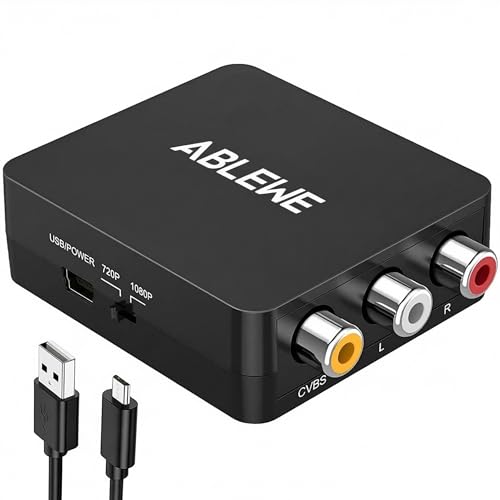
Among these converters, this model is the smallest by the measurements, at about 2.7 × 2.1 × 0.8 inches. It accepts yellow, white, and red composite RCA connections and converts them to HDMI, with 720p or 1080p output at 60 Hz. The maker says it supports PAL, NTSC, SECAM, PAL/M, and PAL/N formats and identifies game consoles, VCRs, and DVD players as compatible source types. It needs USB power during use. Choose another option if you need a bundled HDMI cable; one is not included here.
Bottom line: Choose this for a compact converter with two selectable output modes.
Tengchi RCA to HDMI Converter
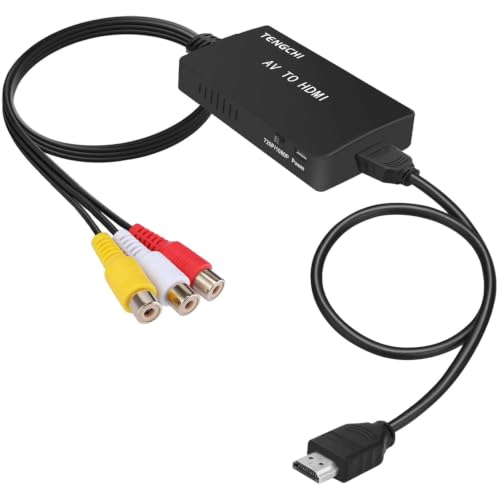
Unlike the other two converters, this model lists input support for NTSC 4.43 as well as NTSC 3.58, PAL, SECAM, PAL/M, and PAL/N. It converts composite RCA input to HDMI 1.3 output at 1080p and is described for devices such as VCRs, DVD players, and game consoles. The maker says the included USB cable must connect to a 5 V, 1 A power source, which is not included. The output is 1080p only, so choose a model with a selectable 720p mode if that option matters for your display.
Bottom line: Choose this when its range of analog video formats matches your source.
Wenter RCA to HDMI Converter with Cables

This is the only option here whose name and features specify a bundled RCA cable and HDMI cable, along with a Micro USB cable for power. Its detachable RCA and HDMI leads allow flexible placement with compatible equipment, and the maker says the converter offers 720p or 1080p output at 60 Hz. It is intended for an RCA/AV source connected to an HDMI display, not for sending HDMI to an older RCA television. Choose another model if you need explicitly listed support for a particular PAL or SECAM variant.
Bottom line: Choose this if you want the RCA and HDMI connection cables included.
How to choose an RCA to HDMI converter
Match the converter’s input to the source’s yellow video and red/white audio plugs, then confirm its HDMI output mode suits the display. Composite video carries picture on one signal, unlike component video, which separates picture into multiple video channels; the connector colors are not interchangeable just because both can use RCA-style plugs. A converter can scale a signal to 720p or 1080p, but scaling does not recreate detail absent from the original recording or source. If your source uses an older PAL-family format, confirm that the converter supports the specific format named for that device. For an HDMI source going to an RCA display, you need the opposite conversion direction.
What 720p and 1080p output mean
Choose 1080p output when the converter and display both support it, but expect the source signal to set the practical picture detail. Many legacy composite sources produce standard-definition video, commonly 480i in NTSC regions or 576i in PAL regions; a converter’s higher-resolution HDMI output is an upscaled signal, not native HD footage. The output refresh rate also matters: two options here specify 60 Hz output. HDMI carries video and audio digitally, while composite sends them as separate analog connections. If a picture is unstable or absent, first check that the source’s video format and the display’s selected HDMI input are compatible.
Which cables and power connections to plan for
Check the cable path before setting up: the source’s yellow, white, and red RCA plugs connect to the converter’s input, and an HDMI cable runs from its output to the display. A USB power lead is necessary for these converters; it powers the converter rather than replacing the RCA or HDMI signal cables. Some converters include only the power lead, while another package specifies separate RCA and HDMI leads too. Keep the converter near an available USB power source and avoid pulling on the ports by letting cables reach without tension. If a unit requires a particular USB voltage or current, use a power source that meets that requirement.
Common RCA-to-HDMI setup mistakes
The most common mistake is reversing the conversion direction: an RCA-to-HDMI adapter cannot send an HDMI device’s signal to an RCA-only television. Another is leaving USB power disconnected, which can prevent conversion even when the RCA and HDMI cables are attached. Match plug colors—yellow for composite video, white and red for left and right audio—and select the corresponding HDMI input on the display. If the source has a PAL/NTSC setting, align it with the converter’s supported input format; an unsupported format can produce a missing or incorrect picture. Keep sound expectations realistic as well: red and white composite plugs carry analog stereo audio, not surround sound.
Frequently Asked Questions
Can an RCA to HDMI converter work in reverse?
No; an RCA-to-HDMI converter accepts an analog RCA source and outputs HDMI. To connect an HDMI source to an RCA display, use a converter designed for HDMI-to-RCA direction.
Does a 1080p converter make VHS look like HD?
No; 1080p output can scale a composite signal for an HDMI display, but it cannot restore detail missing from a VHS recording. VHS picture quality remains limited by the recording and playback signal.
Which RCA plug carries the video signal?
The yellow RCA plug carries composite video, while red and white typically carry right- and left-channel audio. Connect all three when you want both picture and stereo sound.
Why does an RCA to HDMI adapter need USB power?
The converter needs power to process the analog signal and generate HDMI output. Use a USB power source that meets the unit’s requirement; connecting signal cables alone may not power it.
What is the difference between PAL and NTSC?
PAL and NTSC are analog television video format families, with regional and device-specific variants. Confirm that the converter supports the format your source outputs, especially if the source offers a selectable TV standard.