
TV Wall Mount Without Drilling: 5 Drywall Options

For a no-drill TV wall mount that fits many common TVs, choose Perlegear No-Drill 24–65-Inch Mount if your screen is 24 to 65 inches, weighs under 100 pounds and has a compatible VESA pattern. These mounts use nails in drywall rather than screws in studs, so choose another option if your wall is damaged, unusually thin or not drywall.
Before choosing, compare the TV’s weight without its stand, screen size and VESA spacing with the mount’s limits; all three must fit.
We earn a commission if you buy through links on this page. As an Amazon Associate I earn from qualifying purchases. Products are compared on manufacturer specifications, not hands-on testing.
- Best overall: Perlegear No-Drill 24–65-Inch Mount – Fits 24–65-inch TVs under 100 pounds with VESA patterns from 100 × 100 to 400 × 400 mm.
- Best for large TVs: HangSmart TV No-Stud Mount – Its capacity is 150 pounds and its size range extends to 100 inches.
- Best for higher capacity: Supcline No-Drill 26–65-Inch Mount – Supports TVs up to 154 pounds and lists VESA patterns from 75 × 75 to 400 × 400 mm.
| Product | Best for | TV size range | Capacity | Max VESA | Shop |
|---|---|---|---|---|---|
| Perlegear No-Drill 24–65-Inch Mount | Most mid-size TVs | 24–65 in | Under 100 lb | 400 × 400 mm | Check Price on Amazon |
| Supcline No-Drill 26–65-Inch Mount | Heavier TVs | 26–65 in | 154 lb | 400 × 400 mm | Check Price on Amazon |
| AENTGIU Alloy-Steel 26–55-Inch Mount | Low-profile setup | 26–55 in | 80 lb drywall | 400 × 400 mm | Check Price on Amazon |
| Auoace Studless 13–55-Inch Mount | Smaller TVs | 13–55 in | 99 lb | 400 × 400 mm | Check Price on Amazon |
| HangSmart TV No-Stud Mount | Largest screen range | 19–100 in | 150 lb | — | Check Price on Amazon |
TV wall mounts without drilling
Compare each mount’s screen-size range, weight limit and VESA compatibility before picking a drywall mount.
Perlegear No-Drill 24–65-Inch Mount

Perlegear No-Drill 24–65-Inch Mount has a broad fit for mid-size televisions, supporting 24- to 65-inch TVs under 100 pounds with VESA patterns from 100 × 100 to 400 × 400 mm. Its wall plate is attached to drywall with nails and a hammer, rather than screws or a drill. That makes it a straightforward match for renters whose walls and TVs meet its compatibility requirements. The limitation is its lower weight ceiling compared with several alternatives here; a TV weighing 100 pounds or more is outside its range.
Bottom line: Choose this if your TV is 24–65 inches, under 100 pounds and within its VESA range.
Supcline No-Drill 26–65-Inch Mount

Supcline No-Drill 26–65-Inch Mount offers the highest capacity among these options at 154 pounds, with compatibility for 26- to 65-inch TVs and VESA patterns from 75 × 75 to 400 × 400 mm. Its wall clearance is 1.08 inches, which suits buyers who want a close-to-wall position. The manufacturer says installation uses a hammer on drywall without studs. Its screen range starts at 26 inches, so it is not the match for a smaller set; verify the wall and VESA fit as well as the TV’s weight.
Bottom line: Pick this when a compatible 26–65-inch TV needs a higher stated weight limit.
AENTGIU Alloy-Steel 26–55-Inch Mount
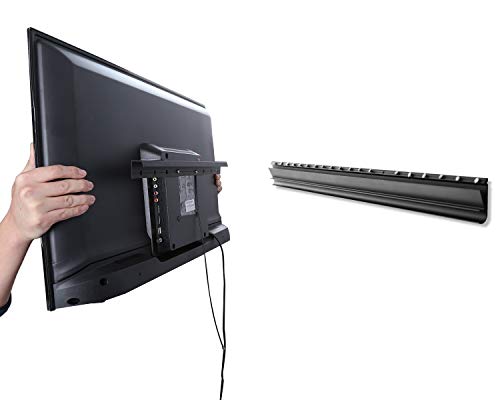
AENTGIU Alloy-Steel 26–55-Inch Mount stands out for its alloy-steel construction and stated one-inch wall clearance, with a small upward tilt range of up to 5 degrees. It fits 26- to 55-inch TVs and VESA patterns up to 400 × 400 mm. The manufacturer gives separate capacities by wall type: 80 pounds on drywall and 110 pounds on wood or concrete block. That distinction matters: use the drywall limit for a drywall installation, and choose another option if the TV exceeds it.
Bottom line: Choose this for a 26–55-inch TV under 80 pounds when a close wall fit matters.
Auoace Studless 13–55-Inch Mount
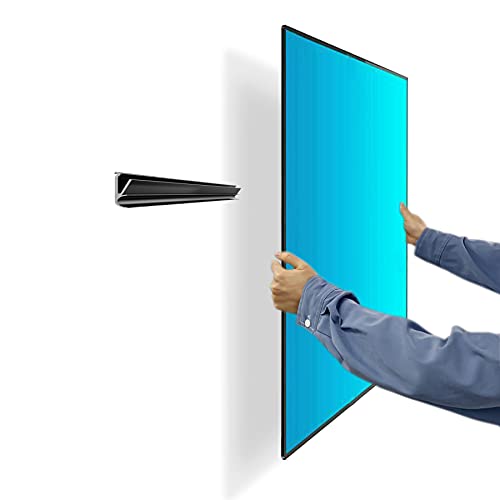
Auoace Studless 13–55-Inch Mount is the option here with the smallest screen-size starting point: its features describe compatibility from 13 to 55 inches, up to 99 pounds, and VESA patterns from 100 × 100 to 400 × 400 mm. It is intended for drywall without drilling and includes mounting hardware. The product name says 12 inches, while its maker gives 13 inches as the lower bound, so confirm the minimum supported size if your TV is 12 inches. Its 55-inch ceiling also rules out larger sets.
Bottom line: Pick this for a smaller TV that falls within its size, weight and VESA limits.
HangSmart TV No-Stud Mount

HangSmart TV No-Stud Mount has the broadest screen range, covering 19- to 100-inch TVs and a capacity of up to 150 pounds. The manufacturer describes it as a DIY, no-stud mount for flat-screen LED, LCD and curved TVs. That range makes it a candidate for larger screens that exceed the size limits of the other mounts here. Its maker gives no VESA range, so check the mount’s compatibility with your TV before ordering. The 150-pound limit still applies, regardless of screen size.
Bottom line: Choose this for a larger TV within 100 inches and 150 pounds after confirming VESA fit.
How to choose a no-drill TV wall mount
Match three measurements before choosing: screen size, TV weight without its stand, and VESA pattern. VESA is the horizontal and vertical distance between the four mounting holes on the TV, measured in millimeters; a 400 × 400 pattern means 400 mm in each direction. A mount’s advertised screen range alone does not guarantee compatibility, because weight and hole spacing must also fit. For these options, the maximum weight ranges from 80 pounds on drywall to 154 pounds, and stated VESA limits vary. Check the back of the TV or its manual for the hole pattern and weight. If the TV’s weight is close to a mount’s limit, pick a mount with a higher capacity rather than relying on the screen-size label.
Drywall and wall fit for studless mounts
Studless mounts transfer a TV’s load through multiple small nails into drywall, rather than using screws anchored into wood studs. Drywall condition and thickness affect how securely the nails can hold, so avoid cracked, crumbling or water-damaged areas. Do not assume a mount intended for drywall is suitable for plaster, masonry or a hollow area with damaged board; use only a wall type the mount supports. Locate pipes and electrical wiring before driving nails, and do not place a mount where hidden services may run. A useful decision rule is to use a stud-mounted solution instead if the wall is not sound drywall or if your TV exceeds the mount’s capacity.
Compare no-drill mount types by fit
Use this comparison to narrow choices by the specification most likely to rule a mount out. The screen-size range is only a starting point; verify weight and VESA compatibility too.
| Need | Option to compare | Fit condition |
|---|---|---|
| Smallest TV size | Auoace Studless 13–55-Inch Mount | Features say 13–55 inches |
| Broadest screen range | HangSmart TV No-Stud Mount | 19–100 inches; confirm VESA fit |
| Highest weight capacity | Supcline No-Drill 26–65-Inch Mount | Up to 154 pounds |
| Mount for drywall at up to 80 pounds | AENTGIU Alloy-Steel 26–55-Inch Mount | Drywall capacity is 80 pounds |
| Under-100-pound, 24–65-inch TV | Perlegear No-Drill 24–65-Inch Mount | VESA from 100 × 100 to 400 × 400 mm |
Install and use a studless TV mount safely
Use the hardware and installation sequence for the selected mount; a hammer-driven nail plate is not installed the same way as a conventional bracket screwed into studs. Keep the mount level, use every required attachment point, and have another person support the TV while it is lifted onto the bracket. Never exceed the mount’s capacity or treat a maker’s test claim as permission to use a damaged wall. After installation, check for movement before letting go, and recheck the mount if it is bumped or the TV is removed. Leave enough room for cables to bend without pulling the set away from the wall.
Frequently Asked Questions
How do I find my TV’s VESA pattern?
Measure the horizontal and vertical distance between the centers of the four threaded holes on the back of the TV in millimeters. A 200 × 200 mm pattern means 200 mm across and 200 mm down; match both dimensions to the mount.
Should I include the TV stand in its weight?
No, use the TV’s weight without its stand when comparing it with a wall mount’s capacity. If the set’s weight is near the mount’s limit, choose a higher-capacity mount rather than counting on a small margin.
Can I put a studless TV mount on plaster?
Do not assume a drywall nail mount is suitable for plaster; the mounting surface needs to match the wall types the mount supports. Plaster thickness and condition differ, so use a mounting method specifically approved for that wall.
How much space does a low-profile mount leave?
The clearance for Supcline No-Drill 26–65-Inch Mount is 1.08 inches, while AENTGIU Alloy-Steel 26–55-Inch Mount lists one inch. The actual gap can also depend on the TV’s back shape and cable plugs, so account for connector clearance before positioning the set.
What should I do if my TV exceeds the weight limit?
Choose a mount with a capacity greater than the TV’s weight and verify that the wall type is supported. For drywall, AENTGIU Alloy-Steel 26–55-Inch Mount lists an 80-pound limit, while Supcline No-Drill 26–65-Inch Mount lists 154 pounds; never use the drywall limit for another wall material.