
Air Compressor for Cleaning PC: 5 Blowers Compared

For most PC owners seeking an air compressor for cleaning a PC, WOLFBOX MF60 Air Duster is a practical fit because it offers three speeds, including a 25,000 RPM setting for delicate dusting. Choose a different model if you want more speed steps, an LED display or included brushes and nozzles.
These cordless electric dusters use a motor-driven fan rather than a tank-style air compressor, so they can direct airflow at dust without disposable cans.
We earn a commission if you buy through links on this page. As an Amazon Associate I earn from qualifying purchases. Products are compared on manufacturer specifications, not hands-on testing.
- Best overall: WOLFBOX MF60 Air Duster – Three speed settings include a 25,000 RPM low setting for delicate dusting.
- Best for accessories: FRESMOL 100,000 RPM Air Duster – Includes five nozzles, three brushes, an LED display and a built-in light.
- Best for speed control: SKTFFR 150,000 RPM Air Duster – Six adjustable gears give more airflow steps than the three-speed models.
| Product | Best for | Top speed | Speed settings | Weight | Shop |
|---|---|---|---|---|---|
| WOLFBOX MF60 Air Duster | Gentle dusting | 110,000 RPM | 3 | 0.5 lb | Check Price on Amazon |
| WOLFBOX MegaFlow 50 | Lightweight handling | 110,000 RPM | 3 | 0.45 lb | Check Price on Amazon |
| FRESMOL 100,000 RPM Air Duster | Detailed cleaning | 100,000 RPM | 3 | 1.15 lb | Check Price on Amazon |
| SKTFFR 150,000 RPM Air Duster | Fine speed control | 150,000 RPM | 6 | 0.4 lb | Check Price on Amazon |
| CAGIWIRU 130,000 RPM Air Duster | Long low-speed use | 130,000 RPM | 3 | 0.82 lb | Check Price on Amazon |
Air Compressors for Cleaning a PC
Compare these cordless electric dusters by their airflow controls, weight and included cleaning accessories.
WOLFBOX MF60 Air Duster
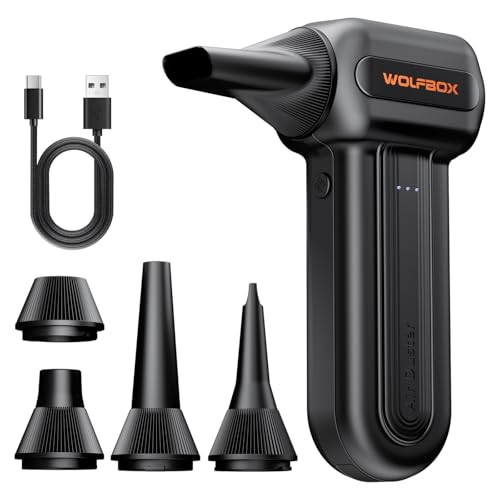
For a low-speed option among these models, this duster has a 25,000 RPM first gear, followed by 60,000 and 110,000 RPM settings. It weighs 0.5 lb and uses two 2,500 mAh batteries; the maker says runtime reaches 240 minutes on the lowest gear and charging takes 3.5 hours. That combination suits careful, cordless cleaning around a desktop setup. The limitation is that the features do not identify included nozzles or brushes, so it may be less convenient for buyers who want a range of attachments ready to use.
Bottom line: Choose it if a distinctly lower first speed matters most for your dusting routine.
WOLFBOX MegaFlow 50

The MegaFlow 50 is the lightest option here with a weight of 0.45 lb, and it includes four nozzles for directing airflow. Its three speed settings make it suitable for different cleaning tasks, while the cordless design and included lanyard support portable use. The maker presents it as a reusable alternative to disposable air cans. Pick this model if carrying weight and nozzle choice matter more than a display or a larger number of speed steps.
Bottom line: Choose it if the lower stated weight and four included nozzles suit your priorities.
FRESMOL 100,000 RPM Air Duster

For buyers who want cleaning accessories and visual cues, this model pairs five nozzles and three brushes with an LED display and built-in light. The display shows speed mode and battery level, while three speed settings let you select airflow for different tasks. Its weight is 1.15 lb, heavier than the other models with weights provided, which may matter during longer handheld sessions. This combination suits users cleaning varied spaces such as keyboard gaps and vents. The maker gives no runtime figure in the features, so this is a weaker fit if knowing time between charges is essential.
Bottom line: Choose it for the display, light and broad set of brushes and nozzles.
SKTFFR 150,000 RPM Air Duster

Six adjustable gears give this duster more speed steps than any other option here, and its top motor speed is 150,000 RPM. At about 0.4 lb, it is a compact choice for users who want to tune airflow in smaller increments. Use a low setting around delicate components and reserve stronger airflow for suitable debris.
Bottom line: Choose it if six airflow settings matter more than a known runtime or accessory set.
CAGIWIRU 130,000 RPM Air Duster

The standout here is its runtime range: the maker says it runs up to 240 minutes on the lowest setting and 25 minutes at top speed. It reaches 130,000 RPM, has three speed settings, includes five nozzles and has an LED light. The weight converts to about 0.82 lb. This model suits someone who values a low-speed runtime and several nozzle choices.
Bottom line: Choose it if the low-speed runtime and five nozzles fit your cleaning needs.
How to Choose an Air Blower for PC Cleaning
For internal PC dusting, choose controllable airflow rather than the highest motor RPM alone. A lower setting gives more control near small headers, cables and loose dust; higher settings can move heavier debris but also spin fans rapidly. These five models offer between three and six speed settings, so select more steps if you want finer adjustments. Motor RPM is not a direct airflow measurement, and only one product gives a wind-speed figure. An electric blower also avoids a compressor tank, hose and separate air line. If you already own a shop compressor, don’t assume it is suitable for electronics: pressure regulation, moisture separation and a clean, oil-free air path are important considerations.
A useful decision rule is to favor a low setting when cleaning around exposed components, and use higher airflow only where you can control what dust and debris will do.
Safe Steps Before Blowing Dust From a PC
Shut down the computer, switch off the power supply and unplug the power cable before opening the case. Let hot components cool, then work in a dry area; never clean a powered system with airflow. Hold fan blades still while cleaning so the blast does not overspin them, which can damage bearings or generate unwanted voltage. Keep the nozzle a short distance from components and use brief, controlled bursts rather than pressing it against a board. Avoid touching circuitry or blowing debris deeper into sockets and ports. A grounded metal PC chassis helps reduce static buildup, but it does not make handling components risk-free. Wear eye protection if dust is likely to scatter.
How Often to Clean a Desktop PC
For a typical home desktop, inspect dust filters every one to three months and clean them when the mesh visibly accumulates debris; dusty rooms, pets and floor-level placement call for more frequent checks. Internal cleaning is often needed every three to six months, but the case and room conditions matter more than a fixed calendar. Remove washable filters and clean them separately from electronics, then let them dry completely before reinstalling. A blower is useful for loose dust, while a soft, electronics-safe brush can help with stubborn buildup when used gently. Avoid household vacuum nozzles near exposed circuit boards because contact and static can put components at risk.
Electric Duster Versus Air Compressor for a PC
A cordless electric duster is a compact motorized blower; a workshop air compressor stores pressurized air in a tank and sends it through a hose. For occasional desktop cleaning, the handheld type is easier to maneuver and does not require a tank or hose. Compressor air can work only when the setup delivers clean, dry, oil-free air at regulated pressure; tank condensation and compressor oil are potential contamination concerns. Air cans use compressed propellant and can discharge cold liquid if tilted or used improperly, so follow their label directions. This comparison covers cordless electric dusters, not tank compressors. If your need is specifically a compressor system, check its regulator and filtration setup before directing air at electronics.
Frequently Asked Questions
Can an air duster spin PC fans too fast?
Yes, strong airflow can overspin a fan and stress its bearings. Hold the blades still and use brief bursts rather than letting the fan free-spin.
Should I unplug my computer before dusting it?
Yes, shut down and unplug the PC before opening its case. Let hot components cool and avoid blowing air into a powered system.
Is a cordless duster the same as a compressor?
No, a cordless duster uses a motor-driven fan, while a compressor stores pressurized air in a tank. A compressor used on electronics needs regulated, clean, dry, oil-free air.
How often should I remove dust from my PC?
Inspect filters every one to three months and clean them when dust is visible. Internal cleaning may be needed every three to six months, sooner in dusty rooms or homes with pets.
Can I use a vacuum inside my computer case?
Avoid placing a household vacuum nozzle near exposed circuit boards because contact and static can damage components. Use controlled airflow for loose dust and a gentle electronics-safe brush for buildup.