
Type-C IR Blasters: 5 Phone Adapters Compared

For a compact Type-C IR blaster with a 10-meter range, choose R09 Mini Type-C IR Adapter; phone compatibility and its remote-control app are the deciding checks. Choose a different adapter if you need stated iOS compatibility, a different claimed range, or a specified carrying case.
A phone IR blaster plugs into a compatible USB-C port and uses an app to send infrared commands to home electronics; infrared control generally needs a clear path to the device.
We earn a commission if you buy through links on this page. As an Amazon Associate I earn from qualifying purchases. Products are compared on manufacturer specifications, not hands-on testing.
- Best overall: R09 Mini Type-C IR Adapter – It specifies Android USB-C compatibility and a 10-meter control range.
- Best for iOS compatibility: OCRUSTAR USB-C IR Blaster – Its product name and features describe USB-C support for iOS and Android.
- Best for stated extended range: Aluminum USB-C IR Controller – The maker claims an 8–15-meter signal range.
| Product | Best for | Phone compatibility | Claimed range | Weight | Shop |
|---|---|---|---|---|---|
| R09 Mini Type-C IR Adapter | Android phone users | Android USB-C | 10 m | 0.21 oz | Check Price on Amazon |
| OCRUSTAR USB-C IR Blaster | iOS and Android | iOS and Android USB-C | — | 0.35 oz | Check Price on Amazon |
| Universal USB-C IR Controller | Android with keychain | Android USB-C; Lightning option | 10 m | — | Check Price on Amazon |
| Mini Type-C IR Controller | Compact carry | Type-C; phone OS — | — | — | Check Price on Amazon |
| Aluminum USB-C IR Controller | Long-range claim | Type-C smartphone | 8–15 m | — | Check Price on Amazon |
Type-C IR blasters for phones
Compare the phone compatibility and range claims before choosing an adapter for your home electronics.
R09 Mini Type-C IR Adapter

Android USB-C compatibility and a 10-meter control range distinguish this mini adapter. The maker says it works with an app to control infrared devices including TVs, DVD players, set-top boxes, air conditioners, projectors, lights and fans, and that it needs no charging. Its compact body can attach to a keychain. It suits someone seeking one small adapter for several household devices. The maker excludes iPhone 15 USB-C compatibility, so iPhone owners should choose another option rather than assume a USB-C port guarantees support.
Bottom line: Pick this if you use a compatible Android USB-C phone and want a 10-meter range.
OCRUSTAR USB-C IR Blaster

Cross-platform USB-C support sets this adapter apart: its maker says it works with iOS and Android through the Ocrustar Remote App. The device range includes TVs, set-top boxes, air conditioners, projectors, DVD players, amplifiers, fans, heaters, robot vacuums and blinds, with named brands including Samsung, Sony, Panasonic, TCL and LG. It suits households with varied appliances or a compatible iPhone.
Bottom line: Choose this if stated iOS and Android support matters more than a range figure.
Universal USB-C IR Controller
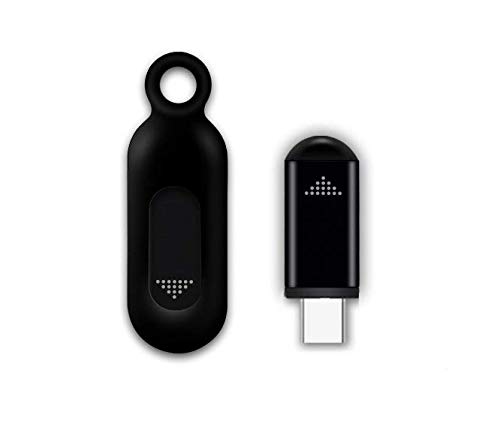
A 10-meter range and an anti-loss keychain design distinguish this adapter. The maker says the Type-C version works with Android, while a separate Lightning version is intended for Apple devices; it also names the uniTV Remote app and lists compatibility with brands such as Samsung, Vizio, LG, Sony, Roku and Apple TV. It is a fit for Android users who want a portable controller and broad stated brand coverage. The specifications do not confirm iOS use with this Type-C version, so Apple-phone owners should not infer support from the separate Lightning option.
Bottom line: Pick the Type-C version for Android when a keychain and stated 10-meter range are useful.
Mini Type-C IR Controller

A smaller-bodied design and a 30-degree control angle are the distinguishing claims for this mini controller. The maker says its fifth-generation chip works without Bluetooth and that the adapter uses an app to control air conditioners, TVs, set-top boxes and projectors. It also mentions a silicone cover, making it a candidate for buyers who value a protected, compact adapter. The specifications do not establish a specific phone operating system or a range in meters, so buyers who need a confirmed OS match or numeric distance should prioritize an adapter with those figures.
Bottom line: Choose this if compact design and the maker’s 30-degree angle claim suit your setup.
Aluminum USB-C IR Controller

An aluminum body and detachable chain distinguish this USB-C adapter, while its maker claims an 8–15-meter signal range. The product is described as controlling TVs, air conditioners and other appliances through an app, and its range claim includes operation through walls and glass. It may suit someone who values a metal construction and wants the longest distance among these options.
Bottom line: Pick this for its aluminum construction and stated 8–15-meter range claim, after checking phone support.
How to choose a Type-C IR blaster
Start with phone and app compatibility, because USB-C describes the connector rather than guaranteeing that every phone can run a particular remote app. Check that the adapter’s operating-system support matches your phone, then confirm the app can control the device category you want. Infrared remotes send commands toward a receiver; a clear path is the safest assumption, especially when a device sits inside a cabinet. A range claim such as 10 meters is a maker’s figure, not a guarantee for every room. Walls, device placement and obstacles can change whether a command reaches a receiver. If the phone or appliance is essential to your setup, verify compatibility before choosing by size or material.
Type-C compatibility and phone fit
A USB-C plug alone does not establish that an IR adapter works with a phone’s operating system or its remote app. Check the adapter’s OS support and app name, then compare those against the exact phone and the appliances you want to control. One product here explicitly excludes iPhone 15 USB-C compatibility, while another describes iOS and Android support; these differences matter more than the shared connector. For products without an OS match, confirm the fit before ordering. Also consider the port’s physical access: a thick case can prevent a plug from seating fully, and an adapter hanging from the phone may be easier to bump than a separate remote.
Infrared range and line of sight
Infrared control works best when the blaster can point toward the appliance’s infrared receiver without an obstruction. A cabinet door or furniture edge can block the direct path, so position the phone where the receiver can be reached rather than relying on a range number alone. Product range claims in this group span 8–15 meters, but those figures come from makers and should not be treated as identical room-level performance. Start with a shorter, unobstructed distance when setting up the app, then move farther away if commands still register. Do not assume a claim about passing through walls means every device or wall will respond; test the intended placement before making the adapter your only control.
Which Type-C IR adapter fits your setup
Choose by the constraint that matters most: confirmed phone support, carrying style, or a distance. A numeric range helps compare claims, while a named app or operating system helps narrow compatibility. Body material and a keychain can affect carry convenience but do not establish whether an appliance will respond. The table separates the choices by features; a dash means no comparable figure is supplied in the specifications.
| Need | Choose by |
|---|---|
| Android support | Look for an explicit Android USB-C match |
| iOS support | Choose a product explicitly describing iOS compatibility |
| Distance comparison | Compare the maker’s meter range claim |
| Easy carry | Look for a compact body, cover or chain |
Frequently Asked Questions
Do Type-C IR blasters work with every USB-C phone?
No; a USB-C connector does not guarantee operating-system or app compatibility. Match the adapter’s phone support to your exact device, and confirm that its remote app is available for that phone.
Do phone IR blasters need line of sight?
Infrared commands generally need a clear path to the appliance’s receiver. A cabinet door or furniture can block the signal, so test the intended placement without obstructions first.
How far can a USB-C IR blaster control devices?
The products here claim ranges from 8 to 15 meters, but those are maker claims rather than guaranteed room distances. Obstacles and receiver placement can change the usable range, so begin with a clear path.
Can an IR blaster control devices through walls?
Do not assume it can: infrared usually needs a path to the device receiver. One adapter’s maker claims operation through walls and glass, but wall materials and appliance placement can affect that claim.
Will a phone case affect a USB-C IR adapter?
A case can matter if its opening prevents the adapter plug from seating fully. Check the port clearance and make sure the adapter fits flush before using the app.