
CD Players for Cars: 5 External Models Compared

For a car stereo without a built-in disc drive, DDup External Car CD Player is a versatile pick if you want USB and AUX connections plus support for several disc and audio formats. Choose POSSPO Jupiter USB CD Player instead only if your stereo has a USB port, since its setup depends on that connection.
External car CD players connect to a stereo rather than fitting into the dashboard, so confirm which connection your stereo accepts before choosing.
We earn a commission if you buy through links on this page. As an Amazon Associate I earn from qualifying purchases. Products are compared on manufacturer specifications, not hands-on testing.
- Best overall: DDup External Car CD Player – Includes USB and AUX connectivity, a USB-C adapter and extension cable, and supports CD, CD-R/RW, MP3, WMA and WAV.
- Best for USB-only setups: POSSPO Jupiter USB CD Player – Designed to connect through a car stereo’s USB port and includes a USB extension cable.
- Best for steering-wheel controls: Portable USB/AUX Car CD Player – Supports touchscreen and steering-wheel control after connection, and handles CD, CD-R/RW, MP3 and WAV.
| Product | Best for | Connections | Supported formats | Dimensions | Shop |
|---|---|---|---|---|---|
| DDup External Car CD Player | Flexible connections | USB, AUX; USB-C adapter | CD, CD-R/RW, MP3, WMA, WAV | — | Check Price on Amazon |
| POSSPO Jupiter USB CD Player | USB-port stereos | USB; AUX use requires decoder | CD; PC DVD support | 6.3 × 6.1 × 2 in | Check Price on Amazon |
| Portable USB/AUX Car CD Player | Steering controls | USB, AUX | CD, CD-R/RW, MP3, WMA, WAV | — | Check Price on Amazon |
| ENVYCLOUD Portable Car CD Player | Compact storage | USB, AUX | — | 4.5 × 4.5 × 0.85 in | Check Price on Amazon |
| Portable USB/AUX Car CD Player, White | Anti-skip playback | USB, AUX | — | 5.16 × 5.16 × 0.94 in | Check Price on Amazon |
CD Players for Cars
Compare connection requirements and supported formats before matching an external player to your car stereo.
DDup External Car CD Player

USB-C adaptability and included accessories distinguish this model: it comes with a USB-C adapter and extension cable alongside USB and AUX connections. It supports CD, CD-R/RW, MP3, WMA and WAV playback, making it suitable for drivers with a mixed disc and audio collection. The maker says its four rubber feet and disc-cover mechanism help reduce skipping on rough roads. Confirm that your stereo accepts one of its connection options; the player is not a fit for a system without compatible USB or AUX input.
Bottom line: Choose this if you want multiple connection options and broad listed format support.
POSSPO Jupiter USB CD Player

USB-dependent setup sets this player apart: the maker says the stereo must have a USB port, where the player is recognized as a USB drive. A USB extension cable lets you place the player in locations such as a console, dashboard or glove box. The name also notes PC DVD support, but that does not mean it plays DVD discs through a car stereo. The maker says AUX use requires a decoder for louder, clearer sound. Skip this choice if your stereo has AUX but no USB port.
Bottom line: Pick this for a stereo with USB and a preferred place to position the player.
Portable USB/AUX Car CD Player

It connects through USB and AUX and supports CD, CD-R, CD-RW, MP3, WMA and WAV; DVD discs are not compatible. The maker says it is powered directly by USB and does not need an additional adapter. That USB power claim does not guarantee your stereo routes audio from the player, so verify that the stereo supports the required connection before choosing it.
Bottom line: Choose this if steering-wheel or touchscreen control support is a priority.
ENVYCLOUD Portable Car CD Player
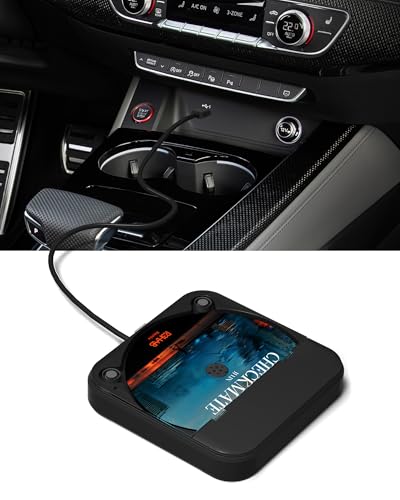
Its 4.5-by-4.5-inch footprint and 0.85-inch height make this the clearest option here for buyers comparing physical size. The maker says it connects to a car radio stereo through USB or AUX and also works with laptops, TVs and computers. Check format compatibility if your collection includes anything beyond standard audio CDs.
Bottom line: Pick this when a compact stated size matters more than named format support.
Portable USB/AUX Car CD Player, White

Anti-skip protection and an included remote distinguish this white external player. It connects by USB and AUX, and the maker says it is designed for stable playback in a vehicle and also works with laptops. Its dimensions are about 5.16 inches square and 0.94 inch high. No particular disc or audio-file formats are identified in the specifications, which matters if you rely on burned discs or compressed files; check support for those formats before choosing it.
Bottom line: Choose this if an included remote and anti-skip feature matter to you.
How to choose a car CD player
Start with the audio connection your stereo can use, not just whether the car has a USB socket. An AUX connection carries analog audio, while USB connections can serve as power, data, or both; an external player needs a compatible path for audio, not power alone. If your stereo has USB but no AUX, favor a model explicitly designed for USB stereo playback. If it has AUX only, choose a model that supports AUX audio and check whether any required decoder is included. Standard audio CDs are 12 cm across, so a player intended for regular CDs should accommodate that disc size. Set up the player and select a track while parked rather than handling discs or controls in traffic.
USB versus AUX connections in cars
USB and AUX are not interchangeable: USB can provide power or digital data, while AUX is an analog audio input. A USB port that charges a phone may not accept audio from an external player, and a stereo may not recognize the player as a USB device. The specifications specifically describe POSSPO Jupiter USB CD Player as requiring a stereo USB port and say AUX use requires a decoder. Before buying any USB-connected unit, check the stereo manual for USB media-device support, not just a charging port. For AUX, verify that the stereo has an audio input and that the player’s required cable or adapter matches it. These checks can prevent a powered-up player from producing no sound.
Disc and audio formats to check
Standard audio CDs and recordable CD-R or rewritable CD-RW discs are different formats; compatibility with one does not automatically guarantee compatibility with the others. MP3, WMA and WAV refer to audio file formats, and a player may support some without supporting all. Choose a model that names every format you plan to play: Portable USB/AUX Car CD Player and DDup External Car CD Player identify multiple disc and file formats, while other options do not name them. DVD is a separate disc format, so a car CD player should not be assumed to play DVDs; Portable USB/AUX Car CD Player explicitly excludes DVD discs. Burned discs can also vary with recording format and finalization, so confirm compatibility if you depend on home-recorded media.
Match the player to your car setup
Match the player to the stereo, then plan where its cable and disc controls will sit. This table summarizes the connection requirement or distinguishing feature to prioritize; it does not replace confirming the stereo’s supported audio inputs.
| Car setup or need | Choice to consider |
|---|---|
| Stereo USB port required | POSSPO Jupiter USB CD Player |
| USB and AUX, with format flexibility | DDup External Car CD Player |
| Steering-wheel control support | Portable USB/AUX Car CD Player |
| Stated compact dimensions | ENVYCLOUD Portable Car CD Player |
| Remote and anti-skip feature | Portable USB/AUX Car CD Player, White |
Allow enough cable reach to place the player where it will not obstruct driving controls, vents or visibility. USB extension cables can help with placement when included, but cable length and mounting options differ. Keep discs in their cases when not in use; scratches and dirt can interfere with reading, especially on recordable media.
Frequently Asked Questions
Will a car CD player work with any USB port?
No, a USB port may provide power without accepting audio data from an external player. Check the stereo manual for USB media-device support; a charging-only port is not enough.
Can an external car CD player play MP3 discs?
Only if the player supports MP3 playback. Of these options, Portable USB/AUX Car CD Player and DDup External Car CD Player name MP3 support; check the format list against the files on your discs.
Are CD-R and CD-RW discs the same?
No, CD-R is recordable while CD-RW is rewritable. Confirm that the player supports the type you use, since compatibility with one does not guarantee compatibility with the other.
Can I use an external CD player while driving?
An external player can be connected to a compatible stereo, but load a disc and set playback while parked. Keep the player and cables away from controls and the driver’s line of sight.
Do car CD players play DVD discs?
A CD player should not be assumed to play DVDs because DVD is a separate disc format. Portable USB/AUX Car CD Player explicitly excludes DVD discs; check a model’s format support before using DVDs.