
EVISTR Digital Voice Recorder: 4 Models Compared

EVISTR L359 128GB AI Recorder suits most buyers looking for an EVISTR digital voice recorder because it pairs 128GB of storage with AI transcription and summaries. Choose a simpler model if you only need audio playback and would rather avoid app-based transcription features.
Digital voice recorders capture spoken audio for later playback; storage, recording format and microphone placement affect how useful the files are.
We earn a commission if you buy through links on this page. As an Amazon Associate I earn from qualifying purchases. Products are compared on manufacturer specifications, not hands-on testing.
- Best overall: EVISTR L359 128GB AI Recorder – Combines 128GB storage with AI transcription, summaries and recording up to 3072Kbps.
- Best for a smaller device: EVISTR L359 64GB AI Recorder – The L359 measures 3.94 × 1.06 × 0.43 inches and includes AI transcription features.
- Best for a stated runtime: EVISTR L357 64GB Recorder – The L357 has a 500mAh battery and supports up to 32 hours of continuous recording.
| Product | Best for | Storage | Max recording bitrate | Dimensions | Shop |
|---|---|---|---|---|---|
| EVISTR L359 128GB AI Recorder | AI-assisted notes | 128GB | 3072Kbps | 4.0 × 1.25 × 0.39 in. | Check Price on Amazon |
| EVISTR L359 64GB AI Recorder | Compact AI notes | 64GB | 3072Kbps | 3.94 × 1.06 × 0.43 in. | Check Price on Amazon |
| EVISTR L357 64GB Recorder | Long recording sessions | 64GB | 1536Kbps | 3.86 × 1.2 × 0.47 in. | Check Price on Amazon |
| EVISTR L357 64GB Metal Recorder | Simple audio capture | 64GB | — | 3.86 × 1.2 × 0.47 in. | Check Price on Amazon |
EVISTR digital voice recorders
Compare storage, recording specifications and note-taking features to find the EVISTR model that fits your workflow.
EVISTR L359 128GB AI Recorder

The L359 stands out for combining 128GB of storage with AI-assisted note features. EVISTR says its app supports transcription in 113 languages and can generate summaries, mind maps, speaker identification and Ask AI insights. The recorder captures audio at up to 3072Kbps, and voice-activated recording can skip periods of silence. It suits people who want searchable meeting or lecture notes as well as audio. The tradeoff is that its transcription and summaries rely on the AI DVR Link app, so it is less suitable if you want a recorder-only workflow.
Bottom line: Choose this if you want AI-assisted notes and 128GB of recording space.
EVISTR L359 64GB AI Recorder

The 64GB L359 is the smaller-bodied AI option in this group, measuring 3.94 × 1.06 × 0.43 inches. EVISTR says it supports transcription in 113 languages, summaries, mind maps, speaker identification and Ask AI insights through the AI DVR Link app; recording reaches up to 3072Kbps. Its compact dimensions suit buyers who want AI features in a narrow device. Its 64GB capacity is half the 128GB offered by EVISTR L359 128GB AI Recorder, so choose the larger-capacity model if keeping more recordings on the recorder is the priority.
Bottom line: Choose this for AI note features in a smaller 64GB recorder.
EVISTR L357 64GB Recorder

The L357 focuses on standalone recording rather than AI-generated notes, with 64GB storage and a 500mAh battery. EVISTR says the battery provides up to 32 hours of continuous recording after a three-hour charge, and its dynamic noise-reduction microphone and PCM noise-reduction technology support recording up to 1536Kbps. Seven recording-gain levels let users adjust pickup sensitivity. This model suits buyers who want playback and long recording sessions without the L359’s app-based note tools. Its maximum bitrate is lower than the L359 models’ 3072Kbps.
Bottom line: Choose this for a 32-hour recording runtime without AI note tools.
EVISTR L357 64GB Metal Recorder
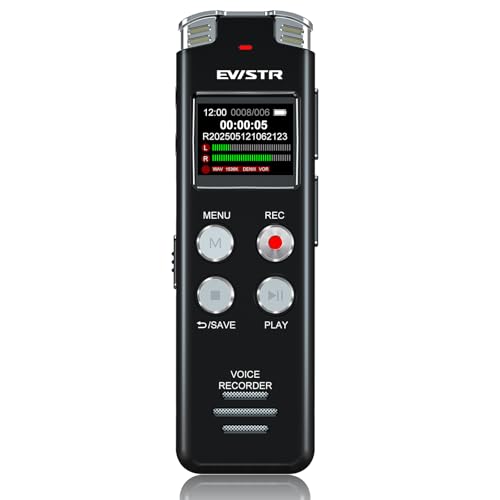
The 64GB capacity and playback-oriented design suit buyers who need a straightforward recorder for classes or conversations. Its maximum bitrate is not clear from the specifications, so it is less suited to buyers comparing recording quality by bitrate; choose EVISTR L357 64GB Recorder if a 1536Kbps maximum matters to you.
Bottom line: Choose this for a metal-bodied L357 recorder and confirm its capacity before ordering.
How to choose an EVISTR digital voice recorder
Start with storage and workflow: a recorder used for long lectures needs more room than one used for short reminders, while AI transcription requires a separate app workflow. Audio bitrate also affects file size; at the same recording duration, a higher bitrate generally uses more storage. For a single hour of mono audio, 128Kbps works out to about 58MB before file-system overhead, while stereo or higher-bitrate recording can use considerably more. If you mainly need searchable notes, prioritize an AI model; if you need files to replay later, a recorder without those tools may be a better fit. Leave room for multiple sessions rather than filling the device on the first long recording.
Where to place a voice recorder
Place a recorder close to the main speaker, ideally about 6 to 12 inches away, with the microphone unobstructed. Greater distance makes room noise and reverberation more prominent, while placing a mic too close can exaggerate plosives or handling noise. In a meeting, a central table position can capture multiple voices, but it will not make distant speakers equally clear. Voice activation can skip silence, yet quiet speech and pauses may be missed if the trigger threshold is poorly matched to the room. Make a short test recording and listen back before an important lecture or interview.
Recording bitrate and file formats
Higher bitrates preserve more audio data but create larger files; compressed MP3 is generally more storage-efficient than uncompressed PCM or WAV. As a rule of thumb, 128Kbps mono MP3 uses about 58MB per hour, while 256Kbps uses about 115MB per hour. These are estimates, and actual file size depends on format and settings. A higher number alone does not guarantee clearer speech: microphone distance, room noise and speaking volume also matter. For ordinary spoken notes, a moderate setting is often practical; use higher settings when preserving detail matters and storage is sufficient.
Matching recorder capacity to session length
Estimate capacity from your expected recording hours and bitrate instead of relying on a maximum-hour claim tied to a low-bitrate setting. At 128Kbps mono, roughly 58MB per hour means 64GB could hold about 1,100 hours in theory before overhead and other files; higher-quality or stereo settings reduce that total. Keep a reserve rather than planning to fill storage completely, and transfer recordings periodically if the device is used every day. Battery runtime is a separate limit: a large-capacity recorder still needs enough charge for the longest session, so recharge before an all-day event.
Frequently Asked Questions
How much storage does a voice recorder need?
For occasional short notes, 64GB can be ample; frequent long sessions or high-bitrate audio benefit from 128GB. At 128Kbps mono, an hour is about 58MB before overhead, but stereo and higher bitrates use more space.
Does a higher recording bitrate sound clearer?
A higher bitrate can preserve more audio detail, but it cannot fix a distant microphone or noisy room. For speech, put the recorder about 6 to 12 inches from the speaker when practical and avoid covering its microphone.
What does voice-activated recording do?
Voice activation starts or continues recording when sound crosses a trigger threshold and may skip quiet periods. Test it with the speaker’s normal volume because soft speech or pauses can be cut off.
How should I record a group meeting?
Place the recorder near the center of the table with its microphone unobstructed, then make a short test recording. A central placement helps balance nearby voices, but room echo and distance can still make quieter speakers harder to understand.