
Fan Xbox One Stand: Compare Fits and Features

For an Xbox One X, Mcbazel Xbox One X Cooling Stand combines a vertical stand, three fans and three fan modes; choose it if you want fan control and USB ports in one dock. If you have the original Xbox One, iPega Auto Sensing Xbox One Fan is the fan option here that fits that console, while Xbox One S owners need a stand designed for that model.
We earn a commission if you buy through links on this page. As an Amazon Associate I earn from qualifying purchases. Products are compared on manufacturer specifications, not hands-on testing.
- Best overall: Mcbazel Xbox One X Cooling Stand – The Xbox One X stand has three fans, high/low/off modes and three USB 2.0 ports.
- Best for USB charging: FASTSNAIL Xbox One X Cooling Stand – The Xbox One X stand has three USB 2.0 ports for accessories, but not external hard drives.
- Best for original Xbox One: iPega Auto Sensing Xbox One Fan – This USB-powered fan is compatible with Xbox One console only.
| Product | Best for | Console fit | Fan controls | USB ports | Shop |
|---|---|---|---|---|---|
| Mcbazel Xbox One X Cooling Stand | Xbox One X | Xbox One X only | High / low / off | 3 USB 2.0 | Check Price on Amazon |
| FASTSNAIL Xbox One X Cooling Stand | Xbox One X USB | Xbox One X only | 3 fans; modes unstated | 3 USB 2.0 | Check Price on Amazon |
| iPega Auto Sensing Xbox One Fan | Original Xbox One | Xbox One only | Auto sensing | — | Check Price on Amazon |
Xbox One Cooling Fans and Fan Stands
Match the console model first, then choose between a fan-only accessory and a stand with added ports or controls.
Mcbazel Xbox One X Cooling Stand

Mcbazel Xbox One X Cooling Stand stands apart with selectable fan speed: its three fans have high, low and off modes. The vertical dock also has three USB 2.0 ports, a light bar, a lock and a non-slip pad. The maker says the fans help cool the console during long play sessions. This is for Xbox One X only, so it will not suit an original Xbox One or Xbox One S owner. The USB ports do not support external hard drives, which matters if you want the stand to connect storage.
Bottom line: Pick this if you have an Xbox One X and want fan speed choices plus accessory ports.
FASTSNAIL Xbox One X Cooling Stand
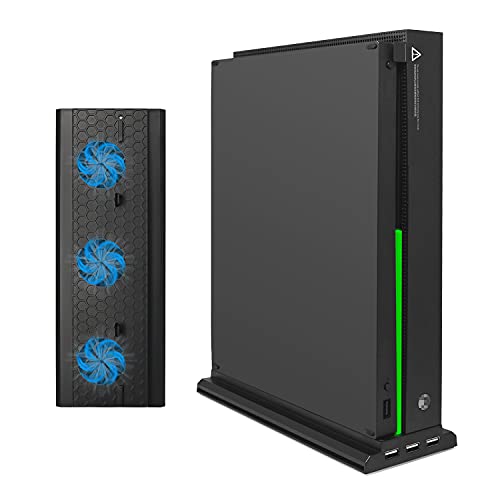
FASTSNAIL Xbox One X Cooling Stand pairs a vertical dock with three fans and three USB 2.0 ports, making its port function the clearest distinction for charging or connecting accessories. It also has a light bar. The maker says the cooling fans are intended to keep the console cool during long sessions. Compatibility is limited to Xbox One X, and the USB ports should not be used with an external hard drive. Choose this if your setup benefits from a dock and extra accessory connections; skip it if you need a fan for another Xbox One model.
Bottom line: Choose this for an Xbox One X setup that needs USB 2.0 accessory ports.
iPega Auto Sensing Xbox One Fan

iPega Auto Sensing Xbox One Fan is the fan-only option here rather than a vertical stand, and it is the only one specified for Xbox One without the X designation. It connects directly by USB and needs no AC adapter. The maker describes its motor as high-speed and quiet. Its compatibility is Xbox One console only, so check the exact console model before choosing it if you own an Xbox One X or Xbox One S. Since it does not provide a stand or USB hub, it suits buyers who want a separate fan accessory rather than a dock.
Bottom line: Pick this if you have the original Xbox One and want a USB-powered fan, not a stand.
How to choose an Xbox One cooling stand
Choose by exact console model before comparing fan features: Xbox One, Xbox One S and Xbox One X accessories are not automatically interchangeable. A fan-only accessory adds airflow hardware without changing how the console sits; a vertical stand also changes orientation and may add accessory ports. For a fan stand, check whether its fan control is adjustable and whether its USB ports support your intended device. These two Xbox One X docks specify USB 2.0 and warn against using the ports with external hard drives. A stand’s fan is supplementary: keep the console’s own ventilation openings clear, and do not treat an add-on fan as permission to place the console in a closed cabinet.
Xbox One, One S and One X fit
Match the accessory to the exact Xbox model name, not just the Xbox One family name. The Xbox One X docks here are identified for One X only, while the iPega fan says Xbox One console only; those labels point to different fits. Console generations also differ physically: the original Xbox One is larger than the One S and One X, so a snug stand or clip-on fan can miss its intended fit on another model. Check the model marking on the console before ordering, especially if the console is already mounted vertically. If model identity is uncertain, confirm it before choosing between a One X dock and an original-One fan.
Fan stand versus fan-only accessory
A fan stand combines console positioning with cooling hardware; a fan-only accessory adds a fan but is not a vertical base. That distinction matters if shelf width, orientation or cable routing is the main constraint. USB-powered fans draw power from a USB connection, while a stand’s hub can make controller or keyboard connections more convenient; USB hubs should not be assumed to handle storage drives. Use this quick choice guide to narrow the type before comparing features.
| Need | Choose | Check first |
|---|---|---|
| Vertical placement plus cooling | Fan stand | Exact console fit and clearance |
| Cooling accessory only | Fan-only unit | Console model and USB power connection |
| More accessory connections | Stand with USB hub | Device support; avoid assuming external-drive support |
Airflow and safe placement
Keep several inches of open space around console vents and avoid enclosed cabinets, since restricted airflow can trap heat instead of carrying it away. Put the console on a hard, stable surface rather than carpet, which can obstruct lower openings or collect dust. A vertical stand must hold the console securely and leave its vents unobstructed; added fans do not replace those basic placement rules. Keep cables clear of fan blades and avoid stacking objects on the console. If a fan’s noise or vibration changes suddenly, turn the accessory off and inspect for obstruction before continuing to use it.
Frequently Asked Questions
Do Xbox One X stands fit the original Xbox One?
Do not assume they fit: the Xbox One X docks here are specified for One X only, while the original Xbox One has a different physical size. Check the model name on the console before choosing a close-fitting stand.
Can I connect an external hard drive to these stand ports?
The two Xbox One X docks with USB 2.0 hubs explicitly exclude external hard drives from their ports. Connect storage directly to the console instead of relying on a stand hub.
Does a cooling fan stand replace console ventilation?
No; leave several inches of open space around the console vents and keep the system out of closed cabinets. An add-on fan does not make blocked vents safe.
Is a USB fan different from a fan stand?
Yes. A USB fan adds a cooling accessory, while a fan stand also supports the console in a particular position and may include a USB hub. Check whether the accessory fits the exact Xbox model.
Can I place an Xbox One console vertically?
Use a stand designed for the exact console model when placing it vertically, so the base is supported and vents remain clear. Keep the unit on a hard, stable surface with open space around it.