
Comp to HDMI Converter: 3 Composite Adapters Compared

For a composite-to-HDMI converter, RCA to HDMI Converter Kit is the most complete choice if you want the adapter and connection cables together. Choose Tengchi RCA to HDMI Converter instead if you want an HDMI 1.3 output and its specifically listed input-format support; these converters will not work with component video or convert HDMI to RCA.
We earn a commission if you buy through links on this page. As an Amazon Associate I earn from qualifying purchases. Products are compared on manufacturer specifications, not hands-on testing.
- Best overall: RCA to HDMI Converter Kit – The kit includes an RCA cable, HDMI cable, and micro-USB power cable.
- Best for HDMI 1.3 output: Tengchi RCA to HDMI Converter – It specifies HDMI 1.3 output and supports several named TV input formats.
- Best for 720p or 1080p output: RCA to HDMI Mini Converter – It offers a choice of 720p or 1080p HDMI output.
| Product | Best for | HDMI output | Included cables | Shop |
|---|---|---|---|---|
| RCA to HDMI Converter Kit | Ready-to-connect kit | 720p or 1080p | RCA, HDMI, micro-USB | Check Price on Amazon |
| Tengchi RCA to HDMI Converter | Format flexibility | 1080p | USB power cable | Check Price on Amazon |
| RCA to HDMI Mini Converter | Output choice | 720p or 1080p | USB power cable | Check Price on Amazon |
Comp to HDMI Converters
These composite-to-HDMI adapters convert analog RCA video for an HDMI display, but differ in output options and included cables.
RCA to HDMI Converter Kit

RCA to HDMI Converter Kit stands out by including a male RCA cable, an HDMI cable, and a micro-USB power cable, so the kit covers the signal and power connections. It converts composite RCA input to 720p or 1080p HDMI output and supports PAL, NTSC, SECAM, and related variants. The maker names older consoles, VCRs, and DVD players among compatible sources. This is a practical fit when you need the cables as well as the converter; choose another option if you specifically need a HDMI 1.3 output specification.
Bottom line: Pick this if you want the converter and its three listed cables in one kit.
Tengchi RCA to HDMI Converter
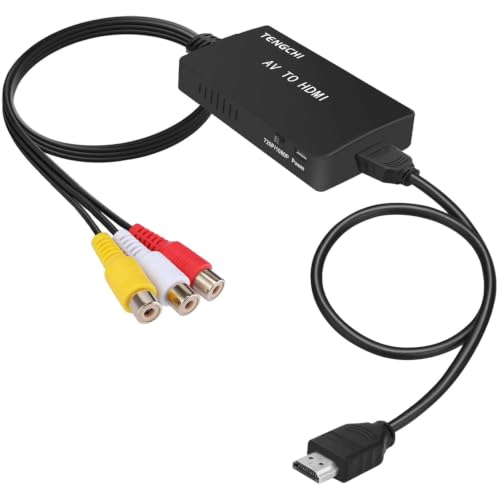
Tengchi RCA to HDMI Converter is the option with HDMI 1.3 output specifically identified, delivering a 1080p output from composite RCA input. It supports PAL, NTSC 3.58/4.43, SECAM, PAL/M, and PAL/N formats, a useful distinction when matching older video equipment. The maker says the USB power cable is included and calls for a 5V, 1A power source, which is not included. The limitation is that it does not support 3D or 4K, so it is not the right fit if either output is required.
Bottom line: Pick this for 1080p output and the specifically named HDMI 1.3 connection.
RCA to HDMI Mini Converter

RCA to HDMI Mini Converter distinguishes itself with a selectable 720p or 1080p HDMI output rather than a single stated output resolution. Its composite RCA input accepts PAL, NTSC 3.58/4.43, SECAM, PAL/M, and PAL/N formats. The maker describes it as plug-and-play and says to connect the included USB power cable to a 5V power adapter. That adapter is separate, so account for a suitable USB power source when setting up. This is a straightforward fit when output resolution choice matters; its included-cable description does not include a separate HDMI cable.
Bottom line: Pick this if you want to choose between 720p and 1080p output.
Composite Versus Component Connections
Composite video uses one yellow RCA connector for video, with red and white RCA connectors typically carrying stereo audio. Component video instead splits the picture across three video connections, commonly colored green, blue, and red; it is not the same input as a yellow composite jack. These converters take composite RCA, so a source with only component outputs needs a converter designed for component input. HDMI carries digital audio and video over one cable, while composite is analog. Before choosing an adapter, match the source’s actual video output—not just its connector color—to the converter’s input.
Choosing Output Resolution and TV Format
Pick an adapter based on the source connection first, then check its output resolution and TV-format compatibility. The products here specify 720p, 1080p, or both as HDMI output options, while accepting common analog formats including PAL and NTSC variants. A converter’s 1080p output does not turn a standard-definition source into native high-definition video; it formats the signal for an HDMI display. Match PAL or NTSC compatibility to the source’s video system, especially with older imported equipment. If the source has HDMI output already, a composite-to-HDMI converter is the wrong direction of conversion.
The table separates the two signal directions and the three common analog input types.
| Signal type | Typical connectors | Match to converter |
|---|---|---|
| Composite | Yellow video; red/white audio | Composite/RCA to HDMI |
| Component | Green, blue, red video; separate audio | Component-to-HDMI converter |
| HDMI source | HDMI connector | HDMI-to-composite converter, if needed |
Power and Cable Setup
USB-powered converters need a USB power connection during use; a video cable alone will not power the conversion electronics. Check whether the kit includes a power cable and whether it also includes the USB power adapter, since those are different items. For example, Tengchi RCA to HDMI Converter calls for a 5V, 1A source and says the supply is not included. Connect the RCA plugs to matching source outputs, route HDMI from the converter to the display, and connect USB power. If your source is a VCR or DVD player, its output must be composite RCA rather than component or HDMI.
Common Compatibility Mistakes
The most common mismatch is buying a one-way composite-to-HDMI adapter when the desired setup needs the reverse direction. These products convert analog RCA input to HDMI output; they do not accept HDMI as the source. Another mistake is treating component video as composite because both can use RCA-style plugs. Identify the source’s video sockets and look for a yellow composite video output before ordering. Also check that the display has an HDMI input and that the converter’s supported PAL or NTSC format covers the source. A converter changes the connection format, not the content or original recording quality.
Frequently Asked Questions
Will a composite converter work with component video?
No, composite and component are different signal types. Composite uses one video signal, usually on a yellow RCA plug; component splits video across three connections, commonly green, blue, and red.
Can I use this adapter in reverse?
No, a composite-to-HDMI converter takes RCA composite input and sends HDMI output. For an HDMI source connected to a composite display, use an HDMI-to-composite converter instead.
Does 1080p output make VHS video high definition?
No, 1080p output formats the converted signal for an HDMI display but does not add detail absent from the source recording. VHS remains an analog standard-definition source.
Does the USB cable power the converter from the TV?
The products require USB power during use, but whether a TV’s USB port supplies a suitable source depends on that port. Tengchi RCA to HDMI Converter specifies a 5V, 1A source, so confirm the power output before relying on a display port.
What do PAL and NTSC compatibility labels mean?
PAL and NTSC are analog television video formats used by different equipment and regions. Match the converter’s supported formats to the source, particularly for older or imported devices.