
Enclosure for 3.5 HDD: Four SATA Options Compared

For a single 3.5-inch SATA hard drive, ORICO 3588US3 3.5-Inch USB 3.0 Enclosure suits most people because it is a tool-free enclosure with a 20 TB maximum capacity. Choose SABRENT EC-KSL3 2.5/3.5-Inch Enclosure for an alternative single-drive case, or a multi-bay unit if you need several drives in one enclosure.
A hard drive enclosure connects an internal drive to a computer through an external interface; check that your drive uses SATA and that you have room and power for the enclosure you choose.
We earn a commission if you buy through links on this page. As an Amazon Associate I earn from qualifying purchases. Products are compared on manufacturer specifications, not hands-on testing.
- Best overall: ORICO 3588US3 3.5-Inch USB 3.0 Enclosure – Tool-free single-drive enclosure supports 3.5-inch SATA drives up to 20 TB.
- Best for broad SATA fit: SABRENT EC-KSL3 2.5/3.5-Inch Enclosure – Accepts both 2.5- and 3.5-inch SATA drives.
- Best for five-drive capacity: Yottamaster FS5U3 Five-Bay DAS – Five bays support up to 120 TB total, according to the maker.
| Product | Best for | Bay count | Maximum capacity | Shop |
|---|---|---|---|---|
| ORICO 3588US3 3.5-Inch USB 3.0 Enclosure | Single-drive setup | 1 | 20 TB | Check Price on Amazon |
| SABRENT EC-KSL3 2.5/3.5-Inch Enclosure | Mixed drive sizes | 1 | — | Check Price on Amazon |
| Yottamaster FS5U3 Five-Bay DAS | Large drive arrays | 5 | 120 TB | Check Price on Amazon |
| ORICO Five-Bay 500U3 Enclosure | Home storage expansion | 5 | 110 TB | Check Price on Amazon |
3.5-Inch HDD Enclosures
Compare single-drive cases with five-bay enclosures by drive compatibility, capacity, and setup needs.
ORICO 3588US3 3.5-Inch USB 3.0 Enclosure

For a straightforward single-drive setup, this ORICO case combines tool-free installation with a 12V/2A power supply. It accepts 2.5- and 3.5-inch SATA drives and supports up to 20 TB. The maker says its USB 3.0 connection reaches up to 5 Gbps and includes UASP support; actual transfers also depend on the drive, computer, and connection. The enclosure is made of ABS and has an auto-sleep mode. Its one-drive design is a limitation if you want several disks housed together; choose a multi-bay enclosure for that setup.
Bottom line: Pick this for one compatible SATA drive and a simple tool-free setup.
SABRENT EC-KSL3 2.5/3.5-Inch Enclosure
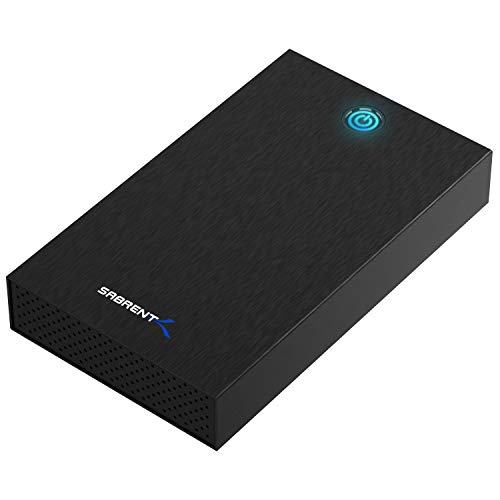
Drive-type exclusions are the key distinction here: the SABRENT EC-KSL3 accepts 2.5- and 3.5-inch SATA drives, but not SAS, M.2, NVMe, or IDE/PATA drives. Its tool-free design is suited to swapping compatible drives without screws, and the maker specifies a USB-A connection with UASP. A USB-C-only computer needs a USB-C-to-USB-A adapter, which is not included. Some 4 TB-or-larger 3.5-inch drives with unusually tall PCBs may not seat correctly, so this case is a less certain fit if your drive has that construction.
Bottom line: Choose this if you need one enclosure for either 2.5- or 3.5-inch SATA drives.
Yottamaster FS5U3 Five-Bay DAS

For consolidating several drives, the Yottamaster FS5U3 has five bays and a maker-stated total capacity of up to 120 TB, using five 24 TB drives. It is a direct-attached storage enclosure, not a NAS, and it does not support hardware RAID. The maker says its SATA III and USB 3.0 connection supports transfer speeds up to 6 Gbps; that is a maximum, not a guaranteed file-transfer rate. It accepts 2.5- and 3.5-inch SATA drives. The larger multi-drive setup is unnecessary if you only need to connect one disk.
Bottom line: Pick this for five SATA drives in a direct-attached, non-RAID enclosure.
ORICO Five-Bay 500U3 Enclosure
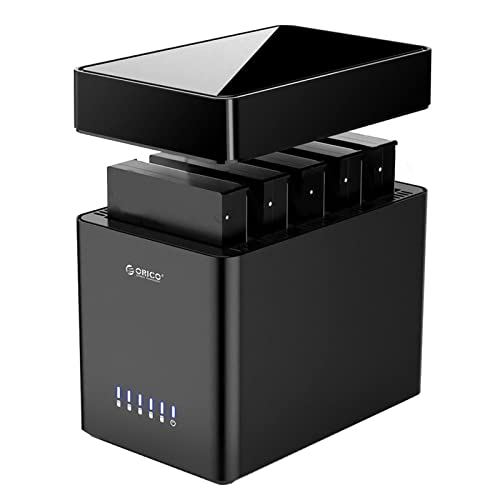
The ORICO 500U3 is a five-bay option with magnetic cover chips for tool-free access, distinguishing it from the single-drive cases. It supports 2.5- and 3.5-inch SATA drives, with a maker-stated total capacity of up to 110 TB and a maximum of 22 TB per drive. The maker also claims it recognizes drives in three seconds, though setup and recognition can vary by system. On Linux, the maker notes that only one hard drive can be read at a time, which limits this enclosure’s usefulness for Linux users who need simultaneous access to multiple drives.
Bottom line: Choose this for five-drive storage expansion, unless you need simultaneous multi-drive access on Linux.
How to Choose a 3.5-Inch HDD Enclosure
Start with the drive interface and the number of drives you need to connect. A 3.5-inch SATA drive needs an enclosure that supports both its physical size and SATA; a case made only for 2.5-inch drives will not fit it. SATA I, II, and III drives share the same basic SATA connector, but the interface and host connection affect transfer ceilings. USB 3.0 has a theoretical maximum of 5 Gbps, while real copying speeds depend on the drive, workload, and computer. For a single disk, a one-bay case avoids buying unused bays; choose multiple bays when you intend to keep several drives connected together.
Single-Bay Cases Versus Five-Bay DAS
A single-bay enclosure is the simpler choice when one external drive meets your storage needs. A five-bay DAS connects directly to a computer and holds multiple drives, but DAS is not the same as NAS: a NAS provides network-attached storage, while DAS depends on a direct host connection. Do not assume that multiple bays mean RAID; RAID requires explicit support and configuration, and one of these five-bay models explicitly does not support hardware RAID. The table compares the basic fit and capacity differences. Match the enclosure’s per-drive limit to your drive rather than relying only on a total-capacity figure.
| Need | Suitable type | Check |
|---|---|---|
| One 3.5-inch SATA drive | Single-bay case | Drive capacity limit |
| Several drives attached to one computer | Multi-bay DAS | Bay count and RAID support |
| Network access without a host computer | NAS, not DAS | Network and drive compatibility |
Check Drive Fit and Power
Drive fit involves more than the 3.5-inch label: confirm the enclosure accepts SATA and supports the drive’s capacity. Some drive designs can differ in PCB height, so verify physical dimensions when a maker flags a fit concern. A 3.5-inch desktop drive also needs external power; do not expect a USB port alone to power it. Multi-bay units need a power supply sized for several drives starting and running together. If you have only USB-C ports, check whether the enclosure’s host connection is USB-A and whether you need an adapter. USB-A-to-USB-C adapters change the connector, not the enclosure’s underlying protocol or speed.
Understand Capacity and Transfer Speed
Capacity figures for multi-bay enclosures often describe the sum of several drives, not the size of one supported drive. For example, a five-bay total of 120 TB based on five 24 TB drives is different from a per-drive maximum of 120 TB. USB 3.0’s 5 Gbps and SATA III’s 6 Gbps are interface ceilings, not promises of sustained copying speed; hard drives are generally slower than those theoretical rates. UASP can improve command handling on compatible hardware and software, but it does not remove the drive’s own limits. For predictable backups, avoid filling the only copy of important files; an enclosure is not itself a backup strategy.
Frequently Asked Questions
Can a 3.5-inch HDD enclosure connect a 2.5-inch drive?
Only if the enclosure supports 2.5-inch drives as well as 3.5-inch drives. Check both the supported physical size and SATA compatibility before connecting a smaller drive.
Does USB 3.0 transfer at 5 Gbps in practice?
No, 5 Gbps is the theoretical USB 3.0 interface maximum, not a typical sustained file-copy rate. The drive, USB controller, cable, and workload all affect actual throughput.
Does a five-bay enclosure automatically provide RAID?
No; multiple bays do not guarantee RAID support. Confirm the enclosure’s RAID features and configuration method, especially if you need redundancy or a combined volume.
Can a USB port power a 3.5-inch hard drive?
A 3.5-inch desktop drive generally needs external power, so use an enclosure with an appropriate power supply. USB alone is not a safe assumption for powering this drive size.
What does DAS mean for an HDD enclosure?
DAS means direct-attached storage: the enclosure connects to a computer rather than providing network access by itself. A NAS is designed for network access, so choose according to how you need to reach the files.