
Air Cards for Laptops: Readers and Hubs Compared

For reading camera memory cards on a laptop, BENFEI 4-in-1 Card Reader is the clearest match because it supports SD, Micro SD, MS and CF cards. The other options are USB hubs with SD and TF slots, better suited to adding ports as well as transferring card files.
We earn a commission if you buy through links on this page. As an Amazon Associate I earn from qualifying purchases. Products are compared on manufacturer specifications, not hands-on testing.
- Best overall: BENFEI 4-in-1 Card Reader – Reads four card formats: SD, Micro SD, MS and CF.
- Best compact hub: Anker 7-in-1 USB-C Hub – Combines SD and TF slots with HDMI and USB ports in a 5.17-inch hub.
- Best for extra USB-A ports: Denlane 8-in-2 USB Hub – Adds four USB-A ports, an SD/TF slot and a 3.5 mm audio adapter.
| Product | Best for | Card formats | Connection | Other ports | Shop |
|---|---|---|---|---|---|
| BENFEI 4-in-1 Card Reader | Multiple card formats | SD, Micro SD, MS, CF | USB-A, USB-C | — | Check Price on Amazon |
| Anker 7-in-1 USB-C Hub | Compact card hub | SD, TF | USB-C | HDMI, 2 USB-A, USB-C data | Check Price on Amazon |
| Anker 8-in-1 Dual HDMI Hub | Dual-display desk setup | SD, microSD | USB-C | 2 HDMI, Ethernet, 2 USB-A | Check Price on Amazon |
| 7-in-1 USB-C Hub | Basic monitor expansion | SD, TF | USB-C | HDMI, 2 USB-A, USB-C | Check Price on Amazon |
| Denlane 8-in-2 USB Hub | USB-A expansion | SD, TF | USB-C, USB-A | USB 3.0, 4 USB-A 2.0, audio | Check Price on Amazon |
Air cards for laptops
Match the reader or hub to your card format and the ports your laptop needs.
BENFEI 4-in-1 Card Reader
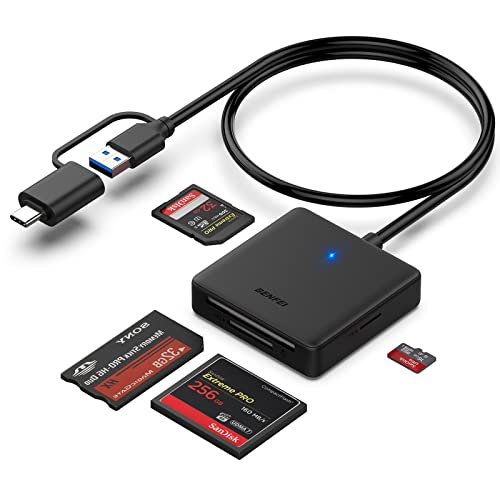
For the widest card-format coverage in this group, this reader handles SD, Micro SD, Memory Stick and CompactFlash cards. Its USB-A and USB-C connectors let it work with laptops that have either port type, and it can read four cards simultaneously. BENFEI says transfer rates reach 160 MB/s in UHS-I mode; actual speed depends on the card and host connection. Choose it when you need legacy formats such as MS or CF. It is a reader rather than a port-expansion hub, so it does not add HDMI or other laptop connections.
Bottom line: Choose this if your cards include formats beyond SD and Micro SD.
Anker 7-in-1 USB-C Hub

Unlike a dedicated reader, this 7-in-1 hub combines SD and TF card slots with display and peripheral connections. It measures 5.17 × 1.46 × 0.47 inches and includes HDMI, two USB-A 3.0 ports, a USB-C data port and a USB-C PD input. Anker says HDMI supports 4K at 60 Hz and the data ports support 5 Gbps; the USB-C data port does not carry video. This fits a laptop user who wants card access alongside a monitor connection. It does not support MS or CF cards, and its card slots share the hub rather than offering four card formats.
Bottom line: Pick this if you need SD/TF access alongside HDMI and USB ports.
Anker 8-in-1 Dual HDMI Hub

For a desk setup that needs network and monitor connections as well as card access, this hub adds Ethernet and two HDMI ports. It has an SD/microSD reader and USB-C PD input, with pass-through charging up to 85 W according to Anker when used with a compatible 100 W wall charger and USB-C cable. Anker says one display can run at 4K/60 Hz or two at 4K/30 Hz; on macOS, both external displays show the same content. This is more useful as a docking hub than as a card-only reader, and it does not cover MS or CF cards.
Bottom line: Choose this for SD/microSD access in a dual HDMI workstation.
7-in-1 USB-C Hub

This hub provides card access plus a 4K HDMI connection and USB data ports, but its HDMI ceiling is 4K at 30 Hz rather than 60 Hz. It includes a USB-C PD charging port rated up to 100 W, two USB-A ports, a USB-C data port, and SD and TF slots. The product says 4K display output requires a USB-C device with DP Alt Mode. Choose it when SD/TF reading and basic monitor expansion matter more than higher refresh-rate output. The card slots do not accept Memory Stick or CompactFlash, so owners of those formats need a separate reader.
Bottom line: Pick this if you need SD/TF slots and 4K/30 Hz HDMI.
Denlane 8-in-2 USB Hub

Among these hubs, this one emphasizes USB-A expansion, with four USB 2.0 ports plus a USB 3.0 port, alongside an SD/TF slot and a 3.5 mm audio adapter. It also has a USB-C data-transfer port and is described as an 8-in-2 design, making it relevant when a laptop needs several peripheral connections rather than display output. The USB 3.0 connection supports 5 Gbps, while USB 2.0 is 480 Mbps. This is suited to keyboards, mice or other lower-speed accessories; it does not include HDMI or the broader card-format support of a dedicated reader.
Bottom line: Choose this when several USB-A peripherals matter more than HDMI.
Choosing a laptop card reader by card format
Start with the label on the card, because SD, Micro SD, Memory Stick and CompactFlash are different physical formats. SD and Micro SD are the only card formats shared across these hubs; the BENFEI reader also accepts MS and CF. A microSD card is often called TF, so a slot marked TF is intended for that smaller format. Before choosing a hub, check whether the card is SD or microSD and whether it needs an adapter. UHS-I is a speed class interface, not a guarantee that every card or laptop will transfer at its maximum rate. For cards that must be read at the same time, check that simultaneous reading is supported rather than assuming multiple slots can work together.
USB-A and USB-C reader connections
Choose a connector your laptop can use without sacrificing its only port. USB-C is reversible and common on newer laptops, while USB-A remains common on accessories and older computers; a dual-connector reader can cover both. USB 3.0 has a theoretical signaling rate of 5 Gbps, but card speed, reader circuitry, file size and the laptop port all affect real transfers. UHS-I’s theoretical bus maximum is 104 MB/s, so claims above that figure need the particular product’s own support details rather than assumptions about the card standard. For hub-based readers, a connected monitor or other USB devices also share the single host connection’s bandwidth.
Card reader hubs and dedicated readers compared
A dedicated reader is the simpler choice when card formats are the main concern; a hub makes sense when the laptop also needs display, Ethernet or peripheral ports. The table separates those roles and notes the actual formats each option supports.
| Need | Choice | Reason |
|---|---|---|
| SD, Micro SD, MS and CF | Dedicated reader | Four card formats in one reader |
| SD/TF plus monitor output | USB-C hub with HDMI | Card access and display connection |
| Card access plus network and dual displays | Docking hub | Ethernet and two HDMI ports |
HDMI resolution and refresh rate are separate limits: 4K at 30 Hz is less smooth for desktop movement than 4K at 60 Hz, even at the same resolution. Mac users should also distinguish extended desktops from mirrored output, because some docks mirror two external displays on macOS.
Safe card handling and common transfer mistakes
Never remove a memory card while files are being written; wait for the transfer to finish and eject the card in the operating system first. This reduces the risk of corrupting files or the card’s file system. A card reader cannot make a slower card reach a faster interface’s ceiling, and copying many small files is usually slower than transferring the same total amount in a few large files. For large video folders, use a USB 3.x host port and a card whose speed rating meets the camera’s recording requirement. Check that the laptop supports USB-C video before expecting a hub’s HDMI port to produce a display signal.
Frequently Asked Questions
Can a laptop read an SD card without a built-in slot?
Yes, an external USB card reader can provide an SD slot through USB-A or USB-C. Confirm the laptop has a matching port, or use an appropriate adapter.
Is a TF card the same as a microSD card?
Yes, TF is another name for microSD. A slot marked TF is intended for microSD cards, though full-size SD cards are physically larger and do not fit that slot.
Why is my memory card transfer slower than expected?
A card reader’s interface speed is only one limit; the card’s own rating, the laptop port and the file mix can reduce transfer speed. USB 3.0’s 5 Gbps signaling rate is not the same as a guaranteed file-copy rate.
Can one card reader transfer files from two cards at once?
Some readers support simultaneous card access, but multiple slots alone do not guarantee concurrent transfers. Check for an explicit simultaneous-read feature before relying on it.
Should I eject a memory card before removing it?
Yes, eject it through the operating system after file transfers finish. Removing a card during a write can corrupt files or the card’s file system.