
Epson L805 DTF Printer: 3 A4 Models Compared

For an Epson L805 DTF printer, choose an A4 L805-based machine by the workflow you need: HIXSOP L805 A4 DTF Printer adds a roll feeder and cutter, while Qilpho L805 A4 DTF Printer with Oven includes an oven. Direct-to-film (DTF) printers put a design on film for later transfer to fabric.
Choose Fynqil L805 A4 DTF Printer if remote installation assistance matters more than an included oven or roll feeder. These are L805-based DTF machines; confirm the computer and software requirements before ordering.
We earn a commission if you buy through links on this page. As an Amazon Associate I earn from qualifying purchases. Products are compared on manufacturer specifications, not hands-on testing.
- Best overall: HIXSOP L805 A4 DTF Printer – Its roll feeder, cutter and white-ink circulation system support a more integrated film-printing workflow.
- Best for curing included: Qilpho L805 A4 DTF Printer with Oven – The package includes an oven, film, ink and powder alongside the printer.
- Best for setup help: Fynqil L805 A4 DTF Printer – Remote installation assistance and EraRIP software are included.
| Product | Best for | Included equipment | Feeding or curing | Cleaning or setup | Shop |
|---|---|---|---|---|---|
| HIXSOP L805 A4 DTF Printer | Roll-fed workflow | Printer, film, software | Roll feeder and cutter | White-ink circulation | Check Price on Amazon |
| Qilpho L805 A4 DTF Printer with Oven | Bundled curing gear | Printer, oven, software, film, ink, powder | Oven included | White-ink circulation; one-touch cleaning | Check Price on Amazon |
| Fynqil L805 A4 DTF Printer | Installation assistance | Printer, consumables, EraRIP software, guide | — | White-ink circulation; remote installation | Check Price on Amazon |
Epson L805 DTF Printers
Compare the included workflow components and support features before choosing an L805-based A4 DTF machine.
HIXSOP L805 A4 DTF Printer

HIXSOP L805 A4 DTF Printer is the option here with both a roll feeder and an integrated cutter, useful when you want to handle film in a continuous feed rather than place each sheet manually. Its white-ink system combines stirring, circulation and filtration; the manufacturer says those features help limit sedimentation and clogging. The package includes the printer, film and software. This setup suits repeated DIY garment transfers, but the kit does not mention an oven or curing unit, so buyers who want that equipment bundled should choose another option.
Bottom line: Pick this if roll feeding and cutting matter more than having a curing oven included.
Qilpho L805 A4 DTF Printer with Oven

Qilpho L805 A4 DTF Printer with Oven stands apart by including an oven plus CMYK and white inks, transfer film and adhesive powder, making it the most complete transfer-workflow bundle of these three. Its A4 format is described as up to 8.3 inches, and the manufacturer says the white-ink circulation and one-touch cleaning are intended to support ink flow and maintenance. It is a fit for buyers who want curing equipment in the same kit. Items may ship separately, and the package is heavier than the other described machines at 55 pounds.
Bottom line: Choose this if you want an oven and core consumables bundled with the printer.
Fynqil L805 A4 DTF Printer
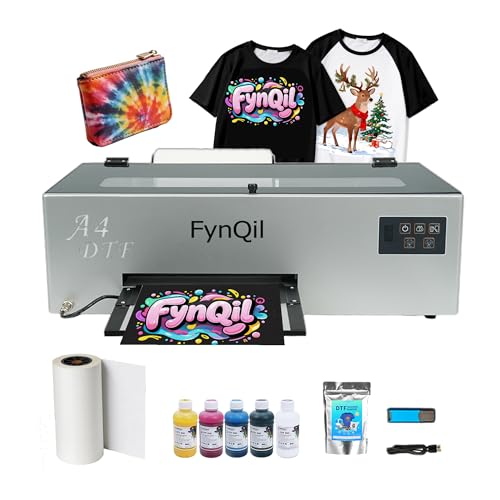
Fynqil L805 A4 DTF Printer differentiates itself with remote installation assistance and EraRIP software, which the manufacturer says is compatible with Windows 7, 8, 10 and 11. The package includes the A4 printer, consumables and a user guide; its feature description also gives a 2280 × 1440 dpi resolution. This option suits buyers who value setup support and use a compatible Windows computer. It does not include a curing oven in the described package, so plan to source curing equipment separately if you need an all-in-one workflow.
Bottom line: Pick this if remote setup support is your priority and you have curing equipment.
How A4 DTF printing works
DTF printing places a design on transfer film, applies adhesive powder to the wet ink, cures the powder, then transfers the design to fabric with a heat press. A4 is roughly 8.3 by 11.7 inches, so check the printable width against your largest design before choosing a machine. White ink provides an underbase for designs on dark fabric; circulation and agitation help keep its pigment from settling. A printer alone does not complete the transfer: the workflow also needs compatible film, powder, a curing method and a heat press. Choose a bundle with an oven if you want curing equipment included, and verify that its software works with your computer.
Choosing an L805 DTF printer by workflow
Choose by the stage you want the machine or bundle to simplify: film handling, curing, or setup. Roll feeding and cutting can reduce manual film handling, while an oven in the package gives you a defined curing component. A software bundle and remote assistance can matter more if you need help getting the printer configured. DTF kits are not interchangeable with ordinary inkjet printing supplies; use transfer film and adhesive powder made for the process. Keep this decision chart handy:
| Need | Feature to prioritize |
|---|---|
| Feed film with less manual handling | Roll feeder and cutter |
| Have curing gear in the bundle | Included oven |
| Get assistance with setup | Remote installation support |
For designs wider than about 8.3 inches, A4 width is a limiting factor; choose a larger-format machine instead.
White ink, powder and transfer safety
White DTF ink contains pigment that can settle, so circulation or stirring is useful for maintaining a more uniform supply to the printhead. Powder adhesive must be applied evenly to the printed film and cured before pressing; excess powder can leave unwanted residue around the design. Curing and heat pressing involve hot surfaces, so keep hands clear of heated equipment and use it in a ventilated work area. Fine adhesive powder can become airborne during handling, so avoid creating dust and follow the powder maker’s safety directions. Store inks and powder sealed when not in use to limit spills and contamination.
Setup and maintenance checks
Before starting, confirm the printer’s software supports your operating system and that the kit includes the film, ink and powder you plan to use. DTF machines need regular attention to white-ink flow because pigment can settle during idle periods; circulation and cleaning features reduce some routine work but do not eliminate maintenance. Keep film flat and free of dust, and avoid touching the print surface. A curing oven and a heat press do different jobs: the oven cures adhesive on film, while the press transfers the finished design to fabric. A bundle that includes one should not be assumed to include the other.
Frequently Asked Questions
How wide can an A4 DTF printer print?
A4 paper measures about 8.3 by 11.7 inches, but a printer’s usable print area can be smaller than the sheet. Leave room for margins and confirm the machine’s actual printable width before preparing oversized artwork.
What equipment is needed after DTF printing?
A DTF transfer typically needs adhesive powder, a curing method and a heat press after the design is printed on film. An included oven handles curing, while the press transfers the cured design onto fabric.
Why does a DTF printer need white ink circulation?
White ink pigment can settle when the printer sits idle, so stirring or circulation helps keep the ink more uniform. Follow the machine’s maintenance routine, especially before printing after an extended pause.
Can DTF transfers go on dark clothing?
DTF transfers can be designed for dark fabrics by printing a white underbase beneath the colors. The garment’s fabric and heat tolerance still matter, so test a transfer on a small area before producing a batch.
Is DTF powder safe to breathe?
Avoid breathing airborne adhesive powder and handle it in a ventilated area because fine particles can become airborne during application. Keep powder away from children and pets, and follow the powder maker’s handling directions.