
EMEET NOVA 4K Webcam: Models Compared by Fit

The standard EMEET NOVA 4K is the closest fit for a straightforward webcam, with PDAF autofocus and a 73-degree field of view; it defaults to 1080p, so select 4K in camera software when needed. Choose a different model if you want dual-camera zoom or 1080p at 60 fps for smoother motion.
A 4K webcam captures more image detail than 1080p, but video-call apps and bandwidth can limit the resolution others receive.
We earn a commission if you buy through links on this page. As an Amazon Associate I earn from qualifying purchases. Products are compared on manufacturer specifications, not hands-on testing.
- Best overall: EMEET NOVA 4K Webcam – The standard NOVA combines 4K capability, PDAF autofocus and a 73-degree field of view.
- Best for zoom framing: EMEET NOVA 4K Dual-Camera – Its dual-camera design supports hybrid zoom up to 11X.
- Best for smoother motion: EMEET S600 – It supports 1080p at 60 fps as well as 4K at 30 fps.
| Product | Best for | Camera design | Maximum resolution and frame rate | Zoom | Shop |
|---|---|---|---|---|---|
| EMEET NOVA 4K Webcam | Everyday video calls | Single camera | 4K at 30 fps | — | Check Price on Amazon |
| EMEET NOVA 4K Dual-Camera | Zoomed meeting framing | Dual camera | 4K | Up to 11X hybrid | Check Price on Amazon |
| EMEET C960 4K | Plug-and-play calls | Single camera | 4K | — | Check Price on Amazon |
| EMEET C60E Dual-Camera | Streaming close-ups | Dual camera | 4K | Up to 11X hybrid | Check Price on Amazon |
| EMEET S600 | Smoother streaming motion | Single camera | 4K at 30 fps; 1080p at 60 fps | — | Check Price on Amazon |
EMEET NOVA 4K Webcam and Alternatives
Compare the standard NOVA with dual-camera and streaming-focused EMEET webcams by how you plan to frame and use video.
EMEET NOVA 4K Webcam

The standard NOVA is the direct match for a conventional 4K webcam setup, rather than a dual-camera zoom system. It has PDAF autofocus, dual omnidirectional microphones, a 73-degree field of view, automatic light correction and a privacy cover. The maker says its autofocus range is 7.9 to 118 inches and that 4K must be selected in camera software or a compatible app because the default is 1080p. This is a practical fit for calls or streaming when a fixed field of view is sufficient; choose a zoom-oriented model if you need to switch between room and speaker framing.
Bottom line: Choose this for ordinary calls when a fixed 73-degree view suits your desk.
EMEET NOVA 4K Dual-Camera

The NOVA 4K Dual adds two camera views and remote-controlled framing, making it distinct from the standard NOVA. Its wide-angle camera is intended for room views, while the telephoto camera supports closer views; the maker specifies hybrid zoom from 1X to 11X and PDAF autofocus. The two cameras share a 1/2.8-inch CMOS 4K sensor. Consider it for meetings, presentations or training where switching between a group and a speaker matters. The tradeoff is added framing complexity: for a single desk view, the standard model has the simpler configuration.
Bottom line: Choose this when switching from a room view to a close-up is useful.
EMEET C960 4K

The C960 4K is a single-camera alternative with a plug-and-play setup, rather than the NOVA-branded model. It includes PDAF autofocus, dual omnidirectional microphones, a 73-degree field of view, automatic light correction and a privacy cover. The maker says 4K requires selecting that resolution in camera software or a compatible app because the default is 1080p. Its familiar fixed-view setup suits routine calls where the camera does not need optical-style view switching. If the priority is a telephoto close-up or hybrid zoom, look at one of the dual-camera options instead.
Bottom line: Choose this for a fixed-view setup with plug-and-play operation.
EMEET C60E Dual-Camera
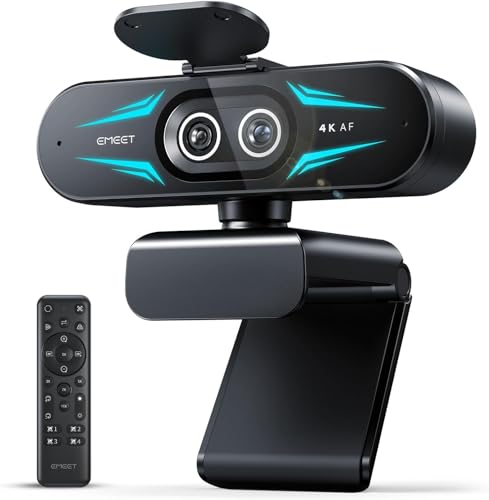
The C60E is the dual-camera option specifically positioned for streaming, with a wide-angle camera for the full scene and a telephoto camera for close-ups. It supports hybrid zoom up to 11X and PDAF autofocus, and its maker recommends a 13.8-inch distance for the telephoto view. The shared 1/2.8-inch CMOS 4K sensor differentiates this design from the single-camera C960 and S600. It suits demonstrations, teaching or streams that alternate between a presenter and details. A fixed desk call may not benefit from switching views, so a simpler single-camera model may be a better match.
Bottom line: Choose this for streams or demonstrations that need close-up framing.
EMEET S600

The S600 stands out for offering 1080p at 60 fps alongside 4K at 30 fps, a useful choice when smoother motion matters more than maximum resolution. It uses a Sony 1/2.55-inch sensor and has PDAF autofocus, two noise-reduction microphones, a built-in privacy cover and a 73-degree field of view. The maker says the available resolution depends on the camera software or app. This single-camera streaming model suits gaming or live commerce; it does not offer the dual-camera, up-to-11X framing described for the zoom-focused alternatives.
Bottom line: Choose this when 60 fps at 1080p matters for streaming.
How to choose an EMEET 4K webcam
Choose by framing and frame rate first, because 4K resolution alone does not determine whether a webcam suits your setup. A fixed-view camera suits a stable desk position; a dual-camera model is more useful when you need both a room view and close-up framing. For motion-heavy streams, compare frame rates: 60 fps captures more temporal detail than 30 fps, while the S600 offers that rate at 1080p rather than 4K. A measurable rule is to choose a model with 60 fps if smooth motion is a priority and 1080p meets your output needs; choose 4K at 30 fps when detail takes precedence. Also check whether your meeting or streaming app supports the resolution and frame rate you intend to select.
What 4K and frame rate mean for webcam video
4K UHD commonly means 3840 by 2160 pixels, four times the pixel count of 1920 by 1080 Full HD. More pixels can preserve detail in a local recording, but the receiving call may be capped by the app, account, network or device. Frame rate describes images captured per second: 30 fps is common for calls, while 60 fps can make fast motion appear smoother. Resolution and frame rate are separate settings, and a camera’s maximum combination may differ from its maximum resolution alone. Before a stream, select the intended capture mode in the app and check the preview; a webcam that defaults to 1080p will not automatically output 4K just because its sensor supports it.
When dual-camera zoom is useful
Dual-camera webcams pair a wider scene view with a tighter telephoto view, so they can shift between a group and a presenter without moving the camera. Hybrid zoom combines image processing with camera views, so its maximum magnification does not mean every zoom level has identical detail. Use a wide view when multiple people or a work area must remain visible; use a close-up only when the subject is centered and the camera is at the recommended distance. The C60E maker recommends 13.8 inches for its telephoto camera. If you only need a single head-and-shoulders composition, a fixed-view webcam avoids extra framing controls and is simpler to position.
Set up autofocus, light and privacy
Place the camera near eye level and keep the subject within its focus range; moving beyond that range can leave autofocus unable to keep the image sharp. Autofocus can also shift when an object moves close to the lens, so clear the foreground before an important call. Face a light source when possible: automatic light correction can adjust exposure, but it cannot replace adequate, even lighting. Open the camera’s settings to choose resolution rather than assuming the highest mode is active, and confirm the app is using the intended camera. Close a physical privacy cover whenever the camera is not in use; a cover blocks the lens but does not mute microphones.
Frequently Asked Questions
Why does my EMEET webcam start at 1080p?
The standard NOVA and C960 default to 1080p, according to their makers. Select 4K in compatible camera software or an app that exposes the resolution setting; some video-call services may still limit the outgoing stream.
Is 4K better than 1080p at 60 fps?
4K provides more spatial detail, while 1080p at 60 fps captures smoother motion. Choose 4K at 30 fps for detailed, relatively still framing, or 1080p at 60 fps when movement matters more.
How far should a webcam be from my face?
A typical desk webcam position is about 2 to 3 feet away, adjusted so your head and shoulders fill the frame. For the C60E telephoto camera specifically, the maker recommends 13.8 inches.
Does autofocus work at every distance?
No; autofocus has a working range, and the NOVA maker gives 7.9 to 118 inches for its PDAF system. Keep the subject within the model’s focus range and avoid placing objects very close to the lens.
Will a webcam privacy cover mute the microphone?
No; a physical lens cover blocks the camera view, not audio. Mute the microphone in the meeting app or disconnect the webcam when you need to prevent audio capture.