
Splitter for USB Headset: Training Cables Compared

For a splitter for USB headset training, Yealink USB-Y Trainer Cable is the closest match for Yealink USB-C headsets, with a 1.8-meter cable and USB-C/A computer connection. Choose VT PLT-QD USB Training Cable instead for compatible 4-pin PLT-QD headsets, or VT PLT-QD Training Kit if you need a complete QD headset training bundle rather than just a cable.
We earn a commission if you buy through links on this page. As an Amazon Associate I earn from qualifying purchases. Products are compared on manufacturer specifications, not hands-on testing.
- Best overall: Yealink USB-Y Trainer Cable – Connects two Yealink USB-C headsets through a 1.8-meter cable to a USB-C or USB-A PC port.
- Best for PLT-QD headsets: VT PLT-QD USB Training Cable – Uses two QD connectors and supports 4-pin PLT-QD headsets, with mute and volume controls.
- Best for a complete kit: VT PLT-QD Training Kit – Includes two mono QD headsets and a USB Y training cable for PC or Mac.
| Product | Best for | Headset connector | Cable length | Headsets included | Shop |
|---|---|---|---|---|---|
| Yealink USB-Y Trainer Cable | Yealink USB-C | USB-C | 1.8 m | No | Check Price on Amazon |
| VT PLT-QD USB Training Cable | 4-pin PLT-QD | 4-pin PLT-QD | 1.6 m | No | Check Price on Amazon |
| VT PLT-QD Training Kit | Complete QD kit | QD | — | 2 mono headsets | Check Price on Amazon |
USB Headset Splitter Cables and Training Kits
Match the headset-side connector first; these choices serve USB-C and QD equipment rather than the same headset type.
Yealink USB-Y Trainer Cable

Unlike the QD options, this training cable connects two Yealink USB-C headsets and reaches a computer through USB-C or USB-A. Its 1.8-meter length gives more reach than the 1.6-meter QD cable, and it is intended for a PC-based coaching setup. The maker says both headset users can manage calls and volume independently, with silent monitoring and agent-only coaching also supported. Choose it when the headset pair is compatible Yealink USB-C gear; it does not serve the 4-pin PLT-QD connector used by VT PLT-QD USB Training Cable and VT PLT-QD Training Kit.
Bottom line: Pick this for two compatible Yealink USB-C headsets and a PC with USB-C or USB-A.
VT PLT-QD USB Training Cable

For a cable-only setup using 4-pin PLT-QD headsets, this adapter has two QD headset connectors and a USB computer plug. The 1.6-meter cord is shorter than the Yealink cable, and built-in mute and volume adjustment are distinguishing controls. Its compatibility is specifically limited to 4-pin PLT-QD headsets, so confirm that connector style before ordering; it is not the USB-C option. The cable does not include headsets, unlike the bundle in VT PLT-QD Training Kit, making it more appropriate when both users already have compatible QD equipment.
Bottom line: Choose this when you already own two compatible 4-pin PLT-QD headsets.
VT PLT-QD Training Kit
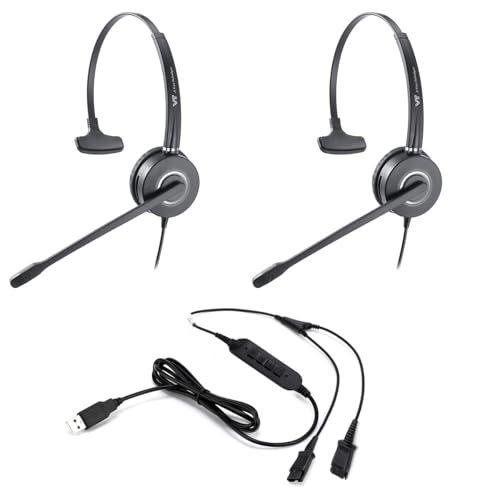
Unlike the cable-only choices, this bundle supplies two mono QD headsets alongside a USB Y training cable, so it can suit a team assembling a training setup from scratch. The maker says the kit works with PC and Mac and lets trainer and trainee join the same call. Its noise-canceling microphones and high-definition speakers are part of the included headsets. This is a less direct match if you only need a splitter cable, and the headset connector is QD rather than Yealink USB-C; verify headset compatibility with your existing equipment.
Bottom line: Pick this if you need two mono QD headsets as well as a training cable.
How to choose a USB headset splitter
Choose by the connector on the headset, not by the word “USB” on the computer cable. These options split into USB-C Yealink gear and QD headset gear; a USB-A or USB-C computer plug does not make the headset-side connectors interchangeable. A training splitter is built to route a computer call to two headset users, while a generic USB Y cable may only provide extra USB ports or power. Decide whether you need the adapter alone or headsets too: only the VT kit bundles two mono QD headsets. For an existing pair, identify its plug shape and exact compatibility before comparing cable length or controls.
| Need | Choose |
|---|---|
| Two Yealink USB-C headsets | Yealink USB-Y Trainer Cable |
| Existing 4-pin PLT-QD headsets | VT PLT-QD USB Training Cable |
| Two mono QD headsets plus cable | VT PLT-QD Training Kit |
Check headset connector and computer port fit
Connector fit determines whether a training cable can attach to the headsets at all. The Yealink cable takes two USB-C headsets and connects to a computer with USB-C or USB-A; the PLT-QD cable takes two 4-pin PLT-QD headsets and uses USB at the computer end. QD means quick disconnect, a headset-side connector family rather than a universal USB audio plug. Do not assume that another headset with a similar-looking QD connector will work: the 4-pin PLT-QD restriction is explicit for VT PLT-QD USB Training Cable. If the existing headset connector is unclear, check its model or connector before ordering.
When a USB Y cable is not a headset splitter
A generic USB Y splitter and a headset training cable solve different problems. A port splitter adds USB connections; it does not inherently create two headset endpoints for one call, and the generic cable in this group is not a headset training product. The training cables here are designed around two headset connections and a computer call, with supported features depending on the particular model. Avoid buying an ordinary USB-A-to-dual-USB cable for coaching just because it has two female ports. For a headset pair, select a cable whose named headset connector matches the actual headsets and whose computer plug fits the computer.
Cable length and training controls
Cable length matters when the trainer and agent sit apart, but no single length fits every desk. The cable-only choices here measure 1.6 meters and 1.8 meters; choose the longer option when the added 0.2 meter better reaches around the workspace, provided its connector fits the headsets. Controls also differ: the PLT-QD cable specifies mute and volume adjustment, while the Yealink cable feature set emphasizes independent call and volume management for both users plus monitoring and coaching modes. A bundle may be more useful when headsets are also needed, but it is not a substitute for checking connector compatibility.
Frequently Asked Questions
Can a USB headset splitter connect two headsets to one call?
A training splitter is designed to let two headset users join a computer call, but the headsets must match the splitter’s connector type. The Yealink option supports two Yealink USB-C headsets, while the QD choices use QD headset connections.
Does a USB Y splitter work with any headset?
No; headset-side connector and compatibility matter. The PLT-QD cable, for example, is limited to 4-pin PLT-QD headsets, while a generic USB port splitter is not itself a headset training cable.
What is the difference between USB-C and QD headset splitters?
USB-C and QD describe different headset connection types, so the cables are not interchangeable. The Yealink cable connects two USB-C headsets; the other options connect QD headsets, with the cable-only model specifying 4-pin PLT-QD.
How long should a headset training cable be?
Choose a cable long enough to reach both users’ positions without pulling on headset connectors. The cable-only options here are 1.6 meters and 1.8 meters, so measure the desk route and leave some slack.
Can a generic USB splitter let two people share a headset call?
A generic USB port splitter is not necessarily an audio-training adapter; extra USB ports alone do not establish two headset connections for one call. Choose a purpose-built training cable with headset connectors matching both headsets.