
Mobile Phone That Looks Like a Landline: 4 Options

For a mobile phone that looks like a landline, Opis PushMeFon 4G Desk Phone is the closest match for most people because it is a 4G push-button desk phone that uses a SIM. Choose Opis Technology 60s 4G Rotary Desk Phone for rotary styling, or a handset if you want to keep using your existing phone.
We earn a commission if you buy through links on this page. As an Amazon Associate I earn from qualifying purchases. Products are compared on manufacturer specifications, not hands-on testing.
- Best overall: Opis PushMeFon 4G Desk Phone – A push-button 4G cellular desk phone with SIM support and a classic desk phone form.
- Best for rotary styling: Opis Technology 60s 4G Rotary Desk Phone – A 4G desk phone with rotary styling and a real metal bell.
- Best for USB-C phones: Retro Type-C Phone Handset, Pink – A wired retro handset with a Type-C connector and built-in call controls.
| Product | Best for | Connection | Controls | Size | Shop |
|---|---|---|---|---|---|
| Opis PushMeFon 4G Desk Phone | Push-button desk use | 4G cellular; SIM | Push buttons | 9.06 × 8.27 × 5.12 in | Check Price on Amazon |
| Opis Technology 60s 4G Rotary Desk Phone | Rotary desk phone style | 4G cellular; SIM | Rotary dial | 9.06 × 8.27 × 5.12 in | Check Price on Amazon |
| Retro Wired Phone Handset, Black | Wired handset accessory | 1-meter cable; phone port | Answer, hang up, reject | — | Check Price on Amazon |
| Retro Type-C Phone Handset, Pink | USB-C handset accessory | Type-C wired connector | Answer, hang up, reject, redial | — | Check Price on Amazon |
Mobile Phones That Look Like Landlines
Choose a SIM-based cellular desk phone for a standalone desk phone form, or a wired handset that connects to a compatible mobile device.
Opis PushMeFon 4G Desk Phone

Unlike the rotary-style desk model, this is a push-button 4G cellular desk phone. It is designed to work with a SIM and has a conventional desk phone shape, so it suits someone who wants a mobile-network phone at a fixed spot rather than a handset accessory for a smartphone. The maker lists compatibility with multiple US carriers and says it works like a landline. Before ordering, confirm that your carrier supports this phone’s 4G service and SIM activation. Its desktop format is less suitable if you want a pocketable phone or wireless handset.
Bottom line: Pick this if you want a push-button cellular phone for a desk.
Opis Technology 60s 4G Rotary Desk Phone

The real metal bell and rotary styling distinguish this cellular desk phone from the push-button model. It is a 4G GSM desk phone for SIM-based calling; its name also specifies talk and text only, with no internet. The maker lists several compatible carriers, but network compatibility and SIM activation still need confirming before purchase. Its rotary interface and stationary desktop shape make it a fit for someone seeking a vintage look, not for someone who wants smartphone apps or a compact travel phone.
Bottom line: Choose this for rotary styling and a talk-and-text desk phone.
Retro Wired Phone Handset, Black
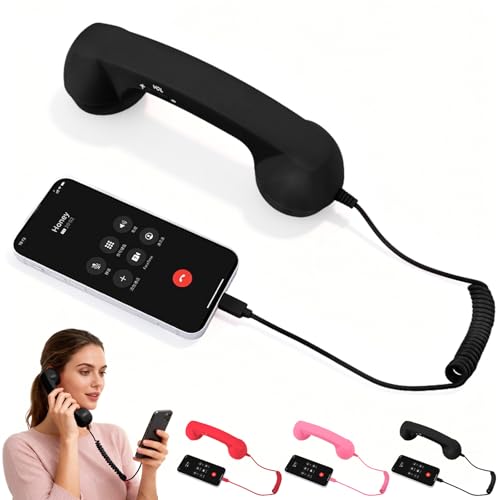
Unlike the SIM-based desk phones, this black retro receiver is an accessory that plugs into a mobile phone rather than a standalone cellular phone. Its 1-meter cable and ABS construction suit calls made near the connected device, and the maker says it supports answering, hanging up, and rejecting calls. It adds a landline-style handset experience, but it does not replace the mobile phone or provide its own cellular connection.
Bottom line: Pick this if you want a wired retro receiver for a compatible phone.
Retro Type-C Phone Handset, Pink

The Type-C plug is the key distinction: this pink handset is an accessory for compatible phones, tablets, or netbooks, while the desk phone options use a SIM-based cellular connection. Its built-in buttons cover answering, hanging up, rejecting, and redialing, and a volume slider adjusts audio. The maker says no Bluetooth pairing or batteries are needed. It suits someone with a compatible Type-C device who wants a wired retro receiver; it is not a standalone mobile phone, and it depends on the connected device for calls.
Bottom line: Choose this if your device has a compatible Type-C port.
How to Choose a Mobile Phone That Looks Like a Landline
Start by deciding whether you want a complete cellular phone or just a retro-shaped receiver. A cellular desk phone takes a SIM and connects to a mobile network; a wired handset connects to a separate phone and depends on that device for calls. With a SIM desk phone, confirm carrier compatibility and whether the required 4G service is supported before ordering. With a handset, match the connector to the device port; a Type-C plug is not interchangeable with other port types. Choose push buttons if you prefer direct keypad entry, or rotary styling if that visual and dialing format is the priority. A desk phone body is intended for a fixed surface, while a cable handset gives you a receiver to lift and hold.
Cellular Desk Phones Versus Wired Handsets
Cellular desk phones and wired handsets look related but serve different roles. A cellular desk phone is a complete phone that uses a SIM and a mobile network; a handset accessory has no independent cellular service and uses a connected device. This distinction determines whether you need an active SIM and carrier support or a compatible phone port. A 4G capability alone does not establish compatibility with every carrier, so verify network support and SIM activation before buying. Wired handset cables also limit how far the receiver can move from the connected device. Choose a desk model for its all-in-one phone format, and choose an accessory if retaining your current mobile device is more important than having a separate phone.
This comparison table summarizes the practical difference between the types.
| Type | Connection | Choose when |
|---|---|---|
| Cellular desk phone | SIM and mobile network | You want a separate desk phone |
| Wired handset | Connected phone or device port | You want a retro receiver for an existing device |
Check Network and Connector Fit Before Buying
Network fit matters for a cellular desk phone, while physical and device compatibility matter for a wired handset. The maker identifies both cellular desk models as 4G and names supported carriers, but carrier names alone do not confirm that a particular plan, SIM, or local network configuration will work. Confirm 4G support and activation with your carrier before purchase. For the pink handset, check for a compatible Type-C port; for the black handset, confirm that its plug matches the phone because the connector type is not specified in its product name. A plug that fits physically may still require device support for call audio and controls. Choose a handset only when both port and calling compatibility are suitable.
Choose the Controls and Features You Will Use
Control style changes the calling experience more than the retro appearance does. A push-button model gives direct keypad entry, while a rotary model uses rotary dialing and adds a real metal bell. Handset accessories instead add receiver-based calling to a connected device; the pink option includes call-control buttons and a volume slider, while the black option’s maker describes answering, hanging up, and rejecting calls. The rotary desk phone is specified for talk and text without internet, so do not choose it for app or web access. Decide whether you need a complete phone, a particular dialing style, or added call controls on an existing device before comparing colors or vintage styling.
Frequently Asked Questions
Does a cellular desk phone need a SIM card?
Yes, the two cellular desk phone models here are described as SIM-based 4G phones. Confirm that the SIM and carrier service can be activated for the device before ordering.
Will a 4G desk phone work with every carrier?
No, 4G capability does not guarantee support on every carrier or plan. Confirm the specific phone’s network compatibility and SIM activation with your carrier before buying.
Can a wired retro handset make calls by itself?
No, a wired handset accessory depends on a connected phone or other compatible device for calls. It does not have the SIM-based cellular connection of a desk phone.
What should I check before choosing a Type-C handset?
Check that your phone or device has a compatible Type-C port and supports call audio and handset controls through it. The handset’s Type-C connector does not make it a standalone phone.
Can the rotary desk phone access the internet?
The rotary desk phone is specified as talk-and-text only, without internet. Choose a device with internet capability if web access or apps are required.