
Best WiFi Extender for Starlink: 5 Models Compared

The WAVLINK AX3000 outdoor extender is the best WiFi extender for Starlink when you need coverage beyond the house, because it combines an IP67 rating, active PoE and dual-band WiFi 6. Choose an indoor extender instead if you only need to address a dead zone inside and do not need weather protection.
A WiFi extender relays a router’s wireless signal, so placement and the connection back to the router matter as much as its advertised range.
We earn a commission if you buy through links on this page. As an Amazon Associate I earn from qualifying purchases. Products are compared on manufacturer specifications, not hands-on testing.
- Best overall: WAVLINK AX3000 Outdoor WiFi 6 – Its IP67 rating and active PoE suit outdoor placement, and its features explicitly say it works with Starlink.
- Best for outdoor coverage: WAVLINK AX1800 Outdoor WiFi 6 – This IP67 outdoor WiFi 6 model has four 8 dBi antennas and explicitly supports Starlink.
- Best for an indoor Ethernet connection: TP-Link RE550 AC1900 – It has a Gigabit Ethernet port and EasyMesh compatibility for indoor network expansion.
| Product | Best for | WiFi class | Band speeds | Shop |
|---|---|---|---|---|
| WAVLINK AX3000 Outdoor WiFi 6 | Outdoor coverage | AX3000 WiFi 6 | 5 GHz: 2,402 Mbps; 2.4 GHz: 573 Mbps | Check Price on Amazon |
| WAVLINK AX1800 Outdoor WiFi 6 | Outdoor reach | AX1800 WiFi 6 | — | Check Price on Amazon |
| WiFi Extender 10,000 Sq. Ft. | Broad indoor reach | — | — | Check Price on Amazon |
| TP-Link RE550 AC1900 | Ethernet access | AC1900 WiFi 5 | 5 GHz: 1,300 Mbps; 2.4 GHz: 600 Mbps | Check Price on Amazon |
| TP-Link RE315 AC1200 | Compact indoor use | AC1200 WiFi 5 | 5 GHz: 867 Mbps; 2.4 GHz: 300 Mbps | Check Price on Amazon |
WiFi Extenders for Starlink
Compare outdoor Starlink-compatible options with indoor extenders for areas closer to the router.
WAVLINK AX3000 Outdoor WiFi 6
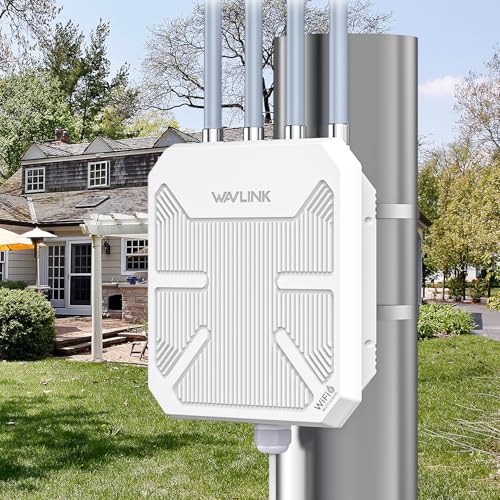
The WAVLINK AX3000 stands out with an IP67 outdoor rating and active PoE, making it the clearest fit here for extending Starlink coverage outside. Its four detachable 8 dBi antennas are omni-directional, and its dual-band WiFi 6 specification gives maximum band speeds of 2,402 Mbps at 5 GHz and 573 Mbps at 2.4 GHz. The maker says it supports Starlink and up to 256 devices. Choose it for a yard, farm or RV area where weather protection matters. Its limitation is that outdoor placement requires planning for PoE power and a suitable mounting location.
Bottom line: Pick this when you need an explicitly Starlink-compatible extender for outdoor coverage.
WAVLINK AX1800 Outdoor WiFi 6

The WAVLINK AX1800 is another outdoor Starlink-compatible choice, with an IP67 rating, PoE and four detachable 8 dBi antennas. The maker describes a line-of-sight coverage radius of 200–300 meters and support for up to 256 devices; real reach depends on obstacles and placement. Its outdoor access point/repeater role suits a garage, yard or RV area better than an indoor plug-in dead-zone fix. The specifications do not give its band speeds, so buyers prioritizing a specific throughput should compare the unit’s exact speed specifications before choosing.
Bottom line: Choose this for outdoor coverage when IP67 protection and PoE matter more than a band-speed figure.
WiFi Extender 10,000 Sq. Ft.

This four-antenna extender is differentiated by a claimed coverage area of up to 10,000 square feet, rather than outdoor protection or a named WiFi class. The maker also claims support for more than 65 devices and a one-tap setup. Treat the area figure as a maker claim, not a guaranteed result: walls, interference and the extender’s link back to the router affect usable coverage.
Bottom line: Consider it for a broad indoor coverage goal after confirming its router compatibility.
TP-Link RE550 AC1900

The TP-Link RE550 is the indoor option here with a Gigabit Ethernet port and EasyMesh compatibility. Its dual-band WiFi 5 specification gives maximum speeds of 1,300 Mbps on 5 GHz and 600 Mbps on 2.4 GHz; three adjustable external antennas support coverage claims of up to 2,100 square feet and 32 devices. The maker says actual performance varies with distance and obstacles. This can suit an indoor dead zone when an Ethernet connection for a nearby device is useful. It is not presented as an outdoor Starlink-specific unit, so it is a less direct fit for extending signal across a yard.
Bottom line: Pick this for an indoor Starlink network when a Gigabit Ethernet port is useful.
TP-Link RE315 AC1200

The TP-Link RE315 is a compact indoor dual-band extender with two adjustable external antennas and one Ethernet port. Its WiFi 5 bands are rated at up to 867 Mbps on 5 GHz and 300 Mbps on 2.4 GHz, and the maker claims coverage up to 1,500 square feet for as many as 32 devices. Adaptive Path Selection and one-touch connection are among its setup features. It can suit a room-level dead zone where a basic indoor extension is the goal.
Bottom line: Choose this for an indoor dead zone if you want a smaller dual-band extender.
How to choose a WiFi extender for Starlink
Choose the extender type by where the weak signal is: outdoor-rated access points suit a yard or detached space, while indoor repeaters suit a room inside the home. A repeater must first receive a usable signal from the router, then rebroadcast it; placing it inside the dead zone leaves it with a weak connection to repeat. As a practical rule, place an indoor extender about halfway to the dead zone, where a phone still shows a reliable router connection. For outdoor units, consider whether PoE cabling and a protected mounting point are practical. The WAVLINK outdoor models explicitly identify Starlink support; the indoor choices here are general extenders, so confirm compatibility before relying on them.
Where to place an extender for better coverage
Place a wireless extender between the router and the target area, not at the far edge where the signal has already failed. A central, elevated position away from dense walls, metal cabinets and appliances can improve the link. For a detached building, a clear line of sight helps, but trees, walls and other obstructions still reduce signal. The outdoor WAVLINK models describe line-of-sight range, which should not be treated as a guaranteed radius through buildings. Use an Ethernet backhaul where the network setup supports it; that avoids spending wireless capacity on the extender-to-router link. Check the Starlink router’s available network and connection settings before selecting an extender mode.
Outdoor and indoor extenders compared
Outdoor and indoor extenders solve different placement problems, so use the environment and connection path to choose. An IP67-rated outdoor unit is built for exposure to dust and water ingress testing, while an indoor plug-in extender should remain in a dry interior location. A repeater wirelessly relays the router’s signal; an access point typically connects to the network by cable and broadcasts WiFi. The WAVLINK outdoor units list PoE and Starlink support, while the TP-Link indoor models list Ethernet ports and EasyMesh compatibility. Compare these roles before comparing maximum speed figures, since a wireless relay’s real throughput depends on its backhaul.
| Need | Choose | Why |
|---|---|---|
| Outdoor yard or RV coverage | IP67 outdoor extender | Weather-rated enclosure and outdoor placement |
| Indoor room dead zone | Indoor dual-band extender | Designed for indoor extension and smaller spaces |
| Wired device near extender | Model with Ethernet port | Allows a local wired connection |
What WiFi speed figures mean
WiFi class and band-speed numbers describe maximum wireless rates, not a guaranteed internet speed at a device. A repeater uses some wireless capacity to communicate with the router, and distance, interference, device capability and walls can lower the delivered rate. The Starlink connection itself is another limit: an extender cannot make the internet connection faster than the router receives it. A dual-band extender offers 2.4 GHz and 5 GHz bands, which trade range and congestion behavior differently; 5 GHz usually has less reach through obstacles. Compare coverage and placement needs first, then treat advertised throughput as a ceiling rather than an expected result.
Frequently Asked Questions
Will a WiFi extender work with Starlink?
A WiFi extender can work with Starlink when it can connect to the Starlink router using a supported WiFi or wired mode. The two WAVLINK outdoor models explicitly claim Starlink compatibility; confirm compatibility for generic extenders before selecting one.
Where should I place a WiFi extender?
Place an extender roughly halfway between the router and the weak-signal area, where the router signal remains usable. Moving it into a dead zone gives it a weak signal to relay, and walls or metal obstacles can further reduce its connection.
Does a WiFi extender increase Starlink speed?
An extender does not increase the internet speed delivered by Starlink; it can improve WiFi coverage in a weak area. Wireless relaying also uses capacity for the link back to the router, so device speeds can be lower than the extender’s maximum band rate.
Can an indoor extender cover a detached garage?
An indoor extender can reach a detached garage only if it has a usable connection back to the router, and intervening walls or distance can weaken that link. For equipment placed outside, use a weather-rated outdoor unit rather than exposing an indoor extender to rain or dust.
What does an IP67 rating mean for an outdoor extender?
IP67 indicates protection against dust ingress and temporary immersion under specified test conditions; it does not mean a device can be left submerged or exposed to every installation hazard. Mount outdoor equipment securely and protect power connections and cabling as required for the installation.