
Ford Expedition Key Fob Battery: 3 Options Compared

For a 2017–2025 Expedition smart remote that uses CR2450, Ford/Lincoln CR2450 2-Pack, 2017–2025 is the closest match; the battery code and fob style decide the fit.
Key fob coin cells power the remote, but Expedition fobs do not all use the same battery. Check the code on the existing cell before opening a replacement pack.
We earn a commission if you buy through links on this page. As an Amazon Associate I earn from qualifying purchases. Products are compared on manufacturer specifications, not hands-on testing.
- Best overall: Ford/Lincoln CR2450 2-Pack, 2017–2025 – Includes two CR2450 cells and specifies compatibility with select 2017–2025 intelligent-access remotes.
- Best for pry-tool kit: Ford/Lincoln CR2450 2-Pack with Pry Tool – Pairs two CR2450 cells with a pry tool for opening the remote.
| Product | Best for | Fob fit | Shop |
|---|---|---|---|
| Ford/Lincoln CR2450 2-Pack, 2017–2025 | Smart remotes | 2017–2025 intelligent access | Check Price on Amazon |
| Ford/Lincoln CR2450 2-Pack, M3N/HC3T | CR2450 remotes | Select Ford/Lincoln fobs | Check Price on Amazon |
| Ford/Lincoln CR2450 2-Pack with Pry Tool | Tool included | 2017–2025 intelligent access | Check Price on Amazon |
Ford Expedition key fob batteries
Match the battery code and remote style before choosing a replacement cell.
Ford/Lincoln CR2450 2-Pack, 2017–2025

For a 2017–2025 Ford or Lincoln intelligent-access smart remote that takes CR2450, this two-cell pack aligns with the battery type and fob category identified for that fit. It does not include a remote, and it is not intended for Ford flipkey or standard keys. Compare the remote with the fit examples and confirm the old cell reads CR2450 before buying; model name alone is not enough to determine compatibility. The pack suits owners replacing a matching smart-remote cell, but not anyone whose fob uses a different battery size.
Bottom line: Choose this for a matching intelligent-access remote with a CR2450 cell.
Ford/Lincoln CR2450 2-Pack, M3N/HC3T
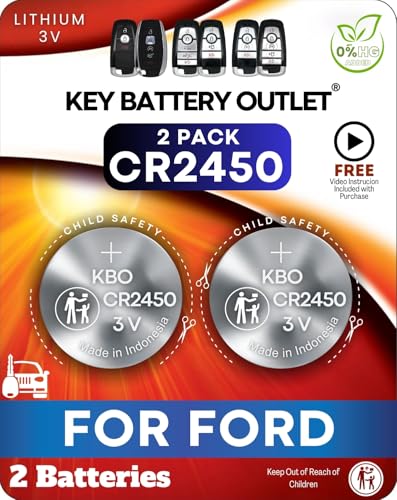
This kit gives Expedition owners another two-cell CR2450 option, with the existing battery code as the deciding check. It is intended for select Ford and Lincoln fobs, and the compatibility references include M3N-A2C931426 and HC3T-15K601-AB. Those references do not establish fit for every Expedition, so compare the fob and verify CR2450 on the removed cell. This is a straightforward choice when the remote uses that exact coin-cell type; it is not the right match for a CR2032 remote or a fob that does not match the fit guidance.
Bottom line: Pick this when your remote uses CR2450 and matches the fob references or fit guidance.
Ford/Lincoln CR2450 2-Pack with Pry Tool

Unlike the other CR2450 options, this pack includes a pry tool alongside two batteries. Its fit is 2017–2025 Ford and Lincoln intelligent-access smart remotes, not Ford flipkeys or standard keys. Confirm both the fob shape and CR2450 code before opening the remote, since a tool cannot make an incompatible cell fit. The included tool may suit someone who wants an accessory for separating the housing, while buyers who already have a suitable opening tool may prefer a battery-only option. No key fob is included.
Bottom line: Choose this if your matching smart remote needs CR2450 and you want a pry tool included.
How to choose a Ford Expedition key fob battery
Match the number printed on the current coin cell before choosing a replacement: these options include CR2450 and CR2032, which are different sizes. A CR2450 measures about 24.5 mm across and 5.0 mm thick; a CR2032 measures about 20 mm across and 3.2 mm thick. Do not substitute one for the other based on vehicle model or appearance alone. Expedition remotes vary by fob and ignition setup, so use the battery code and fob style together. A useful rule is to choose a CR2450 kit only when the removed cell reads CR2450; a CR2032 pack is only relevant when the old cell reads CR2032 and the key type matches.
Expedition remote fit and battery type
Push-button ignition commonly pairs with an intelligent-access remote, but not every Expedition fob uses the same battery. The CR2450 kits here specify select smart remotes, while the CR2032 pack expressly excludes push-to-start trims. The model name by itself therefore cannot settle fit. Before ordering, compare the physical fob to the fit guide and inspect the existing battery code; confirm the remote style and cell size both agree. Coin cells are polarity-sensitive, so note which side faces outward before removing the old battery and preserve that orientation during installation. Avoid bending the contacts or forcing a cell that does not sit flat.
Replacing a key fob coin cell safely
Most key fob batteries are accessible by opening the plastic shell, replacing the coin cell, then snapping the case closed; the exact seam and release point differ by fob design. Use a plastic pry tool where possible to reduce the chance of scratching or cracking the housing, and apply gentle pressure rather than twisting hard. Keep loose coin cells away from children: swallowing a button or coin battery is a medical emergency, and batteries should be stored securely until disposal. Check that the new cell sits level and that the case closes without force. These kits do not include a complete remote, and one includes a pry tool.
Frequently Asked Questions
How do I know which battery my Expedition key fob takes?
Read the code printed on the existing coin cell; the options here are CR2450 and CR2032. Also match the fob style, since push-to-start smart remotes and standard keys can differ.
Can I use a CR2032 instead of a CR2450?
No; CR2032 and CR2450 differ in both diameter and thickness, so they are not interchangeable. Use the same code printed on the original cell.
Does changing an Expedition key fob battery require programming?
The CR2450 kits state that no programming is required for their battery replacement. That applies to replacing the cell in a compatible existing remote, not replacing the remote itself.
Which way should the battery face in the key fob?
Keep the same orientation as the old cell, because the remote contacts require the correct polarity. Note which side faces outward before removal and seat the replacement flat.
Are coin cell batteries safe around children?
No; a swallowed coin battery can cause severe internal injury and needs emergency medical attention. Store loose cells securely and dispose of spent batteries promptly.