
Golf Ball Center Finder: 4 Electric Models Compared

Technasonic Check-Go Pro is the most versatile golf ball center finder here because it locates both the balanced equator and sweet spot, and includes a marking pen and batteries. Choose ERYUE Electric Ball Spinning Balancer, LIQIWI Electric Golf Ball Line Marker or Luocute Electronic Golf Ball Balancer instead if you want a different electric alignment tool; their features focus on finding and marking the center axis.
We earn a commission if you buy through links on this page. As an Amazon Associate I earn from qualifying purchases. Products are compared on manufacturer specifications, not hands-on testing.
- Best overall: Technasonic Check-Go Pro – Finds the balanced equator and sweet spot, with a marking pen and batteries included.
- Best for portability: ERYUE Electric Ball Spinning Balancer – Its PP construction is described as lightweight and portable for a golf kit.
- Best for tap-to-mark operation: LIQIWI Electric Golf Ball Line Marker – The instructions describe starting the spin with a button, then tapping to draw the center line.
| Product | Best for | Finds | Shop |
|---|---|---|---|
| Technasonic Check-Go Pro | Sweet-spot finding | Balanced equator and sweet spot | Check Price on Amazon |
| ERYUE Electric Ball Spinning Balancer | Portable alignment | Center equatorial line | Check Price on Amazon |
| LIQIWI Electric Golf Ball Line Marker | Tap-to-mark use | Center equator and optimal point | Check Price on Amazon |
| Luocute Electronic Golf Ball Balancer | Automatic line drawing | Center equatorial line | Check Price on Amazon |
Golf Ball Center Finders
Compare the alignment features and accessories that distinguish these electric ball spinning tools.
Technasonic Check-Go Pro

Unlike the other options, this model identifies both the balanced equator and sweet spot, and it comes with a marking pen and batteries. The maker says its gyroscopic action locates those points in 30 seconds; an LED signals when the ball is ready to mark. Its built-in alignment cup lets you draw a partial or bold line, and the tool works with all brands of golf balls. Choose it if you want both locating functions in one device. The included marking pen is a convenience, but the specifications do not identify its ink type, so buyers who need a particular ink should confirm compatibility.
Bottom line: Pick this if you want sweet-spot and equator locating plus the pen and batteries.
ERYUE Electric Ball Spinning Balancer
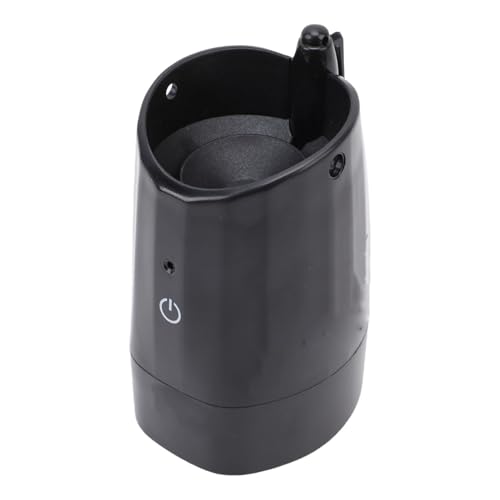
Portability is the main distinction: this electric balancer is made of PP and described as lightweight enough to fit in a golf kit. The maker says its 10,000-RPM motor identifies the ball’s center equatorial line, and its one-button operation is intended to make alignment simple. It suits golfers who want an electric axis marker to carry to a range or course.
Bottom line: Choose this if carrying a lightweight center-line tool is the priority.
LIQIWI Electric Golf Ball Line Marker

This tool emphasizes a tap-to-mark sequence: place the ball, press the button to spin it, then gently tap to draw the center alignment line. The maker says the electric rotation reaches 10,000 RPM and locates the center equator and an optimal point. That operating approach may suit someone who wants the marking step integrated with the spinning process.
Bottom line: Pick this if its button-start and tap-to-mark sequence fits your routine.
Luocute Electronic Golf Ball Balancer

This balancer specifically describes drawing the center axes by holding its button to spin the ball and gently touching it with a marking pen. The maker says its motor spins at 10,000 RPM and identifies the center equatorial line. It is a fit for golfers who want an electric spinning tool with a described pen-contact marking step.
Bottom line: Choose this if you want a described pen-contact line-drawing step.
How a golf ball center finder works
An electric center finder spins a golf ball so its rotation can indicate an equatorial axis or balance point for marking. A line on the ball gives a visible reference when aligning the ball for a putt, but it does not correct face angle, stroke path or speed. The ball itself must be seated consistently; debris or a poor fit can interfere with a smooth spin. Make the mark only after the ball has stopped and the tool indicates it is ready, if that model has an indicator. A ball is at least 1.68 inches in diameter and no more than 1.62 ounces under the Rules of Golf, so check that the tool is intended for regulation-size balls if you play by those rules.
What to compare before choosing
Start with the feature you need: center-axis alignment is not the same as finding a sweet spot, and only Technasonic Check-Go Pro here explicitly identifies both. Next compare what makes the marking process workable, such as a built-in alignment cup, an included pen or a described pen-contact step. A 10,000 RPM spin speed appears across these options, so that figure alone does not distinguish them. This table separates the useful differences; a dash means the specifications do not establish that feature.
| Need | Option to consider | Distinguishing feature |
|---|---|---|
| Equator and sweet spot | Technasonic Check-Go Pro | Both locating functions; pen and batteries included |
| Portable center-axis tool | ERYUE Electric Ball Spinning Balancer | PP body described as lightweight and portable |
| Tap-to-draw workflow | LIQIWI Electric Golf Ball Line Marker | Button-start spin, then gentle tap to draw |
| Pen-contact line drawing | Luocute Electronic Golf Ball Balancer | Hold button to spin, then touch with marking pen |
Marking a ball for putting alignment
A short line can be easier to position than a thick band, while a bold line may be easier to see from address; use the style that remains clear without obscuring the ball’s original identification marks. Align the mark with the intended starting line, then set the ball down without nudging it out of position. A ball line is only a visual reference: a putt can still start offline if the putter face is misaligned at impact. Before a round, practice with the same mark style and setup you plan to use on the course. If the tool requires a separate pen, confirm the pen is compatible before relying on it.
Common center-finder mistakes
The most common mistake is treating a marked axis as proof that a ball will roll perfectly or that a putt will stay on line. A center finder helps create a reference; the green’s slope, ball contact and stroke still affect the result. Another mistake is marking while the ball is moving or before the tool’s ready signal, which can leave an unclear or misplaced line. Keep the ball and spinning surface clean, and stop if the ball wobbles rather than spins smoothly. Store electric tools dry, remove batteries for long-term storage if the manufacturer permits it, and keep fingers clear of the rotating ball and moving parts.
Frequently Asked Questions
Do golf ball center finders work with every ball?
Compatibility depends on the device. Technasonic Check-Go Pro says it works with all brands of golf balls; check the tool’s fit if you use a nonstandard ball size.
Can a line on a golf ball help with putting?
Yes, a ball line can provide a visual reference for aiming the ball along a chosen starting line. It does not guarantee that the putter face or stroke will send the ball on that line.
What does 10,000 RPM mean on a ball marker?
RPM means revolutions per minute, so 10,000 RPM describes the motor’s rotational speed. Spin speed alone does not establish how quickly a specific ball will be located.
Should I mark the ball before or after it stops spinning?
Mark it after the ball stops and is positioned for marking; marking during rotation can produce an unclear line. If a device has a ready indicator, wait for that signal before marking.