
Mic for Car Radio: 4 Wired Models Compared

For a car radio with a compatible 3.5 mm mic input, FingerLakes 3.5 mm Mic Assembly is a straightforward choice because it includes both a dash mount and visor clip. Choose 3.5 mm Car Mic with 2.5 mm Adapter or NewTH 3.5 mm Mic with 2.5 mm Adapter instead if your stereo needs the included 2.5 mm adapter; confirm the head unit’s mic connection and compatibility before ordering.
We earn a commission if you buy through links on this page. As an Amazon Associate I earn from qualifying purchases. Products are compared on manufacturer specifications, not hands-on testing.
- Best overall: FingerLakes 3.5 mm Mic Assembly – Includes a 3 m cable, dash mount and visor clip for two placement options.
- Best for adapter flexibility: 3.5 mm Car Mic with 2.5 mm Adapter – Includes a 3.5 mm female-to-2.5 mm male adapter and a 3 m cable.
- Best for adhesive mounting: FingerLakes FL11 3.5 mm Mic – Its cable-mounted mic can be attached with a sticker to a wall, glass, car or door.
- Best for adapter compatibility: NewTH 3.5 mm Mic with 2.5 mm Adapter – Pairs a 3 m cable with a 3.5 mm female-to-2.5 mm male adapter.
| Product | Best for | Connector | Cable length | Mounting | Shop |
|---|---|---|---|---|---|
| FingerLakes 3.5 mm Mic Assembly | Clip-on placement | 3.5 mm | 9 ft | Dash mount, visor clip | Check Price on Amazon |
| 3.5 mm Car Mic with 2.5 mm Adapter | Adapter flexibility | 3.5 mm; 2.5 mm adapter | 9.84 ft | — | Check Price on Amazon |
| FingerLakes FL11 3.5 mm Mic | Adhesive mounting | 3.5 mm | 9 ft | Sticker; clip | Check Price on Amazon |
| NewTH 3.5 mm Mic with 2.5 mm Adapter | Adapter included | 3.5 mm; 2.5 mm adapter | 9.84 ft | — | Check Price on Amazon |
Mics for Car Radio
Match the microphone connector to the head unit, then compare cable reach and how you plan to mount it.
FingerLakes 3.5 mm Mic Assembly
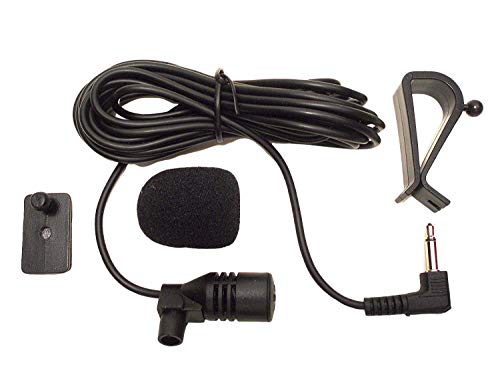
FingerLakes 3.5 mm Mic Assembly stands out for including both a dash mount and a visor clip, so you can choose between two mounting positions. It uses a 3.5 mm plug and has a 9-foot cable. The manufacturer describes the microphone as an electret condenser design and says it supports clear, stable voice transmission. This model suits a head unit with a compatible 3.5 mm mic input and buyers who want a clip or dash mount. Its connector is 3.5 mm only, so check the radio input before choosing it if your stereo uses another connection.
Bottom line: Pick this if your stereo has a compatible 3.5 mm input and you want a dash mount or visor clip.
3.5 mm Car Mic with 2.5 mm Adapter

3.5 mm Car Mic with 2.5 mm Adapter differs by including a 3.5 mm female-to-2.5 mm male adapter, giving it an additional connection option beyond its 3.5 mm microphone connection. Its cable measures 9.84 feet, and the microphone is described as mono and omnidirectional. The manufacturer says it is designed for hands-free calls and lists compatibility with several stereo brands. It may suit an installation where the included adapter matches the radio’s mic input. No mount is specified for this model, so buyers who want a visor clip or dash mount should consider another option.
Bottom line: Choose this if the included 2.5 mm adapter matches your radio and you do not need a specified mount.
FingerLakes FL11 3.5 mm Mic
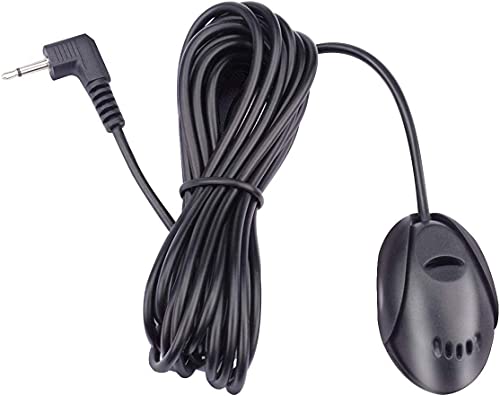
FingerLakes FL11 3.5 mm Mic is the option with an adhesive mounting approach: its features say the microphone can be attached with a sticker to a wall, glass, car or door, and that it can be picked up from the clip. The model has a standard 3.5 mm plug and a 9-foot cable. The manufacturer describes its capsule as an electret condenser and its pattern as omnidirectional. This is a fit for buyers who want flexible placement without relying only on a visor clip. It does not include the 2.5 mm adapter mentioned for some alternatives, so confirm the radio accepts its plug.
Bottom line: Pick this for a compatible 3.5 mm input when adhesive placement is useful.
NewTH 3.5 mm Mic with 2.5 mm Adapter

NewTH 3.5 mm Mic with 2.5 mm Adapter combines a 3.5 mm microphone connection with a 3.5 mm female-to-2.5 mm male adapter, and its cable measures 9.84 feet. The manufacturer describes an electret condenser cartridge and says the mic is intended for hands-free use with compatible head units. This model suits buyers who need the included adapter for their radio and want a long cable. Its features do not identify a mounting clip or adhesive mount, so installers who need a mounting accessory may prefer a different option. Confirm that the radio accepts the adapter’s 2.5 mm connection.
Bottom line: Choose this if the 2.5 mm adapter matches your head unit and a mount is not needed.
How to choose a mic for car radio
Match the microphone input before comparing cable length or mounting. A 3.5 mm plug describes the connector size, but does not by itself establish that the radio accepts that microphone or uses compatible wiring. Some head units use a different connector or a brand-specific microphone input. Check the stereo’s model documentation for the external mic jack and its supported connection; an included 2.5 mm adapter only changes the physical connection, not necessarily electrical compatibility. For placement, a microphone near the driver can reduce the distance to the speaker, but avoid positioning it in front of an airbag cover or where it blocks the driver’s view. If your radio requires 2.5 mm, select a model that includes the matching adapter.
Mic cable length and placement
A 3 m cable is about 9.8 feet, enough to route along many dashboards and up a windshield pillar, though the required route depends on where the head unit sits. Measure the path from the radio to the intended mic position, including slack for corners; do not measure only the straight-line distance. Route wiring away from pedals, steering linkages, sharp edges and moving trim. Keep the microphone near the driver, such as by the visor, while leaving a clear path for visibility and airbag deployment. A dash mount, visor clip or adhesive attachment affects placement options, so choose the mounting style that suits the cabin and surface. Avoid stretching the cable taut or pinching it behind trim.
Car radio microphone connections compared
Adapter choice depends on the radio’s actual microphone input, not just the connector size. A 3.5 mm plug and a 2.5 mm adapter are different physical sizes, and an adapter does not guarantee compatible wiring or microphone power. Check the head unit manual or port markings for a dedicated external microphone connection before installing. Use this comparison to narrow the options by their connection and mounting details.
| Connection or mounting need | Option |
|---|---|
| 3.5 mm input; dash or visor mount wanted | FingerLakes 3.5 mm Mic Assembly |
| 2.5 mm connection via included adapter | 3.5 mm Car Mic with 2.5 mm Adapter or NewTH 3.5 mm Mic with 2.5 mm Adapter |
| 3.5 mm input; adhesive placement wanted | FingerLakes FL11 3.5 mm Mic |
Common installation mistakes to avoid
The most common fit mistake is treating a matching plug diameter as proof of compatibility; check the radio’s mic input and wiring support first. A second mistake is placing the microphone too far from the driver or near a noisy air vent, which can make calls harder to understand. Route the cable so it cannot interfere with pedals, steering movement or airbag deployment zones. Secure excess cable rather than letting it hang near controls. Test a call while parked before finalizing trim, and reposition the microphone if your voice is unclear. Never route accessories across an airbag cover or obstruct the windshield view.
Frequently Asked Questions
Will any 3.5 mm mic work with my car radio?
No. A 3.5 mm connector size does not guarantee that the radio supports that microphone or its wiring. Check the head unit manual for a compatible external mic input before connecting one.
Does a 2.5 mm adapter make a mic universal?
No. An adapter changes the connector size, but it cannot ensure compatible wiring or microphone power. Use one only when the radio’s documentation confirms that input type.
Where should I mount a car radio microphone?
Mount it near the driver, such as by the visor, without blocking the driver’s view or crossing an airbag deployment area. Keep it clear of vents and route the cable away from pedals and steering movement.
How long should a car microphone cable be?
Measure the complete route from the radio to the planned mic position, adding slack for turns; these models use cables of about 9 to 9.86 feet. A 3 m cable is roughly 9.8 feet, but a longer route may need a different installation plan.
Can I test the microphone before hiding its cable?
Yes. Make a call while parked before securing trim, then adjust the mic position if your voice is unclear. Keep the vehicle stationary during installation and testing.