
USB Type-C IR Blasters: 5 Models Compared by Fit

OCRUSTAR USB-C IR Blaster suits the widest range of phone users because it claims compatibility with both iOS and Android, while the other options are aimed at Android phones. A USB-C IR blaster plugs into a phone and sends infrared commands through an app to compatible devices.
Choose an Android-only adapter if that matches your phone; before ordering, confirm that the app supports your phone and the appliances you want to control.
We earn a commission if you buy through links on this page. As an Amazon Associate I earn from qualifying purchases. Products are compared on manufacturer specifications, not hands-on testing.
- Best overall: OCRUSTAR USB-C IR Blaster – Its maker claims compatibility with both iOS and Android, unlike the Android-focused alternatives.
- Best for code learning: Android USB-C IR Adapter with Code Learning – Its app is described as having more than 270,000 infrared codes and a learning function.
- Best for stated range: uniTV USB-C IR Controller – Its maker claims a transmission distance of up to 10 meters and includes a key chain and silicone case.
| Product | Best for | Phone support | Claimed range | Distinctive feature | Shop |
|---|---|---|---|---|---|
| OCRUSTAR USB-C IR Blaster | iOS and Android | iOS and Android | — | Broad device coverage | Check Price on Amazon |
| uniTV USB-C IR Controller | Portable carrying | Android | Up to 10 m | Key chain and silicone case | Check Price on Amazon |
| Mini Type-C IR Remote Adapter | Compact form | Android | — | Silicone cover | Check Price on Amazon |
| Android USB-C IR Adapter with Code Learning | Custom code learning | Android | — | 270,000+ codes; learning function | Check Price on Amazon |
| USB-C IR Blaster with 10 m Range | Stated range | Android | Up to 10 m | Key chain and silicone case | Check Price on Amazon |
USB Type-C IR Blasters
Compare phone compatibility, stated range and app features before choosing an adapter.
OCRUSTAR USB-C IR Blaster

Unlike the Android-focused alternatives, this adapter is presented for both iOS and Android phones. The maker says its app can control TVs, set-top boxes, air conditioners, projectors, DVD players, amplifiers, fans, heaters, and other infrared devices, and names brands including Samsung, Sony, Panasonic, TCL, and LG. That breadth makes it a candidate for households with several appliance types or mixed phone platforms. The product weighs about 0.02 pounds. Its compatibility is broad, but the phone operating system alone does not guarantee a specific appliance will work; check both app and device support before ordering.
Bottom line: Pick this if you need a USB-C adapter presented for both iOS and Android.
uniTV USB-C IR Controller
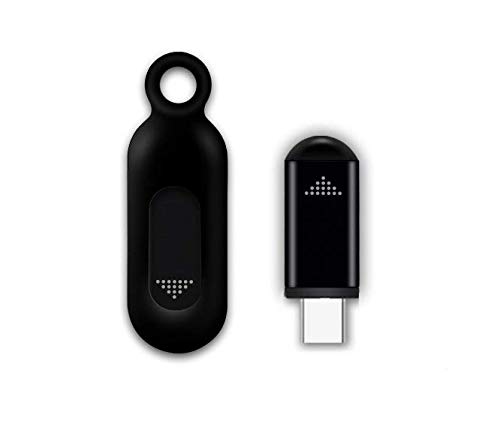
The key chain and silicone case distinguish this compact adapter from options that emphasize code libraries or wider phone support. It uses the uniTV Remote app, and the maker says the signal can reach up to 10 meters. The product is aimed at Android phones; its name also mentions an Apple Lightning version, which is a different connector. This pick suits someone who wants an attachable carry case and a range. The 10-meter figure is the maker’s claim, not a guarantee through walls or around obstacles, so keep the blaster with a clear path to the appliance.
Bottom line: Choose this if a key chain and stated 10-meter range matter to you.
Mini Type-C IR Remote Adapter

The compact size and silicone cover set this adapter apart for buyers who want a small accessory that is easier to keep with a phone. Its maker describes a fifth-generation chip and says commands work without a Bluetooth connection, with a longer range and wider angle than its predecessor. The uses include air conditioners, TVs, set-top boxes, and projectors through a phone app. No numeric range is given, so this is a less useful choice when distance is the deciding factor. Check that the app supports your Android phone and target appliances before choosing it.
Bottom line: Pick this if compactness and a protective cover matter more than a range.
Android USB-C IR Adapter with Code Learning

The code learning feature distinguishes this adapter from models whose feature set focuses on portability or phone-platform breadth. Its maker says the app includes more than 270,000 infrared codes and can learn from an original remote when a device code is unavailable. The adapter is intended for Android phones and is described for appliances such as TVs, fans, projectors, set-top boxes, and air conditioners. This may suit owners of less common equipment who still have the original remote. The number of codes does not ensure a match for every device, and learning requires access to a working original remote.
Bottom line: Choose this if you may need to teach the app commands from an original remote.
USB-C IR Blaster with 10 m Range

This adapter pairs a 10-meter range with a key chain and silicone case, making distance and carrying features its main points of distinction. The maker says it works with an app to control household appliances and names Samsung, Vizio, LG, Sony, Sharp, Roku, and Apple TV among compatible brands. It is aimed at Android phones with USB-C. The range is a manufacturer claim and can be reduced by obstacles or poor alignment; infrared needs a usable path to the appliance’s receiver. Confirm app compatibility and device support, particularly for streaming boxes, before relying on it as a replacement remote.
Bottom line: Choose this if you want an Android adapter with a 10-meter range and carry accessories.
How USB-C IR Blasters Work
A USB-C IR blaster sends infrared commands from a phone app to an appliance’s IR receiver. Infrared is directional, so point the phone’s emitter toward the receiver and keep a clear path; walls and closed cabinets block the signal. These adapters do not make every phone or appliance compatible: the phone must support the app, and the app needs a matching command set for the appliance. USB-C describes the connector, not the control protocol or app support. If you need control from another room, a plug-in IR adapter may not be the right tool; a network-connected hub is a different product type and relies on home-network and appliance compatibility.
How to Choose a USB-C IR Blaster
Choose first by phone operating system, then by appliance coverage and any range. A USB-C plug can fit mechanically while its app still fails to support the phone’s operating system. Check that the app covers the exact appliance category and brand, and that you can select the appliance model or enter commands if needed. If you have an unusual device and still own its original remote, a learning feature can be useful. For a room setup, keep the phone and receiver in line of sight; a claimed distance such as 10 meters should not be treated as a guaranteed usable range through furniture or walls.
This table separates the choices by the deciding feature each maker emphasizes.
| Need | Adapter to consider | Reason |
|---|---|---|
| iOS and Android phone support | OCRUSTAR USB-C IR Blaster | Presented for both platforms |
| Learning commands | Android USB-C IR Adapter with Code Learning | App includes code learning |
| Stated distance | uniTV USB-C IR Controller or USB-C IR Blaster with 10 m Range | Maker claims up to 10 meters |
| Small accessory with cover | Mini Type-C IR Remote Adapter | Compact design and silicone cover |
Range, Alignment and Room Setup
Infrared remotes generally work best with a direct line of sight to the appliance sensor, so aim the phone’s emitter toward the receiver rather than toward the screen’s center by habit. Bright sunlight and strong competing infrared sources can interfere with some IR receivers. A claimed 10-meter range is a maximum-style manufacturer figure, not a promise for every room; distance, emitter orientation, receiver placement, and obstructions all affect results. If commands work only when you stand close, test from a few feet away and adjust the angle before concluding that the code is wrong. A closed cabinet or a wall is a reason to consider a network-based controller instead.
App Compatibility and Infrared Codes
App support is as important as the USB-C connector because the phone app selects or sends the infrared command. Before ordering, verify that the app runs on your phone’s operating system and covers the appliance category and brand you plan to control. Infrared code databases group commands by manufacturer and device type; an app may offer several code sets for one brand, so try the device setup process with the original remote nearby. A learning function can capture commands from a working remote when the database misses a device, but it cannot help if the original remote is unavailable or faulty. Keep the original remote until the phone control works reliably.
Frequently Asked Questions
Can a USB-C IR blaster work through a wall?
No; infrared requires a usable path to the appliance’s receiver and does not pass through walls. A cabinet door or furniture can also obstruct commands, so position the phone with a clear line of sight.
Will any USB-C phone support an IR blaster?
Not necessarily; the app must support the phone’s operating system and the adapter must work with that app. Confirm both before ordering, since a matching connector alone does not ensure software compatibility.
How far can a phone IR blaster reach?
Range depends on the emitter, receiver alignment, and obstacles. Some models claim up to 10 meters, but treat that as a maker’s maximum-style figure rather than a guaranteed indoor distance.
Can an IR adapter control a Roku device?
Only if the specific Roku model accepts infrared commands and the app has a compatible code set. Roku models and control methods vary, so check the exact device before relying on an IR adapter.
What if the app has no code for my appliance?
A learning function can capture commands from a working original remote if the adapter and app support learning. Keep the original remote available during setup, because a missing or failed original remote prevents that workaround.